
ChEMBL plugin
Short answer: Install ChEMBL from Settings, Plugins, open the ChEMBL tab, click Use canvas or type a name/ID, then press Lookup.
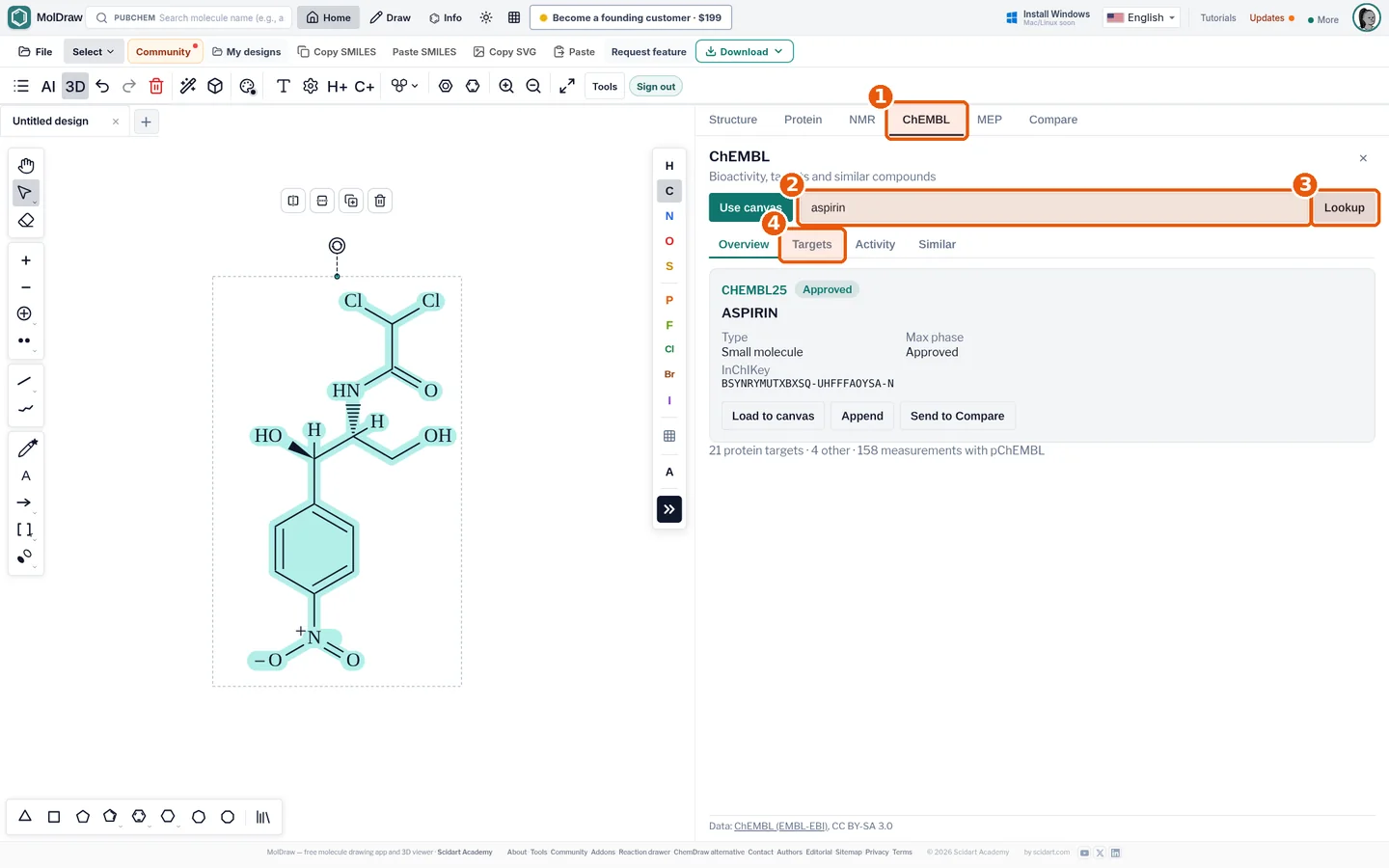
- ChEMBL tab in the analysis panel.
- Query box: a name, ChEMBL ID (e.g. CHEMBL25) or the canvas structure.
- Lookup runs the search.
- Result tabs: Overview, Targets, Activity and Similar.
What it does#
ChEMBL is a free database of drug-like molecules. EMBL-EBI runs it. It holds millions of activity data points.
- Search finds a compound by name, ChEMBL ID or your drawing.
- Targets lists proteins the compound was tested on.
- Activity lists values like IC50 and Ki.
- Similar finds look-alike compounds. Load any of them to the canvas.
Who it is for#
Medicinal chemistry students. Researchers who check known activity. Teachers who show real drug data.
How to use it#
- Open the MolDraw editor and sign in. Click Settings, then Plugins, then Install next to ChEMBL.
- Draw a molecule or leave the canvas empty if you will search by name.
- Open the ChEMBL tab (callout 1).
- Type a name or ChEMBL ID in the query box (callout 2) or press Use canvas.
- Press Lookup (callout 3).
- Browse the Overview, Targets, Activity, Similar tabs (callout 4).
- Use Load to canvas, Append or Send to Compare to keep working with a hit.
Tips#
- If a drawn structure is not found, check stereochemistry and charges; InChIKey matching is exact.
- Activity values from different assays are not directly comparable; open the assay link for conditions.
- Pair with Lipinski's rule of five and drug-likeness to screen hits.
Questions and answers
What is ChEMBL?
A free, manually curated database of bioactive drug-like molecules maintained by EMBL-EBI, with over two million compounds and their measured activities against biological targets.
Is the ChEMBL plugin free?
Yes. It uses ChEMBL's public web services and needs only a free MolDraw account to install.
Can I search by structure?
Yes. Use canvas looks up the drawn molecule by InChIKey; the Similar tab finds related structures.