
Compare Molecules plugin
Short answer: Install Compare molecules, open the Compare tab, press Add canvas for the reference, paste other SMILES and press Add SMILES.
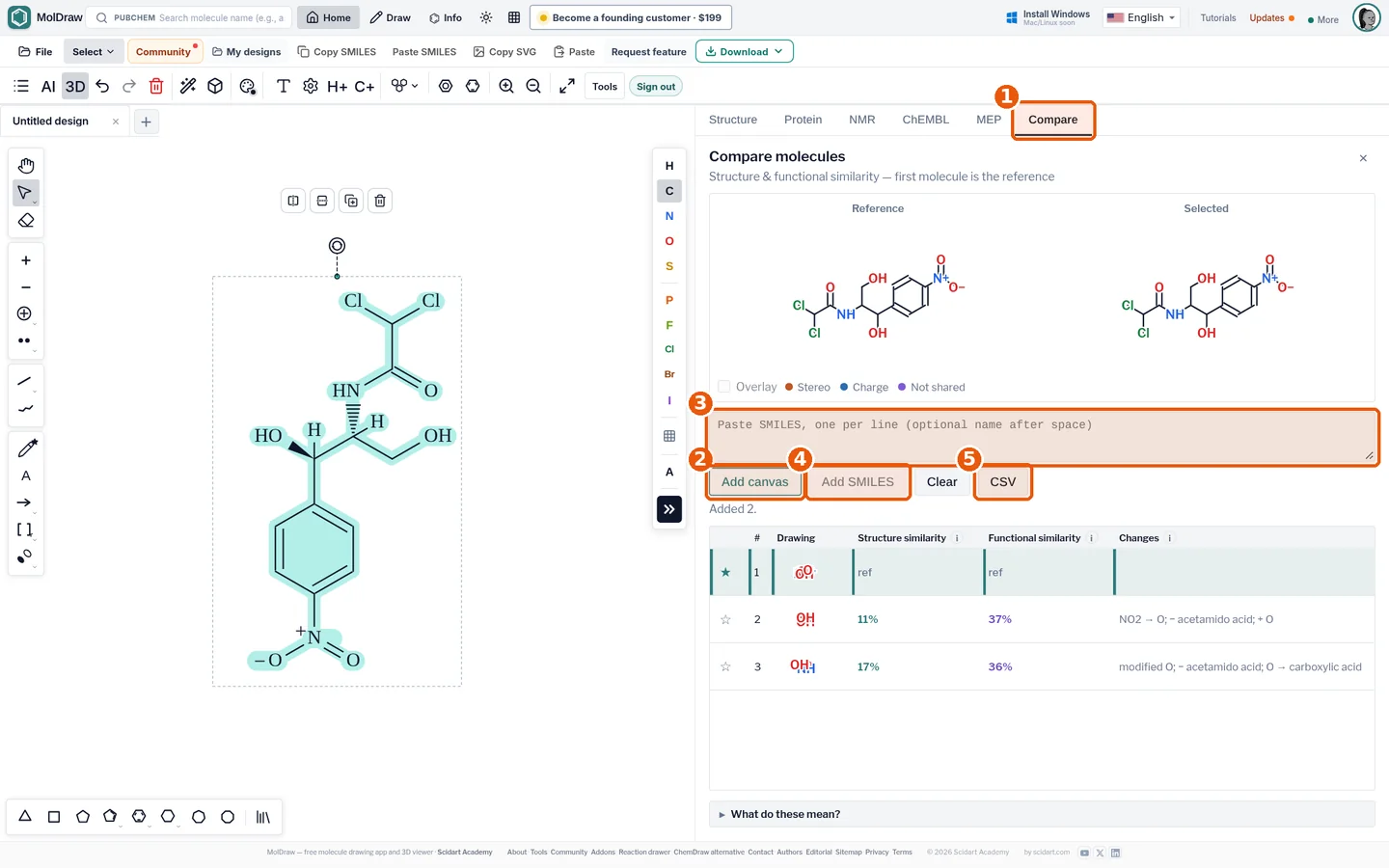
- Compare tab.
- Add canvas adds the current drawing (the first molecule is the reference).
- SMILES box: one SMILES per line, optional name after a space.
- Add SMILES adds them all to the table.
- CSV exports the comparison table.
What it does#
Pick one molecule as the reference. Add others to compare.
- Structure similarity is a Tanimoto score from fingerprints.
- Functional similarity compares the groups each molecule has.
- Changes lists groups gained, lost or changed.
- Export the table as CSV.
Who it is for#
Medicinal chemists who look at analogues. Students who compare isomers or drug series.
How to use it#
- Open the MolDraw editor and sign in. Click Settings, then Plugins, then Install next to Compare Molecules.
- Draw the reference molecule.
- Open the Compare tab (callout 1) and press Add canvas (callout 2).
- Paste more structures as SMILES, one per line (callout 3), then press Add SMILES (callout 4).
- Click a row to see reference and selected structures side by side with the shared core highlighted.
- Sort by similarity, and press CSV (callout 5) to export.
Tips#
- Tanimoto 1.00 can still hide stereo differences; check the stereo flag column.
- Use the ChEMBL plugin's Send to Compare to add database hits directly.
- To get SMILES, convert names with name to SMILES.
Questions and answers
What is Tanimoto similarity?
The number of fingerprint bits two molecules share divided by the number set in either. 1 means identical fingerprints; above about 0.7 is usually considered similar.
How many molecules can I compare?
You can add many rows at once by pasting a list of SMILES; the first molecule added is the reference.
Does it detect stereoisomers?
Yes, stereocentre differences are reported separately because fingerprints ignore stereochemistry.