chemfig 反應機構範例:多步驟反應機構、彎箭頭與自由基魚鉤箭頭
簡短回答:以下是五個以 chemfig 撰寫的完整反應機構:兩個以單電子魚鉤箭頭繪製的自由基連鎖反應,以及三個以雙電子彎箭頭繪製的極性反應機構。每一個都是可下載的 .tex 檔,可用 pdflatex 編譯(執行兩次)。想修改的話,把檔案貼到 MolDraw 畫布上,用滑鼠編輯,再選擇 Download → chemfig (.tex)。
五個範例
| 甲烷的自由基氯化 | 起始、兩個傳遞步驟與終止,每步都有標題。均裂,以及在新鍵處相遇的魚鉤箭頭。radical-chlorination-of-methane.tex |
|---|---|
| HBr 的反馬可尼可夫加成 | 分四步驟呈現的過氧化物效應:過氧化物均裂、溴原子生成、對丙烯加成與奪氫。鍵線式碳上的自由基點。anti-markovnikov-hbr-addition.tex |
| 鹼催化的醛醇加成 | 烯醇鹽生成(平衡)、C–C 鍵形成與質子化。從電荷與 π 鍵出發的箭頭。base-catalysed-aldol-addition.tex |
| 三級丁醇的 E1 脫水 | 分成四列排列的單一流程圖,每個箭頭上方標有條件,並含碳陽離子。e1-dehydration-of-tert-butanol.tex |
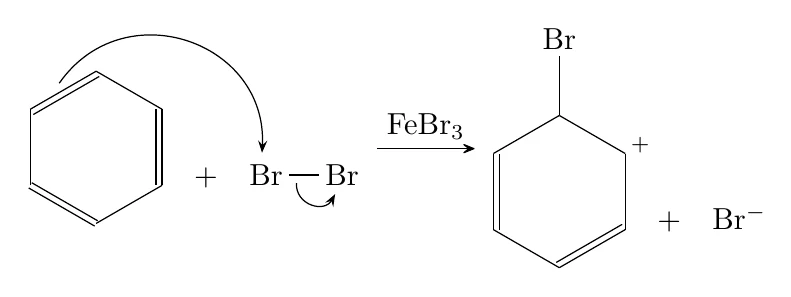
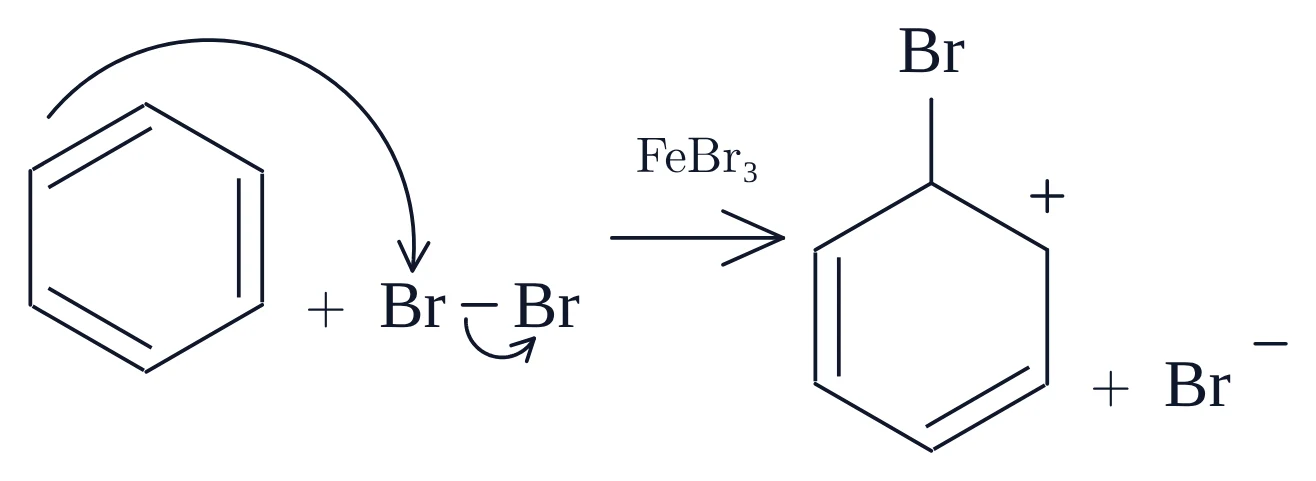
| 苯的溴化 | 經由 σ 錯合物進行的芳香親電取代,箭頭上方標有催化劑。bromination-of-benzene.tex |
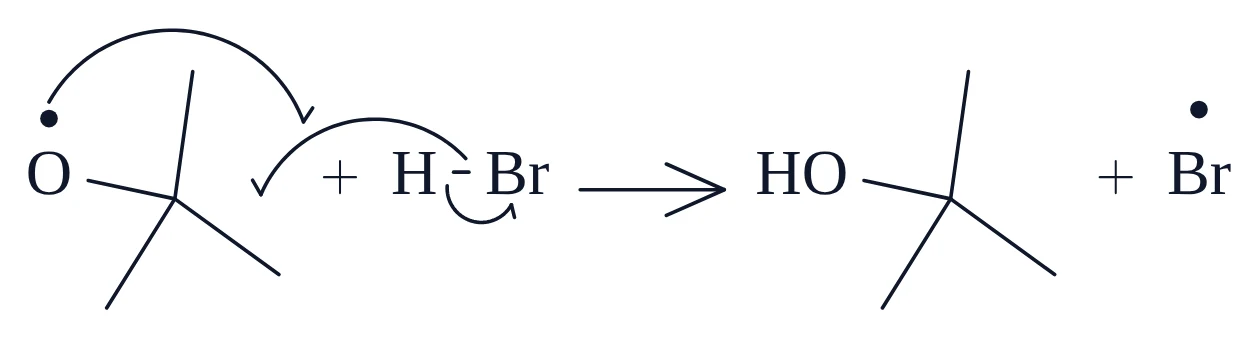
以下每個步驟都包含三部分:chemfig 程式碼(用 Copy 按鈕複製)、pdflatex 由該程式碼產生的 PDF,以及把同一段程式碼貼上後 MolDraw 畫出的圖形。兩張圖都完全由所示程式碼產生,你可以核對貼上後的版面、間距與彎箭頭是否與 PDF 一致。
若想描述化學內容而不是圖形,可以用 MolScript 撰寫反應機構:物種以 SMILES 表示,每個彎箭頭寫一行。MolDraw 會自動排版,也能產生相同的 chemfig 程式碼。
chemfig 中彎箭頭的寫法
chemfig 透過 TikZ 在原子之間畫箭頭,分成三部分:
- 為兩端命名。在原子前面加上
@{a1},或寫在鍵的選項中(-[@{b1}:0]),就能為它命名。 - 在
\chemmove中繪製。在流程圖之後,\chemmove{ \draw[…] (a1) to[bend left=50] (a2); }會從一個名稱畫箭頭到另一個名稱。 - 編譯兩次。chemfig 在第一次執行時儲存已命名原子的位置,第二次執行時才使用。
範例遵循以下規則,與 MolDraw 畫布上箭頭的外觀一致:
| 兩個電子 | 完整箭頭:-{Stealth[length=4pt,inset=1.5pt]}。 |
|---|---|
| 一個電子 | 魚鉤箭頭,也就是半個箭頭:-{Straight Barb[left,length=4pt]}。[left] 或 [right] 只保留曲線外側的倒鉤。 |
| 箭尾的起點 | 位於提供電子的孤電子對、負電荷、自由基點或鍵的中點。[shift={(…em,…em)}] 會把箭尾從原子中心移到該位置。 |
| 箭頭的終點 | 在接受電子的原子前方稍微停住;形成新鍵時則停在兩個原子之間。 |
| 比例 | \setchemfig{atom sep=2.5em, …} 設定鍵長。所有以 em 為單位的 shift 都以它為基準,所以複製程式碼時請保留這一行。 |
| 弧度 | bend left / bend right 搭配角度,弧度較深時再加上 looseness。角度是相對於兩端連線而言,所以即使 chemfig 排列流程圖的間距與畫布不同,曲線仍能維持形狀。 |
五個檔案都載入相同的兩行;若你把程式碼複製到自己的文件中,也需要這兩行:
\usepackage{chemfig}
\usetikzlibrary{arrows.meta,decorations.pathmorphing}
1. 甲烷的自由基氯化
自由基連鎖反應的經典入門範例,共四個步驟:
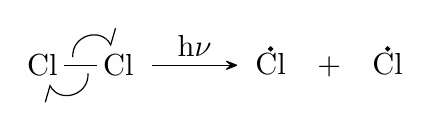
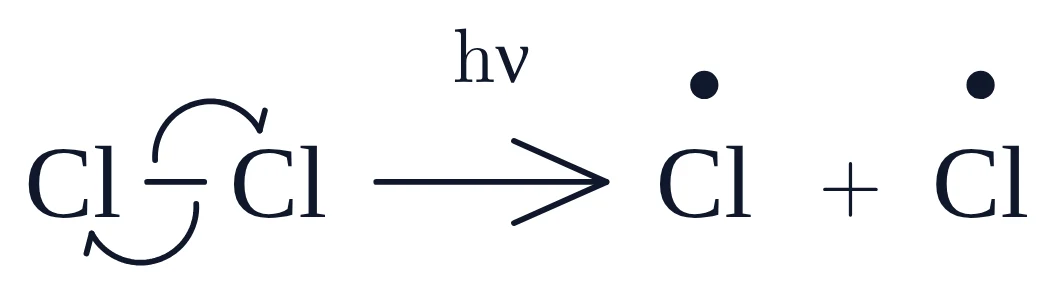
- 起始:光使 Cl–Cl 鍵平均斷裂(均裂)。兩個魚鉤箭頭從鍵出發,分別指向兩個氯。
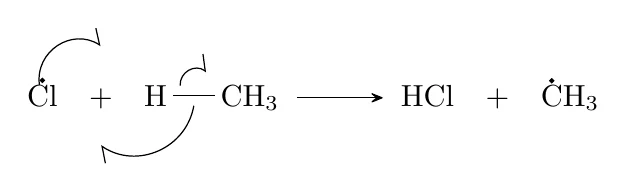
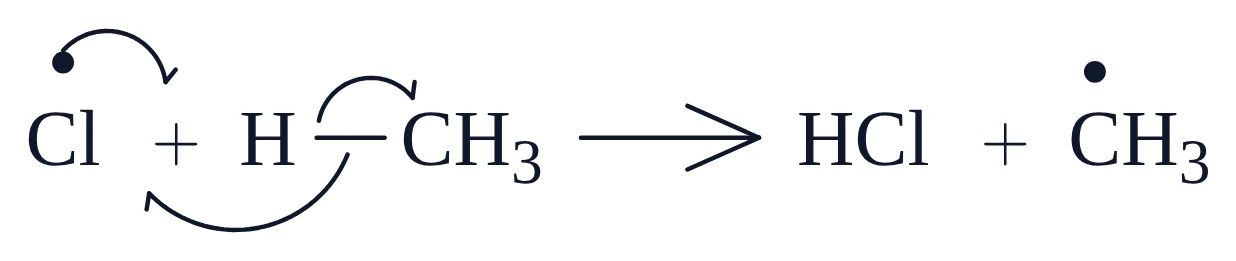
- 傳遞 1:氯原子從甲烷奪取一個氫。Cl• 的一個電子與 C–H 鍵的一個電子形成新的 H–Cl 鍵;C–H 的另一個電子留在碳上,成為甲基自由基。
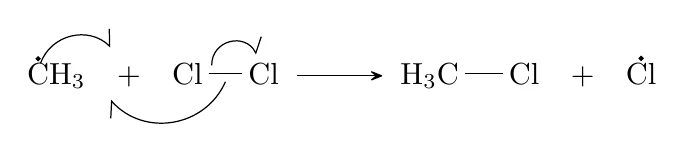
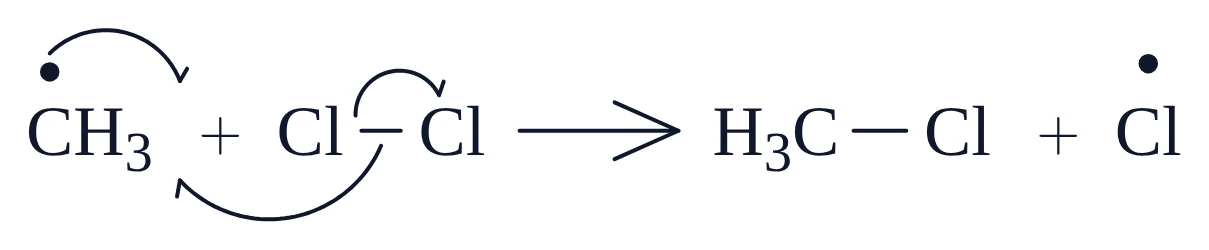
- 傳遞 2:甲基自由基從 Cl2 奪取一個氯原子,並放回 Cl•,讓循環重新開始。
- 終止:兩個自由基配對結合,此處為 CH3• 與 Cl•。
每個步驟都是獨立的 \schemestart … \schemestop。終止步驟展示了最難手寫的部分:兩個魚鉤箭頭在它們所形成之鍵的中點相遇。
起始
\setchemfig{atom sep=2.5em, + sep left=0.7em, + sep right=0.7em, compound sep=4em, arrow offset=6pt}
\schemestart
  \chemfig{@{a1}Cl-[@{b1}:0]@{a2}Cl}
  \arrow{->[h$\nu$]}
  \chemfig{\charge{90=\.}{Cl}}
  \+
  \chemfig{\charge{90=\.}{Cl}}
\schemestop
\chemmove{
  \draw[-{Straight Barb[left,length=4pt]}]([shift={(0.25em,-0.27em)}]b1) to[bend left=77,looseness=1.4] ([shift={(0.23em,-0.63em)}]a1);
  \draw[-{Straight Barb[left,length=4pt]}]([shift={(-0.25em,0.27em)}]b1) to[bend left=77,looseness=1.4] ([shift={(-0.23em,0.63em)}]a2);
}
傳遞 1:奪氫
\setchemfig{atom sep=2.5em, + sep left=0.7em, + sep right=0.7em, compound sep=4em, arrow offset=6pt}
\schemestart
  \chemfig{@{a1}\charge{90=\.}{Cl}}
  \+
  \chemfig{@{a2}H-[@{b1}:0]@{a3}CH_3}
  \arrow{->}
  \chemfig{HCl}
  \+
  \chemfig{\charge{90=\.}{C}H_3}
\schemestop
\chemmove{
  \path (a2) -- (a1) coordinate[pos=0.5] (m1);
  \draw[-{Straight Barb[left,length=4pt]}]([shift={(0em,1.71em)}]a1) to[bend left=65,looseness=1.2] ([shift={(0em,1.64em)}]m1);
  \path (a2) -- (a1) coordinate[pos=0.5] (m2);
  \draw[-{Straight Barb[left,length=4pt]}]([shift={(0em,-0.33em)}]b1) to[bend left=57,looseness=1.1] ([shift={(0em,-1.64em)}]m2);
  \draw[-{Straight Barb[left,length=4pt]}]([shift={(-0.45em,0.33em)}]b1) to[bend left=65,looseness=1.2] ([shift={(-0.83em,0.78em)}]a3);
}
傳遞 2:氯轉移
\setchemfig{atom sep=2.5em, + sep left=0.7em, + sep right=0.7em, compound sep=4em, arrow offset=6pt}
\schemestart
  \chemfig{@{a1}\charge{90=\.}{C}H_3}
  \+
  \chemfig{@{a2}Cl-[@{b1}:0]@{a3}Cl}
  \arrow{->}
  \chemfig{H_3C-[:0]Cl}
  \+
  \chemfig{\charge{90=\.}{Cl}}
\schemestop
\chemmove{
  \path (a2) -- (a1) coordinate[pos=0.5] (m1);
  \draw[-{Straight Barb[left,length=4pt]}]([shift={(-0.55em,1.36em)}]a1) to[bend left=57,looseness=1.1] ([shift={(0em,0.87em)}]m1);
  \path (a2) -- (a1) coordinate[pos=0.5] (m2);
  \draw[-{Straight Barb[left,length=4pt]}]([shift={(0em,-0.27em)}]b1) to[bend left=57,looseness=1.1] ([shift={(0em,-0.87em)}]m2);
  \draw[-{Straight Barb[left,length=4pt]}]([shift={(-0.45em,0.27em)}]b1) to[bend left=77,looseness=1.4] ([shift={(-0.23em,0.63em)}]a3);
}
終止
\setchemfig{atom sep=2.5em, + sep left=0.7em, + sep right=0.7em, compound sep=4em, arrow offset=6pt}
\schemestart
  \chemfig{@{a1}\charge{90=\.}{C}H_3}
  \+
  \chemfig{@{a2}\charge{90=\.}{Cl}}
  \arrow{->}
  \chemfig{H_3C-[:0]Cl}
\schemestop
\chemmove{
  \path (a2) -- (a1) coordinate[pos=0.58] (m1);
  \draw[-{Straight Barb[left,length=4pt]}]([shift={(-0.55em,1.36em)}]a1) to[bend left=57,looseness=1.1] ([shift={(0em,0em)}]m1);
  \path (a1) -- (a2) coordinate[pos=0.5] (m2);
  \draw[-{Straight Barb[right,length=4pt]}]([shift={(0em,1.37em)}]a2) to[bend right=57,looseness=1.1] ([shift={(0em,1.31em)}]m2);
}
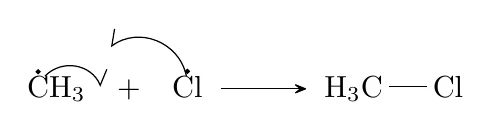
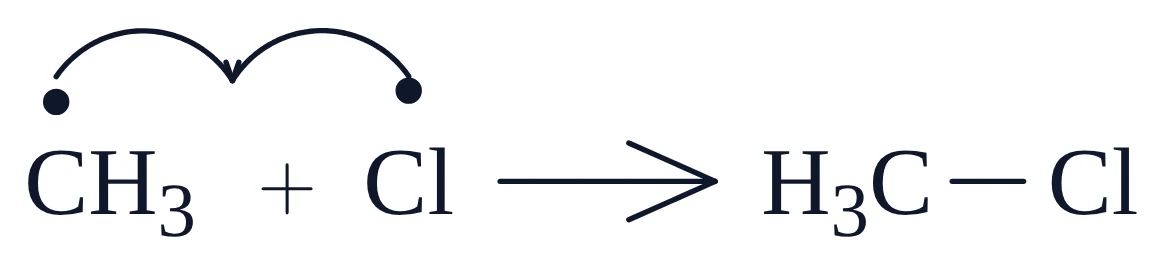
在終止步驟的程式碼中,\path … coordinate 這幾行會在兩個自由基之間建立一個點。因為它取的是兩者距離的某個比例,即使你修改 + sep left 或鍵長,魚鉤箭頭仍會在間隙中相遇。若改用相對於某個原子的固定位移,間距一變就會偏離間隙。
自由基點以 \charge{90=\.}{Cl} 撰寫:在 90° 方向、原子上方放一個單電子。對 CH3• 而言,點要放在碳上,也就是 \charge{90=\.}{C}H_3,而不是放在整個基團上。
2. HBr 的反馬可尼可夫加成(過氧化物效應)
有過氧化物存在時,HBr 會以「相反」的方向加成到丙烯上:溴最後接在末端碳上。原因是連鎖反應由 Br• 傳遞,而它會加成在能留下較穩定二級自由基的位置。
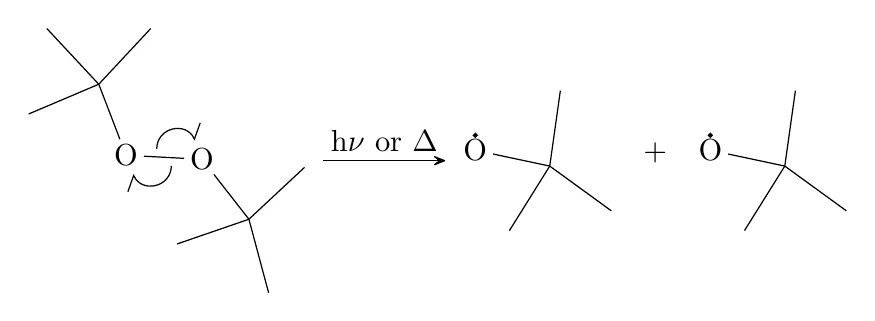
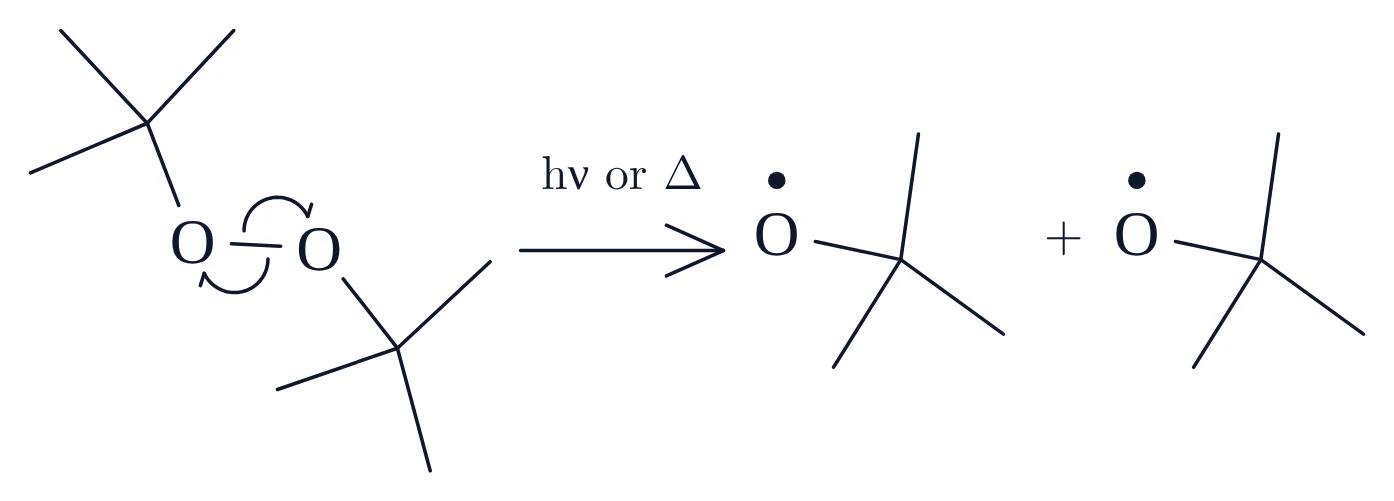
- 起始 1:二(三級丁基)過氧化物在較弱的 O–O 鍵處斷裂。
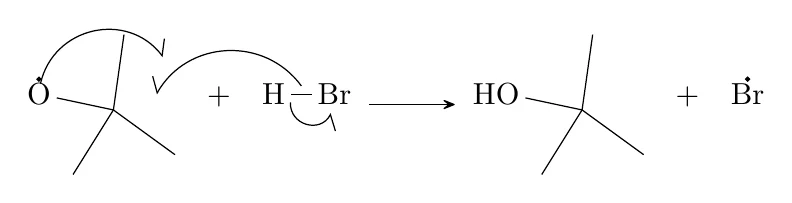
- 起始 2:三級丁氧基自由基從 HBr 奪取 H,釋出 Br•。
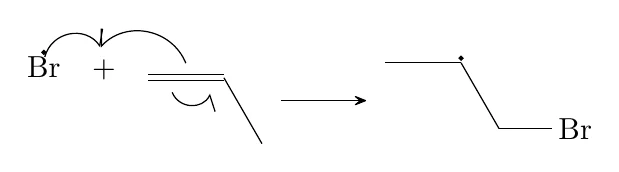
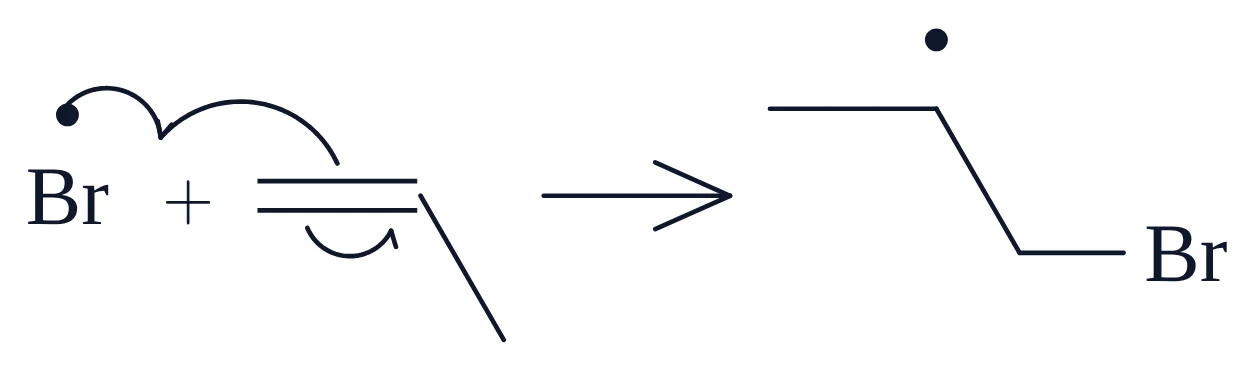
- 傳遞 1:Br• 加成到 C=C 的 CH2 端。一個 π 電子進入新的 C–Br 鍵,另一個留在中間的碳上。
- 傳遞 2:這個二級自由基從 HBr 奪取 H,生成 1-溴丙烷,並再次產生 Br•。
起始:過氧化物均裂
\setchemfig{atom sep=2.5em, + sep left=0.7em, + sep right=0.7em, compound sep=4em, arrow offset=6pt}
\schemestart
  \chemfig{-[:23](-[:-69]@{a2}O-[@{b1}:-3]@{a1}O-[:-52](-[:43])(-[:-75])-[:-161])(-[:47])-[:133]}
  \arrow{->[h$\nu$ or $\Delta$]}[,1.3]
  \chemfig{\charge{90=\.}{O}-[:-12](-[:-36])(-[:82])-[:-122]}
  \+
  \chemfig{\charge{90=\.}{O}-[:-12](-[:-36])(-[:82])-[:-122]}
\schemestop
\chemmove{
  \draw[-{Straight Barb[left,length=4pt]}]([shift={(-0.24em,0.28em)}]b1) to[bend left=77,looseness=1.4] ([shift={(-0.23em,0.62em)}]a1);
  \draw[-{Straight Barb[left,length=4pt]}]([shift={(0.24em,-0.28em)}]b1) to[bend left=77,looseness=1.4] ([shift={(0.23em,-0.62em)}]a2);
}
起始:溴原子生成
\setchemfig{atom sep=2.5em, + sep left=0.7em, + sep right=0.7em, compound sep=4em, arrow offset=6pt}
\schemestart
  \chemfig{@{a1}\charge{90=\.}{O}-[:-12](-[:-36])(-[:82]@{a3})-[:-122]}
  \+
  \chemfig{@{a2}H-[@{b1}:0,0.8]@{a4}Br}
  \arrow{->}
  \chemfig{HO-[:-12](-[:-36])(-[:82])-[:-122]}
  \+
  \chemfig{\charge{90=\.}{Br}}
\schemestop
\chemmove{
  \path (a2) -- (a3) coordinate[pos=0.7] (m1);
  \draw[-{Straight Barb[left,length=4pt]}]([shift={(0em,1.36em)}]a1) to[bend left=65,looseness=1.2] ([shift={(-0.08em,-0.19em)}]m1);
  \path (a2) -- (a1) coordinate[pos=0.5] (m2);
  \draw[-{Straight Barb[right,length=4pt]}]([shift={(0em,0.27em)}]b1) to[bend right=57,looseness=1.1] ([shift={(0em,0em)}]m2);
  \draw[-{Straight Barb[right,length=4pt]}]([shift={(-0.36em,-0.27em)}]b1) to[bend right=77,looseness=1.4] ([shift={(-0.11em,-0.63em)}]a4);
}
傳遞 1:Br• 加成到取代較少的碳上
\setchemfig{atom sep=2.5em, + sep left=0.7em, + sep right=0.7em, compound sep=4em, arrow offset=6pt}
\schemestart
  \chemfig{@{a1}\charge{90=\.}{Br}}
  \+
  \chemfig{@{a2}=[@{b1}:0]@{a3}-[:-60]}
  \arrow{->}
  \chemfig{-[:0]\charge{90=\.}{}-[:-60]-[:0]Br}
\schemestop
\chemmove{
  \path (a2) -- (a1) coordinate[pos=0.5] (m1);
  \draw[-{Straight Barb[left,length=4pt]}]([shift={(0em,1.37em)}]a1) to[bend left=65,looseness=1.2] ([shift={(-0.12em,0.87em)}]m1);
  \path (a2) -- (a1) coordinate[pos=0.5] (m2);
  \draw[-{Straight Barb[right,length=4pt]}]([shift={(0em,0.48em)}]b1) to[bend right=57,looseness=1.1] ([shift={(-0.12em,0.87em)}]m2);
  \draw[-{Straight Barb[right,length=4pt]}]([shift={(-0.45em,-0.48em)}]b1) to[bend right=65,looseness=1.2] ([shift={(-0.44em,-0.53em)}]a3);
}
傳遞 2:從 HBr 奪氫
\setchemfig{atom sep=2.5em, + sep left=0.7em, + sep right=0.7em, compound sep=4em, arrow offset=6pt}
\schemestart
  \chemfig{-[:0]@{a1}\charge{90=\.}{}-[:-60]-[:0]Br}
  \+
  \chemfig{@{a2}H-[@{b1}:0,0.8]@{a3}Br}
  \arrow{->}
  \chemfig{-[:0]-[:-60]-[:0]Br}
  \+
  \chemfig{\charge{90=\.}{Br}}
\schemestop
\chemmove{
  \path (a2) -- (a1) coordinate[pos=0.58] (m1);
  \draw[-{Straight Barb[left,length=4pt]}]([shift={(0em,1.36em)}]a1) to[bend left=57,looseness=1.1] ([shift={(0em,0em)}]m1);
  \path (a2) -- (a1) coordinate[pos=0.5] (m2);
  \draw[-{Straight Barb[right,length=4pt]}]([shift={(0em,0.27em)}]b1) to[bend right=57,looseness=1.1] ([shift={(0.05em,0.43em)}]m2);
  \draw[-{Straight Barb[right,length=4pt]}]([shift={(-0.36em,-0.27em)}]b1) to[bend right=77,looseness=1.4] ([shift={(-0.11em,-0.63em)}]a3);
}
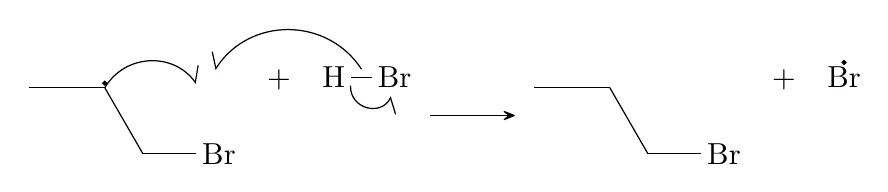
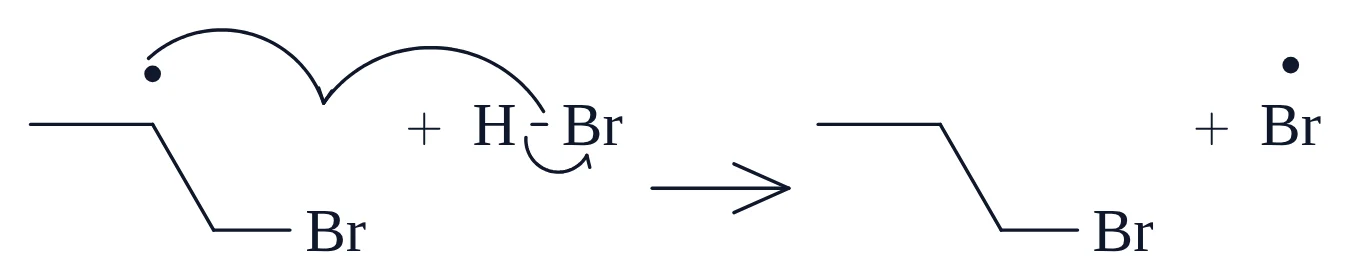
傳遞 2 中的自由基位於鍵線式的碳上,沒有字母可以掛上點。chemfig 以 \charge{90=\.}{} 處理這種情況:對空原子使用 \charge,鍵仍會在頂點交會。
魚鉤箭頭可以從點出發,也可以從鍵出發。在傳遞 1 中,箭頭從 C=C 鍵出發,該鍵以 =[@{b3}:0] 命名。
3. 鹼催化的醛醇加成
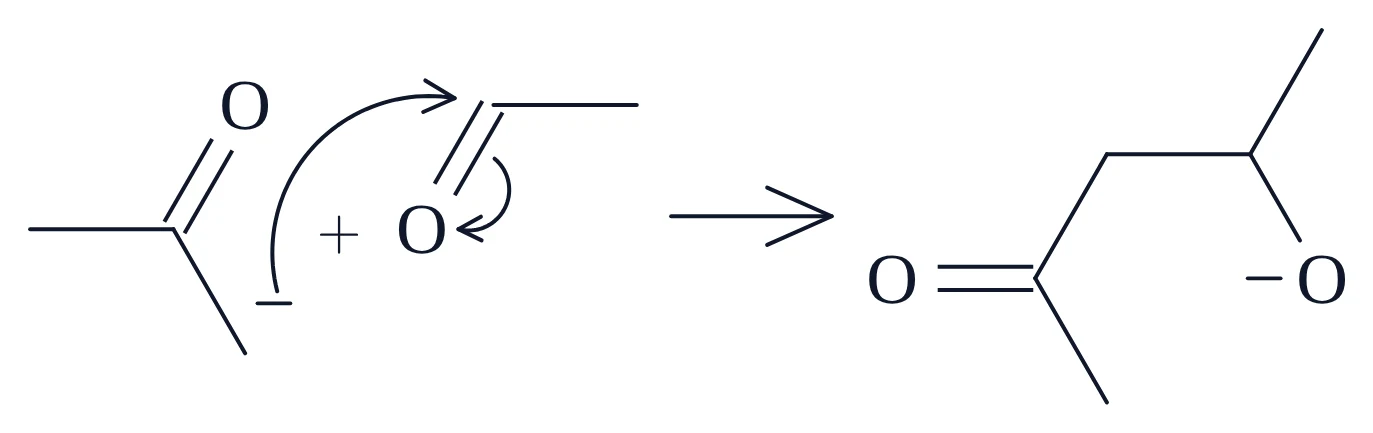
使用雙電子箭頭的極性反應機構,共三個步驟:
- 氫氧根移去丙酮的 α-氫,生成烯醇鹽。這一步是平衡(
\arrow{<=>})。 - 烯醇鹽的碳進攻乙醛的羰基碳,C=O 的 π 電子移到氧上。
- 烷氧離子從水取得一個質子,生成 β-羥基酮並重新產生氫氧根。
1. 烯醇鹽生成
\setchemfig{atom sep=2.5em, + sep left=0.7em, + sep right=0.7em, compound sep=4em, arrow offset=6pt}
\schemestart
  \chemfig{@{a1}HO^{-}}
  \+
  \chemfig{-[:0](-[:-60]@{a3}-[@{b1}:0,0.8]@{a2}H)=[:60]O}
  \arrow{<=>}
  \chemfig{-[:0](-[:-60]\charge{300:4pt=$\scriptstyle-$}{})=[:60]O}
  \+
  \chemfig{H_2O}
\schemestop
\chemmove{
  \draw[-{Stealth[length=4pt,inset=1.5pt]}]([shift={(1.88em,0em)}]a1) to[bend right=47] ([shift={(-0.69em,-0.4em)}]a2);
  \draw[-{Stealth[length=4pt,inset=1.5pt]}]([shift={(0.2em,0.27em)}]b1) to[bend right=65,looseness=1.2] ([shift={(0.17em,0.47em)}]a3);
}
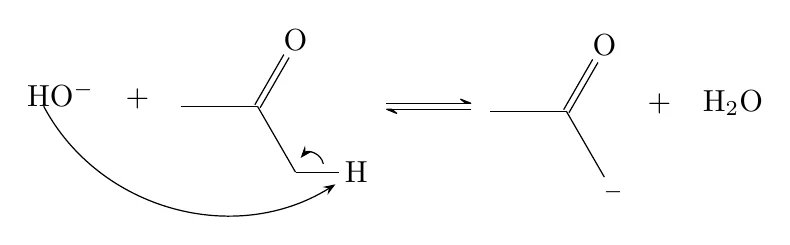
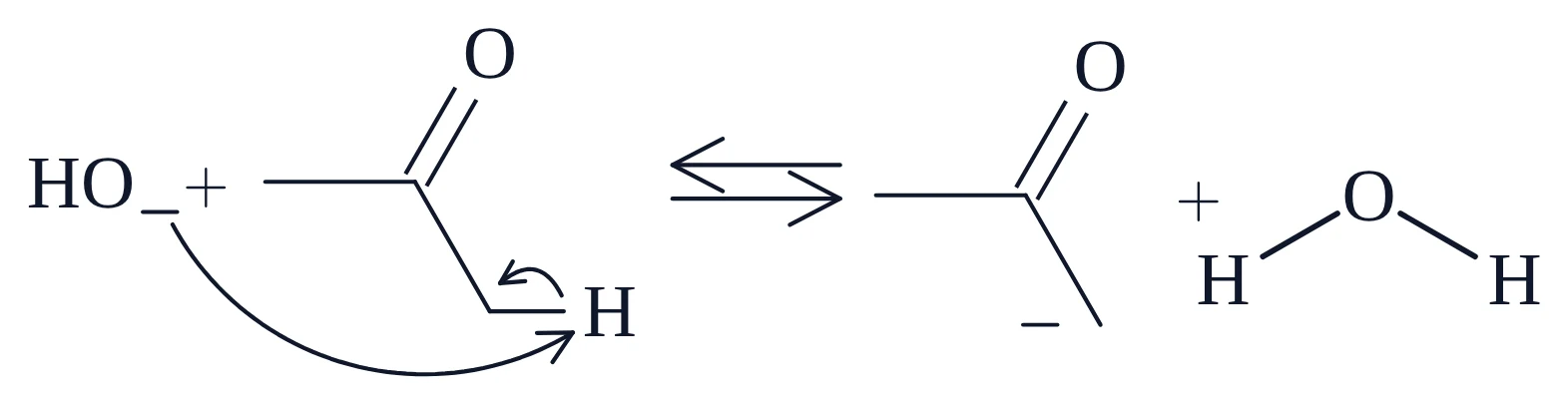
2. 對醛的親核加成
\setchemfig{atom sep=2.5em, + sep left=0.7em, + sep right=0.7em, compound sep=4em, arrow offset=6pt}
\schemestart
  \chemfig{-[:0](-[:-60]@{a1}\charge{300:4pt=$\scriptstyle-$}{})=[:60]O}
  \+
  \chemfig{@{a3}O=[@{b1}:60]@{a2}-[:0]}
  \arrow{->}
  \chemfig{O=[:0](-[:-60])-[:60]-[:0](-[:60])-[:-60]O^{-}}
\schemestop
\chemmove{
  \draw[-{Stealth[length=4pt,inset=1.5pt]}]([shift={(0.39em,1.07em)}]a1) to[bend left=57,looseness=1.1] ([shift={(-0.65em,0.38em)}]a2);
  \draw[-{Stealth[length=4pt,inset=1.5pt]}]([shift={(0.64em,0.15em)}]b1) to[bend left=77,looseness=1.4] ([shift={(0.64em,0em)}]a3);
}
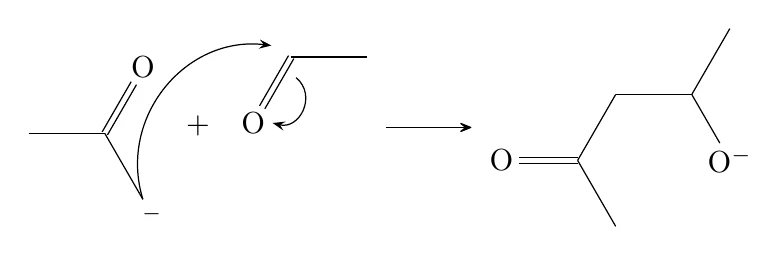
3. 烷氧離子的質子化
\setchemfig{atom sep=2.5em, + sep left=0.7em, + sep right=0.7em, compound sep=4em, arrow offset=6pt}
\schemestart
  \chemfig{O=[:0](-[:-60])-[:60]-[:0](-[:60])-[:-60]@{a1}O^{-}}
  \+
  \chemfig{@{a3}HO-[@{b1}:90,0.8,2]@{a2}H}
  \arrow{->}
  \chemfig{O=[:0](-[:-60])-[:60]-[:0](-[:60])-[:-60]OH}
  \+
  \chemfig{HO^{-}}
\schemestop
\chemmove{
  \draw[-{Stealth[length=4pt,inset=1.5pt]}]([shift={(0.62em,1.07em)}]a1) to[bend left=40] ([shift={(-0.72em,0.26em)}]a2);
  \draw[-{Stealth[length=4pt,inset=1.5pt]}]([shift={(0.27em,0.36em)}]b1) to[bend left=77,looseness=1.4] ([shift={(1.01em,0.11em)}]a3);
}
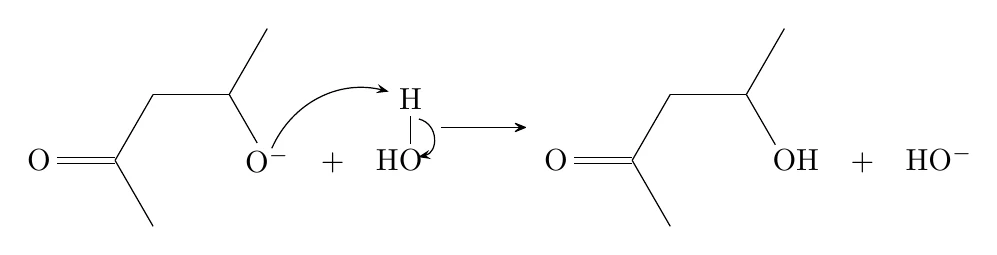
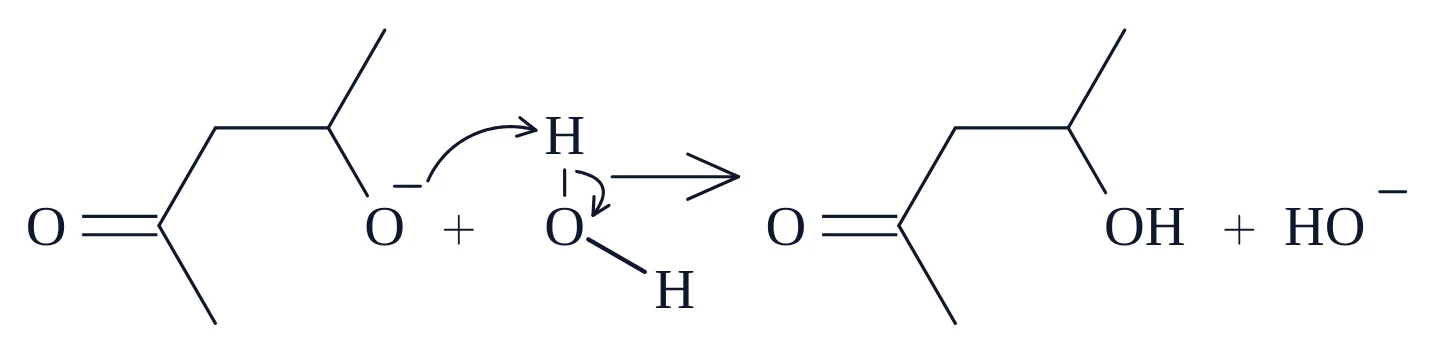
這裡的每個箭頭都是完整箭頭。每個步驟有兩個箭頭:一個形成鍵,另一個斷開鍵並把電子帶到原子上。第二種箭頭從鍵(b1)出發,停在原子上。
烯醇鹽的負電荷位於鍵線式的碳上。它的寫法與範例 2 中的自由基相同,也就是對空原子使用 \charge,這樣鍵就不會因為「−」標籤而被截短。
4. 三級丁醇的 E1 脫水:分成多列的單一流程圖
前三個範例把每個步驟放在各自的標題下。你也可以像許多課本一樣,把整個反應機構畫成一個連續、會自動換列的流程圖:
- OH 基從 H3O+ 取得一個質子。
- 水離去,生成三級丁基陽離子。這是慢步驟。
- 水從與 C+ 相鄰的碳上移去一個質子,C–H 的電子形成 2-甲基丙烯的 C=C 鍵。
在 chemfig 中,每一列都是以箭頭開頭的獨立流程圖,因此條件會一直跟著所屬的箭頭:
完整流程圖
\setchemfig{atom sep=2.5em, + sep left=0.7em, + sep right=0.7em, compound sep=4em, arrow offset=6pt}
{\centering \textbf{Acid-catalysed dehydration of tert-butanol (E1)}\par}
\par\bigskip
\vspace{0.9em}
\schemestart
  \chemfig{@{a1}H\charge{90=\:,-90=\:}{O}-[:-12](-[:-36])(-[:82])-[:-122]}
  \+
  \chemfig{@{a3}H_2O^{+}-[@{b1}:90,0.8,2]@{a2}H}
\schemestop
\par\bigskip
\schemestart
  \arrow{->[protonation]}[,1.6]
  \chemfig{@{a4}H_2O^{+}-[@{b2}:-12](-[:-36])(-[:82])-[:-122]}
  \+
  \chemfig{H_2O}
\schemestop
\par\bigskip
\schemestart
  \arrow{->[$-$H$_{2}$O][slow]}
  \chemfig{-[:0]\charge{120:4pt=$\scriptstyle+$}{}(-[@{b4}:-60]-[@{b3}:0,0.8]@{a6}H)-[:60]}
  \+
  \chemfig{@{a5}H_2\charge{90=\:,-90=\:}{O}}
\schemestop
\par\vspace{1.2em}
\par\bigskip
\schemestart
  \arrow{->[$-$H$^{+}$]}
  \chemfig{-[:0](=[:-60])-[:60]}
  \+
  \chemfig{H_3O^{+}}
\schemestop
\chemmove{
  \draw[-{Stealth[length=4pt,inset=1.5pt]}]([shift={(0.37em,1.21em)}]a1) to[bend left=40] ([shift={(-0.67em,0.56em)}]a2);
  \draw[-{Stealth[length=4pt,inset=1.5pt]}]([shift={(0.27em,0.36em)}]b1) to[bend left=77,looseness=1.4] ([shift={(1.19em,0.11em)}]a3);
  \draw[-{Stealth[length=4pt,inset=1.5pt]}]([shift={(0.19em,-0.31em)}]b2) to[bend left=77,looseness=1.4] ([shift={(0.66em,-0.63em)}]a4);
  \draw[-{Stealth[length=4pt,inset=1.5pt]}]([shift={(0.55em,-1.21em)}]a5) to[bend left=47] ([shift={(0.69em,-0.4em)}]a6);
  \draw[-{Stealth[length=4pt,inset=1.5pt]}]([shift={(0em,0.27em)}]b3) to[bend right=77,looseness=1.4] ([shift={(0.08em,0.33em)}]b4);
}
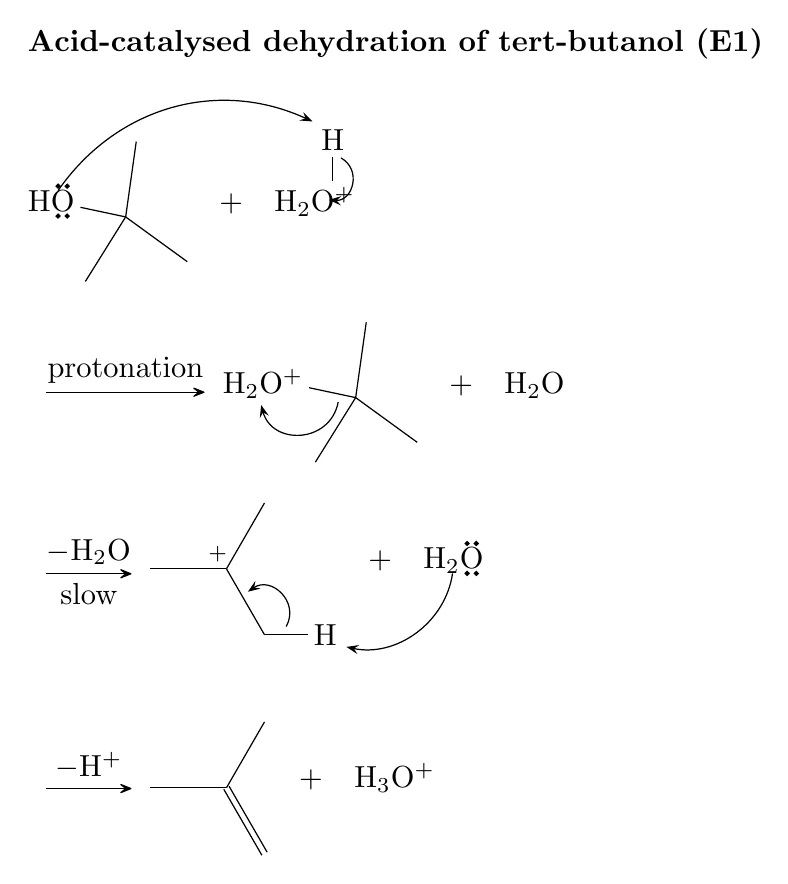
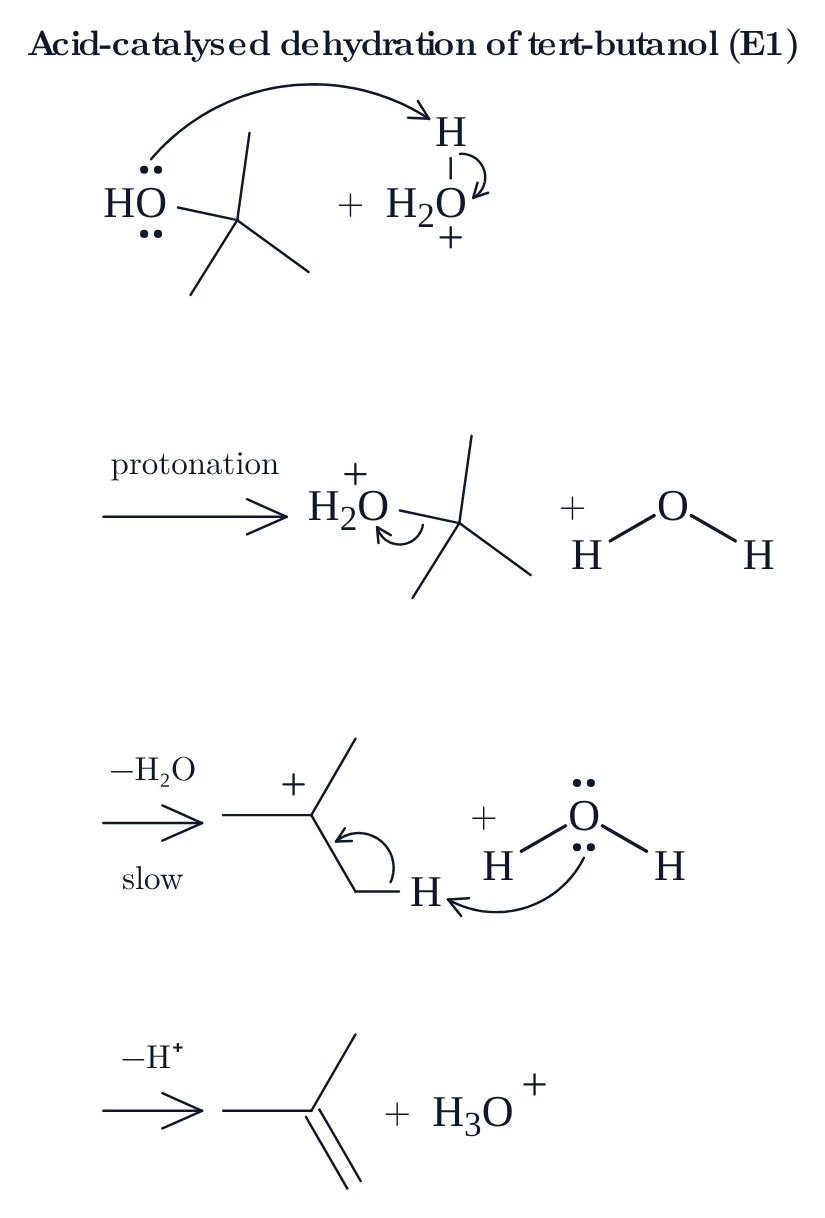
兩個值得參考的細節:
[,1.6]讓箭頭變成正常長度的 1.6 倍,這樣 protonation 這個字就能放在箭頭上方,而不會碰到下一個結構。- 碳陽離子寫成
\charge{120:4pt=$\scriptstyle+$}{}:在距頂點 4 pt、各鍵之間最寬的空隙處放一個小「+」。
5. 苯的親電溴化
苯的 π 電子進攻(經 FeBr3 活化的)溴,生成 σ 錯合物。接著溴離子移去 sp3 碳上的質子,C–H 的電子讓芳香環恢復。
下載 bromination-of-benzene.tex1. 進攻溴(σ 錯合物)
\setchemfig{atom sep=2.5em, + sep left=0.7em, + sep right=0.7em, compound sep=4em, arrow offset=6pt}
\schemestart
  \chemfig{?[a]-[:90]=_[@{b1}:30]-[:-30]=_[:-90]-[:-150]?[a,{=_}]}
  \+
  \chemfig{@{a1}Br-[@{b2}:0]@{a2}Br}
  \arrow{->[FeBr$_{3}$]}[,1.1]
  \chemfig{?[a]=_[:90]-[:30](-[:90]Br)-[:-30]\charge{30:4pt=$\scriptstyle+$}{}-[:-90]=_[:-150]?[a]}
  \+
  \chemfig{Br^{-}}
\schemestop
\chemmove{
  \draw[-{Stealth[length=4pt,inset=1.5pt]}]([shift={(-0.13em,0.23em)}]b1) to[bend left=74,looseness=1.34] ([shift={(-0.13em,0.73em)}]a1);
  \draw[-{Stealth[length=4pt,inset=1.5pt]}]([shift={(-0.25em,-0.27em)}]b2) to[bend right=77,looseness=1.4] ([shift={(-0.23em,-0.63em)}]a2);
}
2. 失去 H⁺ 使環恢復
\setchemfig{atom sep=2.5em, + sep left=0.7em, + sep right=0.7em, compound sep=4em, arrow offset=6pt}
\schemestart
  \chemfig{?[a]=_[:90]-[:30](-[:90]Br)(-[@{b2}:-30]\charge{30:4pt=$\scriptstyle+$}{}-[:-90]=_[:-150]?[a])-[@{b1}:30,0.8]@{a2}H}
  \+
  \chemfig{@{a1}Br^{-}}
  \arrow{->}
  \chemfig{?[a]-[:90]=_[:30](-[:90]Br)-[:-30]=_[:-90]-[:-150]?[a,{=_}]}
  \+
  \chemfig{HBr}
\schemestop
\chemmove{
  \draw[-{Stealth[length=4pt,inset=1.5pt]}]([shift={(-1.55em,0em)}]a1) to[bend right=51] ([shift={(0.73em,0.13em)}]a2);
  \draw[-{Stealth[length=4pt,inset=1.5pt]}]([shift={(-0.04em,-0.33em)}]b1) to[bend left=51] ([shift={(0.51em,-0.02em)}]b2);
}
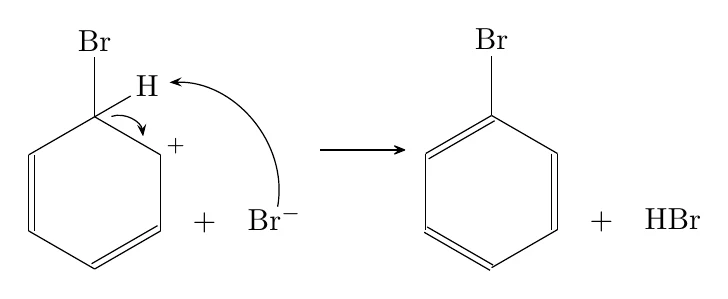
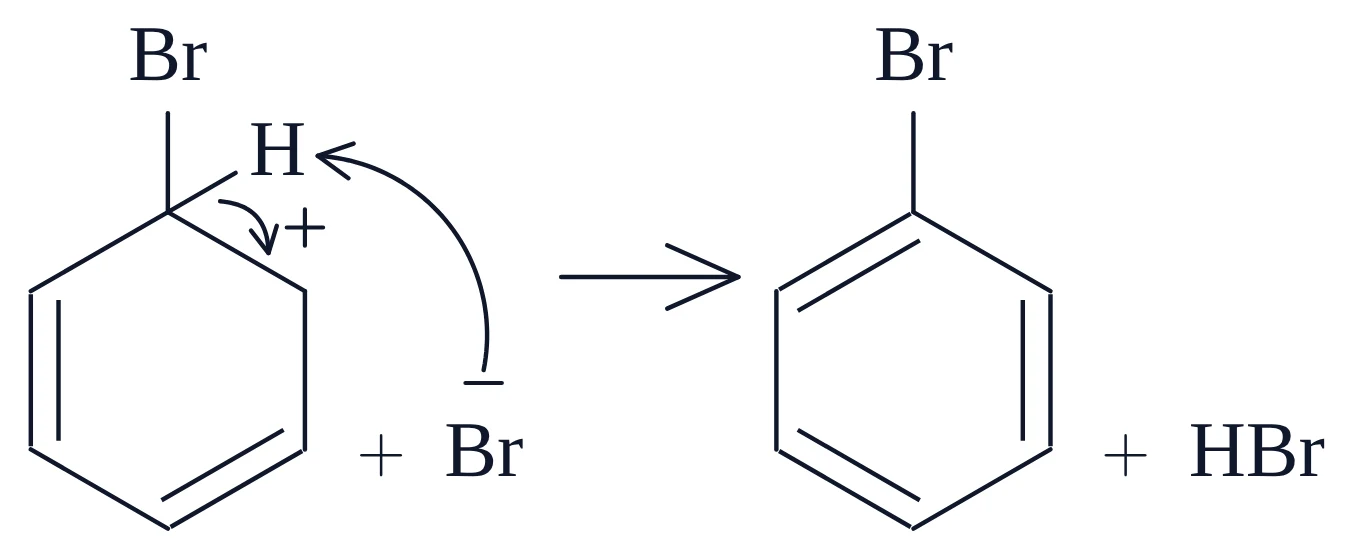
環以絕對鍵角與鉤子(?[a])撰寫,而不是 *6(…),因此每個環的方向都與畫布上完全相同,每根環鍵也都能帶一個 @{…} 名稱供箭頭使用。FeBr3 中的下標在 MolDraw 中輸入為 FeBr₃,匯出時為 FeBr$_{3}$。
繪製你自己的反應機構
- 在 MolDraw 編輯器中畫出各物種與反應箭頭,或從其中一個檔案開始:開啟檔案、全部複製,再用 Ctrl+V 貼到畫布上。
- 選擇彎箭頭工具。從孤電子對、電荷、自由基點或鍵拖曳到接受電子的原子或鍵。若是單電子步驟,請在箭頭選項中選擇 Fishhook (1e⁻)。
- 用文字工具在每一列上方加入步驟標題。
- 選擇 Download → chemfig (.tex),或選擇 Copy as chemfig (LaTeX),把程式碼貼到你自己的文件中。
- 編譯兩次。
你也可以詢問編輯器中的 AI 助理,例如:「用魚鉤箭頭畫出甲苯苄位的自由基溴化,起始、傳遞與終止各自放在標題下。」它會在畫布上畫出各步驟,你可以用同樣的方式匯出。
當你把 chemfig 貼回來時,MolDraw 會讀取每個 \chemmove 箭頭起訖於哪個原子或鍵、是完整箭頭還是魚鉤箭頭、bend 彎向哪一側,以及弧度有多深。停在兩個原子之間 \path … coordinate 點上的箭頭會變成成鍵箭頭,因此魚鉤箭頭仍會在間隙中相遇。間距取自 \setchemfig(atom sep、compound sep、+ sep left/right、arrow offset),文字與線條則以類似 LaTeX 的襯線字體與 chemfig 的細線寬繪製。MolDraw 仍會依自己的規則調整每個箭頭,所以手寫的 \draw 不必完美。
手動調整匯出的程式碼
- 弧度更平或更深:修改彎曲角度(用
bend left=40取代57),或刪除looseness。 - 讓曲線彎向另一側:對調
bend left與bend right。若是魚鉤箭頭,也要同時對調箭頭中的[left]與[right],讓倒鉤保持在外側。 - 移動箭尾或箭頭:修改以 em 為單位的
shift。(0em,1em)表示原子中心上方 1 em。 - 魚鉤箭頭的相遇點:修改
pos=0.58。0.5正好位於兩個原子的正中間。 - 列上方的空間:每個流程圖前的
\vspace{…em}會為往上彎的箭頭預留空間。若箭頭碰到標題,請把它調大。
問與答
如何在 chemfig 中畫魚鉤箭頭?
用 @{…} 為兩端命名,再在 \chemmove 中以半箭頭畫出箭頭:\draw[-{Straight Barb[left,length=4pt]}] (a1) to[bend left=50] (a2); 使用 [left] 或 [right],讓倒鉤位於曲線外側。需載入 TikZ 函式庫 arrows.meta。
如何讓兩個魚鉤箭頭在新鍵的中點相遇?
在 \chemmove 中用 \path (a1) -- (a2) coordinate[pos=0.5] (m1); 在兩個原子之間建立一個點,再讓兩個魚鉤箭頭都停在 (m1)。無論 chemfig 如何排列流程圖,這個點都會跟著原子移動。
在 chemfig 中如何在鍵線式的碳上加自由基點?
對空原子使用 \charge:\charge{90=\.}{}。鍵仍在頂點交會,點則位於頂點上方。若是有標籤的原子,請寫 \charge{90=\.}{Cl}。
為什麼 PDF 中的彎箭頭位置不對?
\chemmove 使用第一次 LaTeX 執行時儲存的位置。請再編譯一次。
我可以編輯這些範例嗎?
可以。開啟 .tex 檔,複製內容並貼到 MolDraw 畫布上。用滑鼠修改結構或箭頭,再重新下載 chemfig (.tex)。
這些範例可以免費使用嗎?
可以。可用於筆記、習題、學位論文與期刊論文。