Hydrogens' bugDone
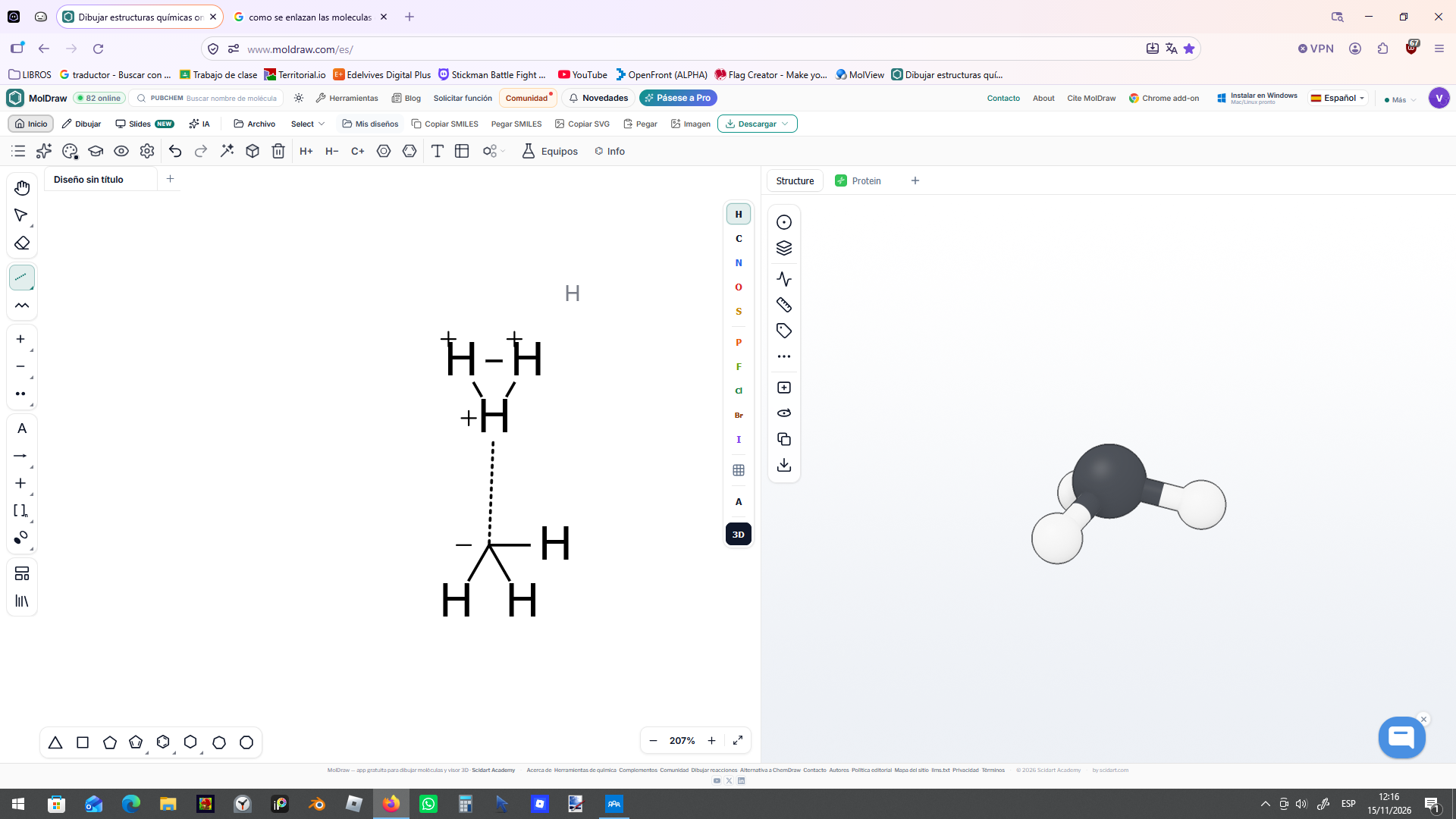
I was trying to make the cation H3(+) (trihydrogen) bonding with the anion CH3(-) (methonium) but the hydrogens of the H3(+) didn't show up
Request a feature here so the community can vote and track progress. Sign in to submit.
I was trying to make the cation H3(+) (trihydrogen) bonding with the anion CH3(-) (methonium) but the hydrogens of the H3(+) didn't show up
rotation of water molecule (at present you can't even rotate it e.g. 45 or 90 degrees)
bro that's because you need to add the hydrogens manually to do it. I saw that too
Thanks Kristine! Fixed: a water molecule now rotates like any other structure. Drag the round handle above the selection, and hold Shift to turn in 15° steps (e.g. 45° or 90°).
E.g. the cation H₃⁺ is impossible because the system doesn't let you to put positive charges on hydrogen, meanwhile others like MolView do. It is frustrating because MolDraw has a greater capacity to model big and complex molecules and I don't want to be changing between one modeller and another
Thanks Vic! This is now fixed: you can put a + charge on a bonded hydrogen, and hydrogen can take two bonds for three-centre bonds. To draw H₃⁺, draw three H atoms in a triangle and add + to one of them. The same change lets you draw the B–H–B bridges of diborane.
sorry but I tried it and it doesn't work. the B appear like they were separated BH3 molecules joint up with a H-bond instead of a hole molecule of B2H
check again now? draw diborane with ordinary solid bonds (B–H–B for each bridge), not the dotted H-bond tool. When a hydrogen is bonded to two atoms, MolDraw now treats it as a three-centre bridge, so each boron shows BH₂, the formula reads B₂H₆, and the 3D view shows the whole molecule. Refresh the page to get the update.
Hi there, I'd like to be able to label Atoms automatically by selecting them and then clicking a button or right click to label them with numbers like this:
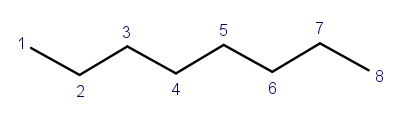
Now possible, right-click the structure → Number atoms (select atoms first to number only those).
Hey @rafeeque Very nice. I used it already for some material. Two things: - Would it be possible to select atoms with ctrl+leftclick when using the select tool? It wold make selecting individual atoms much easier. - Would it be possible to define start and end of the automatic numbering? As of now it seems to be random and sadly I was out of luck so that I had to number my menthol molecule by hand.
Thanks Ramon, glad it’s useful! Both are done: • Ctrl+click (⌘ on Mac) with the select tool now picks single atoms. • To set the numbering: Ctrl+click the atoms in the order you want, then right-click → Number in click order. Or right-click the atom that should be 1 → Number from this atom.
I tried to draw the haworthprojection of fructose, but the auto snapping came in the way of it. Everytime I tried to bring a OH group near one of the bonds or another atom it snapped to it and disappeared. I tried to disable as many snapping option as I could but it did not work. In Lewisformula it is better but still noticeable.
this should be fixed now
Wow, very nice. Works as intended.
Hi there, When I try to add alpha-D-Glucose as haworth projection from the library it will insert mills projection. If I press ctrl-Z it will change to haworth projection.
Hi Ramon, thanks for the reports. Everything is now fixed.. 1. Sugars from the library now stay Haworth projections (they no longer turn into Mills). 2. α/β-D-fructose were swapped. That's corrected now. 3. Haworth rings now use the textbook look: thick front edge, straight up/down OH and CH₂OH. 4. There's a new **Snapping** switch in the 👁 menu. Turn it off to place OH groups next to atoms and bonds without them attaching. Holding Shift while dragging also works. check and let me know if any fixes required
this is also fixed. check?
Yes, tried it. Works as intended and thanks for the tip with holding shift.
the 3d structure window is broken on my machine it stuck at priveiw and isent rendering anything
Thanks for the report and screenshot, found and fixed! A recent update made some browsers keep an outdated copy of the 3D engine, which stopped it from starting. Please reload moldraw.com once and the 3D view should render again. Let us know if it’s still stuck.
Great thanks for the support it works flawlessly now thank you for your time
Thanks , same cause as the 3D issue, and it’s now fixed! please check
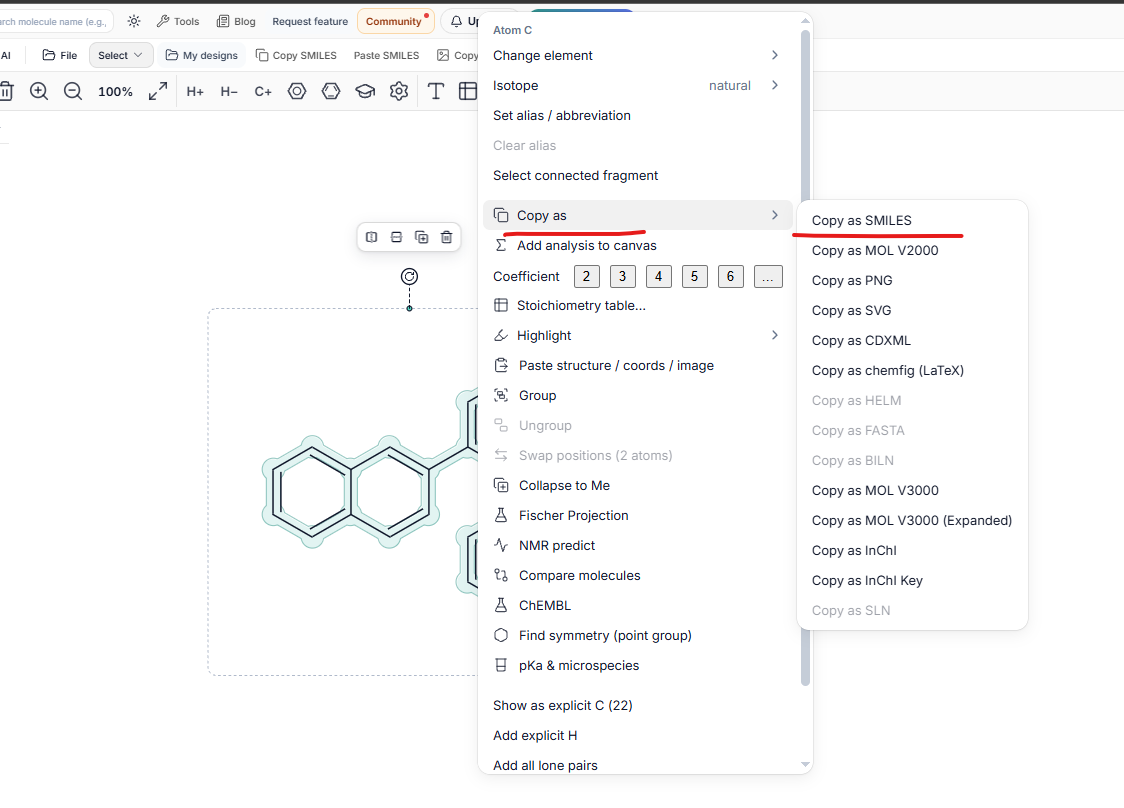
generate smiles
You can already generate smiles. select the molecule, right click, copy as smiles!
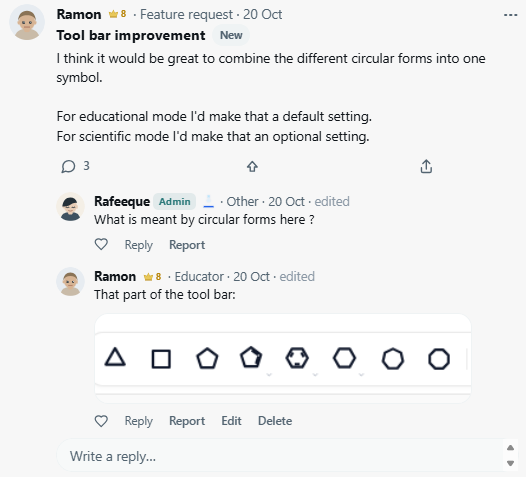
Sometimes a topic will not show all replies or display the wrong amount of replies or will not show the "view more comments". It might be easier to follow discussions and feature requests if only the first post is displayed and to show the replies the discussion has to be opened. Or maybe even only the title of the discussion or request. i.e. tool bar improvement doesnt show the "view more comments" although there is another one to show.
Hi there, In my opinion the upper toolbars needs sorting. I made an image of my suggestions. My ideas behind the new order: - The first row is for stuff the opens new windows or links. It is usually not used heavily for drawing. (i.e. AI and Slides open a new window, Blog, tools and other will open a link) - The second row contains "Home, Draw, Slides AI" which add a new window or change the drawing setup. Also everything that is associated with files, uploads and downloads. - The third row has the settings part split into Section 1: Color settings, display settings, CH, teaching settings and all settings Drawing options in Section 2: Back Repeat, clean, Discard, Zoom, Fullscreen. Inserts in Section 3: Insert Text, Insert table, Insert apparatus, aligning options and info - The 3D button exists twice and I would delete it. - The H+ H- C+ Aromatize Dearomatize should be together in one symbol, as it uses a lot of space.

Hi Ramon, all three are fixed and live, please reload once. • Lewis ↔ skeletal: hydrogens you draw in the Lewis view now disappear on carbon and show as OH/NH₂ on heteroatoms in skeletal and come back exactly where you drew them when you switch back. Hydrogens with a wedge, isotopes or charges are kept. • Teaching settings are back under the 🎓 hat; the 👁 menu is now toolbar and display only. • The overlapping buttons are gone: the top row now hides less-used links (still in “More”) when space is tight. Thanks for reporting
Hey @rafeeque , Thank you for the fast response. I really like the idea with the more button. I have some points to add: - The 🎓 should be next to the 👁. - Working with MolDraw I found that it is great to be able to change the settings in 🎓 👁 very fast, but it would be better if I could see the changes while making them. The Dropdown Menu hides the drawing space sometimes. Therefore I think it would be great to group the settings together with the Gear ⚙ symbol on the far right side oder far left side to have the dropdown menu hide less important space. - I still think the "H+ H- C+ aromatize dearomatize" take up to much space and the solution which you implemented last week with the "CH" Symbol was better. But maybe other users see it differently. If so, I'd like the option to group them in the CH-Symbol.
Hey @rafeeque , Great! Thank you. This is much better. I have some other things I'd like to point out: - The hat 🎓 should be next to the eye 👁. - When I use the 🎓 symbol the drop down menu will be directly on the most important drawing space. I'd suggest to have 🎓 👁 and ⚙ (Settings) next to each other and either on the far left side or the far right side to avoid their drop down menus to be in the middle of the drawing space. Another solution would be to have 🎓 next to 👁 on the far left and settings on the far right. - I still don't like the "C+ H+ H- aromatize and dearomatize" taking up so much space. I really loved the implementation of the CH symbol. Maybe other user dont like the idea of grouping them together. If so, I'd like to have the option to group them.
Every MolDraw update in one feed, newest first.
Rafeeque
Thanks Vic! The earlier fix let you draw H₃⁺ in 2D, but the 3D view was a separate bug: it dropped any molecule made only of hydrogens (H₃⁺, even H₂), and the bridging hydrogens in molecules like diborane. That's fixed now, so H₃⁺ next to CH₃⁻ shows all its hydrogens in 3D. Refresh the page to get the update. If anything still looks off, post a screenshot here.
Vic S.
Thanks! Now the only left is showing the H3(+) by itself, something that doesn't work yet. Even with that, you're doing a great job on these little details
Rafeeque
check now?: H₃⁺ on its own (and H₂) now shows in 3D. The 3D view was skipping molecules made only of hydrogens