MolDraw › Templates › Teaching lab › Apparatus labelling: distillation
Teaching labPremium
Apparatus labelling: distillation template
Premium template. Preview and edit it free in MolDraw; downloading and exporting it is part of MolDraw Pro.
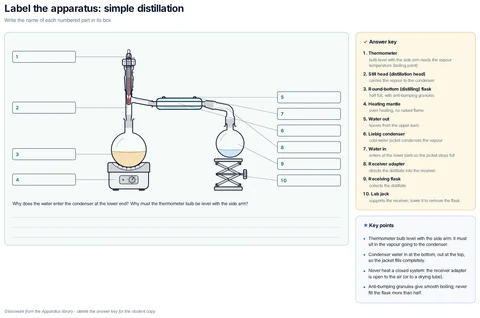
A simple distillation set-up from the glassware library with ten numbered blank label boxes for students to fill in, plus an answer key panel giving each part and its purpose.
What the template shows
- Label the apparatus: simple distillation
- Write the name of each numbered part in its box
- Why does the water enter the condenser at the lower end? Why must the thermometer bulb be level with the side arm?
- Answer key
- bulb level with the side arm reads the vapour temperature (boiling point)
- 2. Still head (distillation head)
- carries the vapour to the condenser
- 3. Round-bottom (distilling) flask
- half full, with anti-bumping granules
- 4. Heating mantle
- even heating, no naked flame
- 5. Water out
- leaves from the upper barb
- 6. Liebig condenser
- cold-water jacket condenses the vapour
- enters at the lower barb so the jacket stays full
- 8. Receiver adapter
- directs the distillate into the receiver
- 9. Receiving flask
- collects the distillate
- 10. Lab jack
- supports the receiver; lower it to remove the flask
- Thermometer bulb level with the side arm: it must sit in the vapour going to the condenser.
- Condenser water in at the bottom, out at the top, so the jacket fills completely.
Drawn with 35 shapes – every one editable in MolDraw.
Sources
How to use this template
- Press Edit in MolDraw. The template opens on the canvas of the free MolDraw editor.
- Change anything: move structures, edit atoms and labels, recolour highlights or delete what you do not need.
- Add your own structures, arrows and text next to it, or combine several templates on one page.
- Export the drawing as PNG, SVG or PDF for slides, worksheets, theses and papers.
Frequently asked questions
Is the Apparatus labelling: distillation template free?
You can preview the Apparatus labelling: distillation template here and open and edit it in MolDraw for free. Downloading or exporting it is part of MolDraw Pro, together with the other premium templates.
Can I edit the Apparatus labelling: distillation template?
Yes. It opens as an ordinary MolDraw drawing, so every structure, arrow, label and colour can be changed, and you can add your own content around it.
Is the chemistry checked?
Every structure is checked with RDKit and every curly arrow passes MolDraw’s electron-flow audit. The sources used are listed on this page.
Are the teaching lab sheets printable?
Yes. Open one in MolDraw, add your school or course name and export it as PDF to print.