MolDraw › Templates › Mechanisms › E1 elimination
MechanismsPremium
E1 elimination template
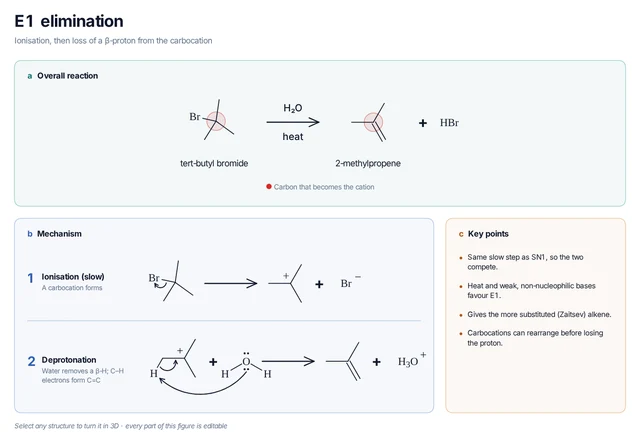
Premium template. Preview and edit it free in MolDraw; downloading and exporting it is part of MolDraw Pro.
tert-Butyl bromide ionises and water removes a proton to give 2-methylpropene.
Mechanism step by step
Ionisation, then loss of a β-proton from the carbocation
- Ionisation (slow) – A carbocation forms
- Deprotonation – Water removes a β-H; C–H electrons form C=C
Key points
- Same slow step as SN1, so the two compete.
- Heat and weak, non-nucleophilic bases favour E1.
- Gives the more substituted (Zaitsev) alkene.
- Carbocations can rearrange before losing the proton.
Drawn with 31 atoms, 6 arrows, 6 shapes – every one editable in MolDraw.
Sources
How to use this template
- Press Edit in MolDraw. The template opens on the canvas of the free MolDraw editor.
- Change anything: move structures, edit atoms and labels, recolour highlights or delete what you do not need.
- Add your own structures, arrows and text next to it, or combine several templates on one page.
- Export the drawing as PNG, SVG or PDF for slides, worksheets, theses and papers.
Frequently asked questions
Is the E1 elimination template free?
You can preview the E1 elimination template here and open and edit it in MolDraw for free. Downloading or exporting it is part of MolDraw Pro, together with the other premium templates.
Can I edit the E1 elimination template?
Yes. It opens as an ordinary MolDraw drawing, so every structure, arrow, label and colour can be changed, and you can add your own content around it.
Is the chemistry checked?
Every structure is checked with RDKit and every curly arrow passes MolDraw’s electron-flow audit. The sources used are listed on this page.
What is a curly-arrow mechanism template?
A ready-made drawing of a reaction mechanism in which curved arrows show where electron pairs move in each step. You can open it in MolDraw, change the substrate and reuse it.