MolDraw › Templates › Mechanisms › Cuprate 1,4- vs Grignard 1,2-addition
MechanismsPremium
Cuprate 1,4- vs Grignard 1,2-addition template
Premium template. Preview and edit it free in MolDraw; downloading and exporting it is part of MolDraw Pro.
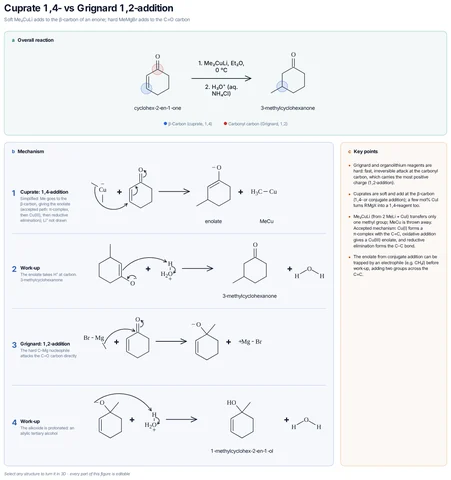
Lithium dimethylcuprate adds to the β-carbon of cyclohex-2-enone (conjugate addition) and work-up gives 3-methylcyclohexanone; methylmagnesium bromide adds directly to C=O to give 1-methylcyclohex-2-en-1-ol.
Mechanism step by step
Soft Me₂CuLi adds to the β-carbon of an enone; hard MeMgBr adds to the C=O carbon
- Cuprate: 1,4-addition – Simplified: Me goes to the β-carbon, giving the enolate (accepted path: π-complex, then Cu(III), then reductive elimination); Li⁺ not drawn
- Work-up – The enolate takes H⁺ at carbon: 3-methylcyclohexanone
- Grignard: 1,2-addition – The hard C–Mg nucleophile attacks the C=O carbon directly
- Work-up – The alkoxide is protonated: an allylic tertiary alcohol
Key points
- Grignard and organolithium reagents are hard: fast, irreversible attack at the carbonyl carbon, which carries the most positive charge (1,2-addition).
- Cuprates are soft and add at the β-carbon (1,4- or conjugate addition); a few mol% CuI turns RMgX into a 1,4-reagent too.
- Me₂CuLi (from 2 MeLi + CuI) transfers only one methyl group; MeCu is thrown away. Accepted mechanism: Cu(I) forms a π-complex with the C=C, oxidative addition gives a Cu(III) enolate, and reductive elimination forms the C–C bond.
- The enolate from conjugate addition can be trapped by an electrophile (e.g. CH₃I) before work-up, adding two groups across the C=C.
Drawn with 93 atoms, 15 arrows, 9 shapes – every one editable in MolDraw.
Sources
How to use this template
- Press Edit in MolDraw. The template opens on the canvas of the free MolDraw editor.
- Change anything: move structures, edit atoms and labels, recolour highlights or delete what you do not need.
- Add your own structures, arrows and text next to it, or combine several templates on one page.
- Export the drawing as PNG, SVG or PDF for slides, worksheets, theses and papers.
Frequently asked questions
Is the Cuprate 1,4- vs Grignard 1,2-addition template free?
You can preview the Cuprate 1,4- vs Grignard 1,2-addition template here and open and edit it in MolDraw for free. Downloading or exporting it is part of MolDraw Pro, together with the other premium templates.
Can I edit the Cuprate 1,4- vs Grignard 1,2-addition template?
Yes. It opens as an ordinary MolDraw drawing, so every structure, arrow, label and colour can be changed, and you can add your own content around it.
Is the chemistry checked?
Every structure is checked with RDKit and every curly arrow passes MolDraw’s electron-flow audit. The sources used are listed on this page.
What is a curly-arrow mechanism template?
A ready-made drawing of a reaction mechanism in which curved arrows show where electron pairs move in each step. You can open it in MolDraw, change the substrate and reuse it.