MolDraw › Templates › Reaction setups › TLC: spot, develop, visualise
Reaction setupsPremium
TLC: spot, develop, visualise template
Premium template. Preview and edit it free in MolDraw; downloading and exporting it is part of MolDraw Pro.
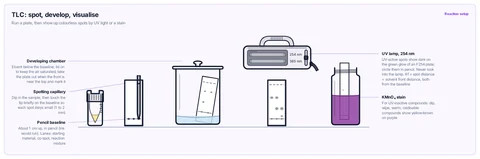
Spotting capillary touching the pencil baseline of a TLC plate beside the sample vial, covered developing chamber, UV lamp (254 nm) over the developed plate, and a KMnO₄ staining jar.
What the template shows
- Run a plate, then show up colourless spots by UV light or a stain
- Developing chamber
- Eluent below the baseline; lid on to keep the air saturated; take the plate out when the front is near the top and mark it
- Spotting capillary
- Dip in the sample, then touch the tip briefly on the baseline so each spot stays small (1 to 2 mm)
- Pencil baseline
- About 1 cm up, in pencil (ink would run). Lanes: starting material, co-spot, reaction mixture
- UV-active spots show dark on the green glow of an F254 plate; circle them in pencil. Never look into the lamp. Rf = spot distance ÷ solvent front distance, both from the baseline
- KMnO₄ stain
- For UV-inactive compounds: dip, wipe, warm; oxidisable compounds show yellow-brown on purple
- Reaction setup
Drawn with 14 shapes – every one editable in MolDraw.
Sources
How to use this template
- Press Edit in MolDraw. The template opens on the canvas of the free MolDraw editor.
- Change anything: move structures, edit atoms and labels, recolour highlights or delete what you do not need.
- Add your own structures, arrows and text next to it, or combine several templates on one page.
- Export the drawing as PNG, SVG or PDF for slides, worksheets, theses and papers.
Frequently asked questions
Is the TLC: spot, develop, visualise template free?
You can preview the TLC: spot, develop, visualise template here and open and edit it in MolDraw for free. Downloading or exporting it is part of MolDraw Pro, together with the other premium templates.
Can I edit the TLC: spot, develop, visualise template?
Yes. It opens as an ordinary MolDraw drawing, so every structure, arrow, label and colour can be changed, and you can add your own content around it.
Is the chemistry checked?
Every structure is checked with RDKit and every curly arrow passes MolDraw’s electron-flow audit. The sources used are listed on this page.
Can I edit the glassware?
Yes. Every piece of glassware is a MolDraw apparatus object: move, resize, recolour the liquid or swap a piece and the joints stay connected.