MolDraw › Templates › Reaction setups › Caffeine: extraction and sublimation
Reaction setupsPremium
Caffeine: extraction and sublimation template
Premium template. Preview and edit it free in MolDraw; downloading and exporting it is part of MolDraw Pro.
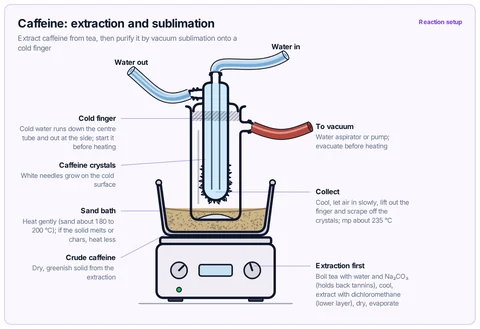
Vacuum sublimator with the crude caffeine on its floor, heated on a sand bath; crystals form on the cold finger. The tea extraction is described in the notes. A-level / AP / IB / university.
What the template shows
- Extract caffeine from tea, then purify it by vacuum sublimation onto a cold finger
- Water out
- Cold finger
- Cold water runs down the centre tube and out at the side; start it before heating
- Caffeine crystals
- White needles grow on the cold surface
- Sand bath
- Heat gently (sand about 180 to 200 °C); if the solid melts or chars, heat less
- Crude caffeine
- Dry, greenish solid from the extraction
- Water aspirator or pump; evacuate before heating
- Cool, let air in slowly, lift out the finger and scrape off the crystals; mp about 235 °C
- Extraction first
- Boil tea with water and Na₂CO₃ (holds back tannins), cool, extract with dichloromethane (lower layer), dry, evaporate
- Reaction setup
Drawn with 14 shapes – every one editable in MolDraw.
Sources
How to use this template
- Press Edit in MolDraw. The template opens on the canvas of the free MolDraw editor.
- Change anything: move structures, edit atoms and labels, recolour highlights or delete what you do not need.
- Add your own structures, arrows and text next to it, or combine several templates on one page.
- Export the drawing as PNG, SVG or PDF for slides, worksheets, theses and papers.
Frequently asked questions
Is the Caffeine: extraction and sublimation template free?
You can preview the Caffeine: extraction and sublimation template here and open and edit it in MolDraw for free. Downloading or exporting it is part of MolDraw Pro, together with the other premium templates.
Can I edit the Caffeine: extraction and sublimation template?
Yes. It opens as an ordinary MolDraw drawing, so every structure, arrow, label and colour can be changed, and you can add your own content around it.
Is the chemistry checked?
Every structure is checked with RDKit and every curly arrow passes MolDraw’s electron-flow audit. The sources used are listed on this page.
Can I edit the glassware?
Yes. Every piece of glassware is a MolDraw apparatus object: move, resize, recolour the liquid or swap a piece and the joints stay connected.