MolDraw › Templates › Lab notebook › Sample vial label sheet
Lab notebookPremium
Sample vial label sheet template
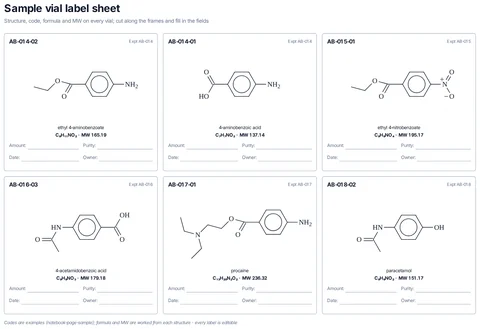
Premium template. Preview and edit it free in MolDraw; downloading and exporting it is part of MolDraw Pro.
A printable sheet of six sample labels, each with structure, compound code, name, formula and MW (from the structure), and fields for amount, date and owner.
What the template shows
- Structure, code, formula and MW on every vial; cut along the frames and fill in the fields
- ethyl 4-aminobenzoate
- 4-aminobenzoic acid
- ethyl 4-nitrobenzoate
- 4-acetamidobenzoic acid
- Codes are examples (notebook-page-sample); formula and MW are worked from each structure · every label is editable
Drawn with 77 atoms, 30 shapes – every one editable in MolDraw.
Sources
How to use this template
- Press Edit in MolDraw. The template opens on the canvas of the free MolDraw editor.
- Change anything: move structures, edit atoms and labels, recolour highlights or delete what you do not need.
- Add your own structures, arrows and text next to it, or combine several templates on one page.
- Export the drawing as PNG, SVG or PDF for slides, worksheets, theses and papers.
Frequently asked questions
Is the Sample vial label sheet template free?
You can preview the Sample vial label sheet template here and open and edit it in MolDraw for free. Downloading or exporting it is part of MolDraw Pro, together with the other premium templates.
Can I edit the Sample vial label sheet template?
Yes. It opens as an ordinary MolDraw drawing, so every structure, arrow, label and colour can be changed, and you can add your own content around it.
Is the chemistry checked?
Every structure is checked with RDKit and every curly arrow passes MolDraw’s electron-flow audit. The sources used are listed on this page.
What goes on the lab notebook experiment page?
The reaction scheme, a reagent table with amounts and equivalents, the procedure, observations, yield and characterisation, in the order most notebooks require.