Peptide Builder Add-on: A Step-by-Step Guide with Screenshots
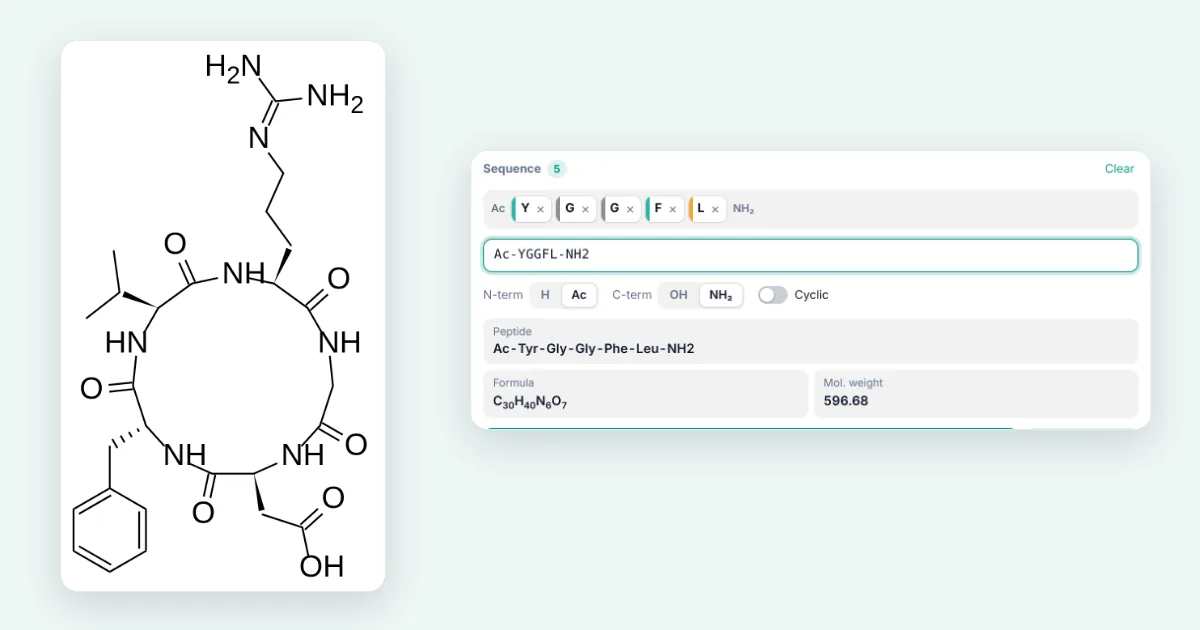
Short answer: Open the 3D viewer, press + and install Peptide builder. In the Peptide tab, type a sequence (for example Ac-YGGFL-NH2 or cyclo(RGDfV)) or click amino-acid tiles, pick the termini, and press Insert on canvas. You get the full structure with a wedge at every stereocentre, plus the name, formula and molecular weight.
How to read the screenshots: each orange number in a picture matches the numbered note under it. Dashed boxes with a magnified panel are zoomed-in details.
Step 1: Install the Peptide builder add-on
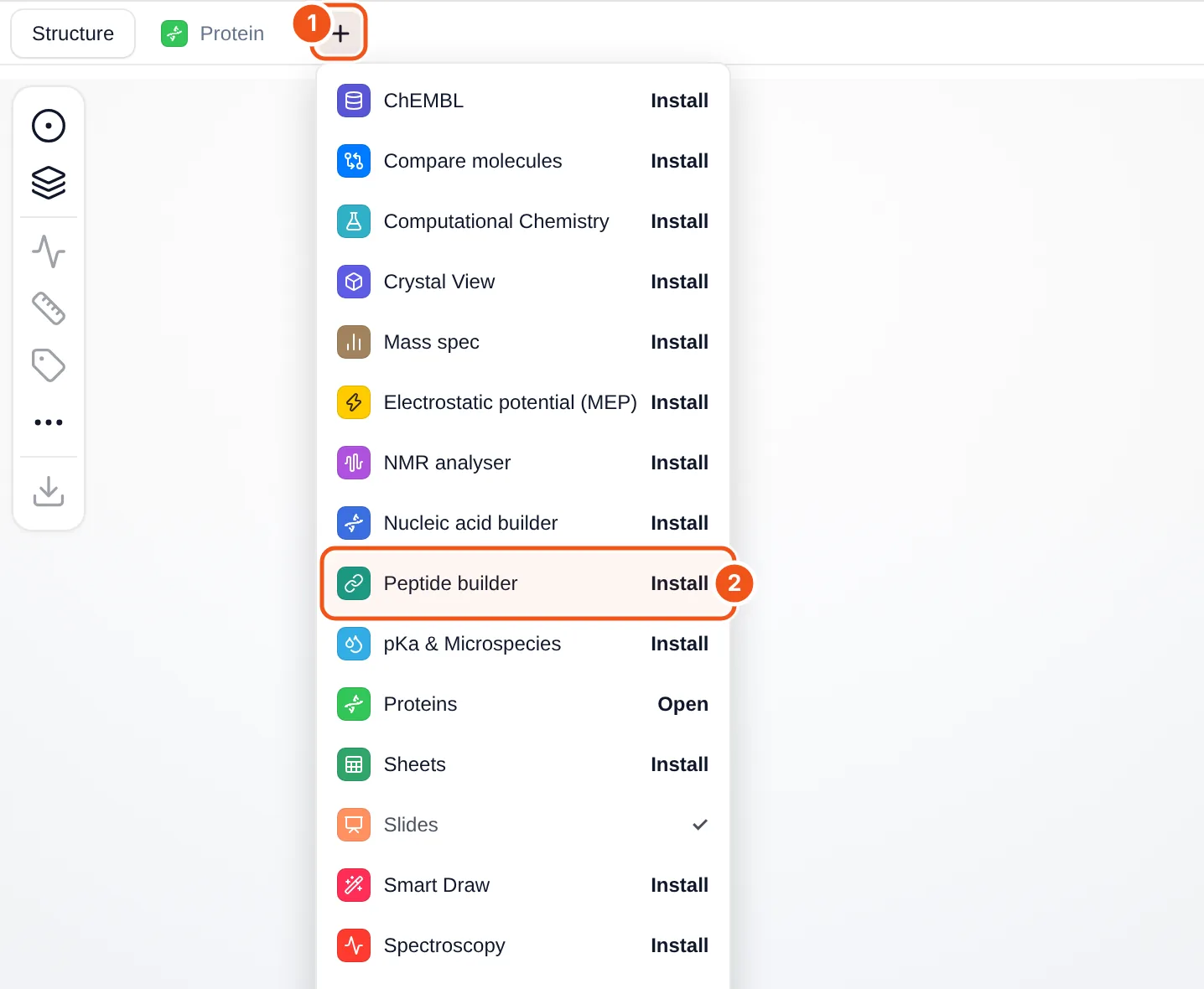
- The + button at the end of the tab row (Structure, Protein, …) opens the add-on menu.
- Peptide builder: click Install and a Peptide tab appears.
- Open the MolDraw editor and sign in. A free account is enough to use add-ons.
- Open the 3D viewer on the right (the 3D button at the bottom of the atom bar) and press + next to the tabs.
- Click Install next to Peptide builder (callout 2). The Peptide tab opens, and the button changes to Open.
Add-ons stay installed on your account. To remove one, hover its tab and click the small ×. You can also manage them under Settings › Plugins.
Step 2: Get to know the Peptide panel
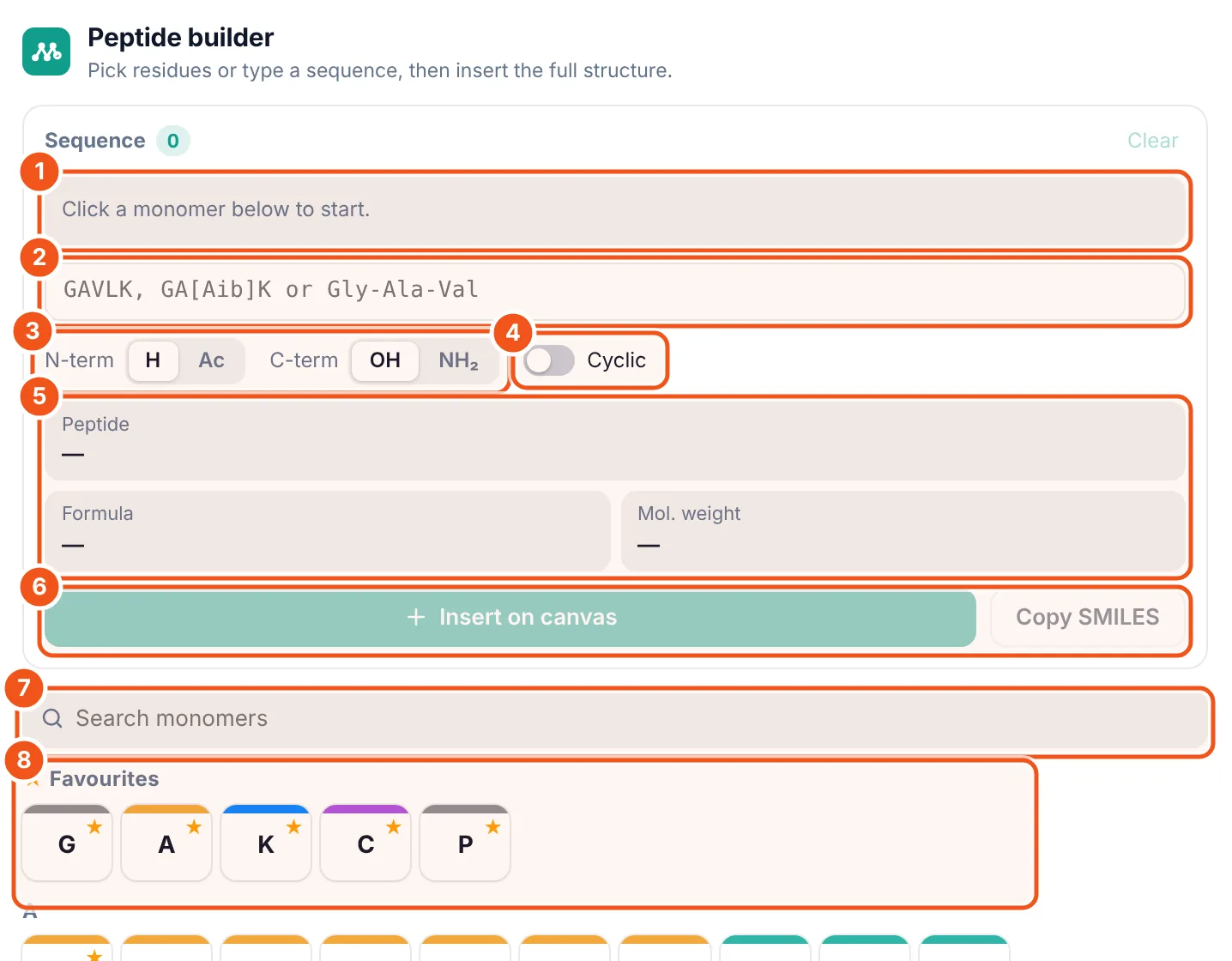
- Sequence chips. Each residue you add appears here as a coloured chip, N-terminus on the left. Drag a chip to move it, click its × to remove it.
- Sequence text box. Type or paste a sequence instead of clicking tiles. The chips update as you type.
- Termini. N-term: free amine (H) or acetyl (Ac). C-term: free acid (OH) or amide (NH₂).
- Cyclic. Joins the last carbonyl to the first nitrogen (a head-to-tail lactam). The termini switches are then greyed out.
- Read-outs. Three-letter name, molecular formula and molecular weight, updated live.
- Insert on canvas draws the full structure; Copy SMILES copies the isomeric SMILES for other software.
- Search monomers filters the library by code or name.
- Favourites and library. Click a tile to append that residue. The star on a tile adds or removes it from Favourites.
Step 3: Type a sequence
As an example we build Leu-enkephalin with an acetyl cap and a C-terminal amide: Ac-YGGFL-NH2.
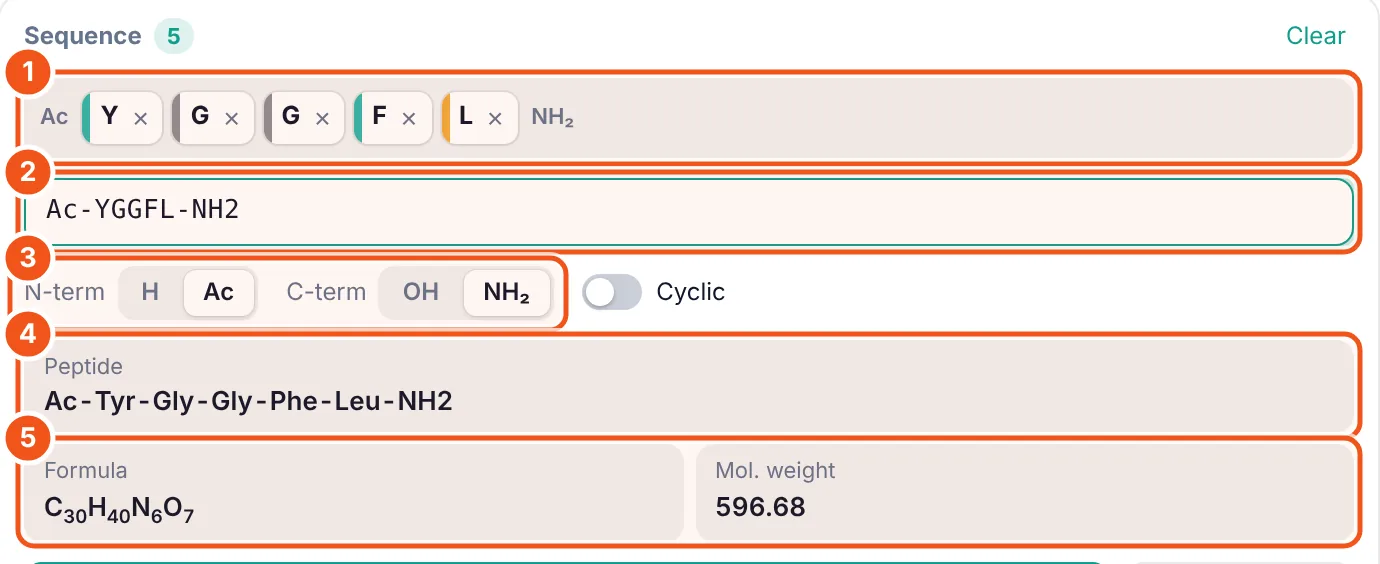
Ac-YGGFL-NH2 fills in the chips, sets both termini and shows the formula and mass.- The chips: Tyr, Gly, Gly, Phe, Leu, with Ac and NH₂ shown at the ends.
- The text you typed. One-letter codes, dash form and caps are all accepted (see the table below).
- Because the text starts with
Ac-and ends with-NH2, the termini switches moved to Ac and NH₂ by themselves. - The name in three-letter form: Ac-Tyr-Gly-Gly-Phe-Leu-NH2.
- Formula C₃₀H₄₀N₆O₇ and molecular weight 596.68 g/mol. Use these to check a mass spectrum or a weighing.
| One-letter codes | GAVLK. Spaces are ignored. |
|---|---|
| Non-standard residues | In brackets: GA[Aib]K, [Hyp], [Nle]. |
| D-amino acids | Lower case inside a mixed-case sequence (RGDfV: f = D-Phe), or dA, D-Ala, dLeu. |
| N-methyl residues | [meA], NMe-Ala or MeAla. |
| Dash form | Gly-Ala-Val, H-Gly-dAla-NH2, Ac-Ala-Aib-OH. Codes and three-letter names can be mixed. |
| Cyclic | Wrap either form in cyclo( ): cyclo(RGDfV). |
Tip: pressing Enter in the text box inserts the peptide straight away.
Step 4: Insert the full structure on the canvas
Click Insert on canvas. MolDraw draws every atom along a zigzag backbone and puts a wedge or hashed bond at each stereocentre, so the drawing is ready for a figure or a reaction scheme.
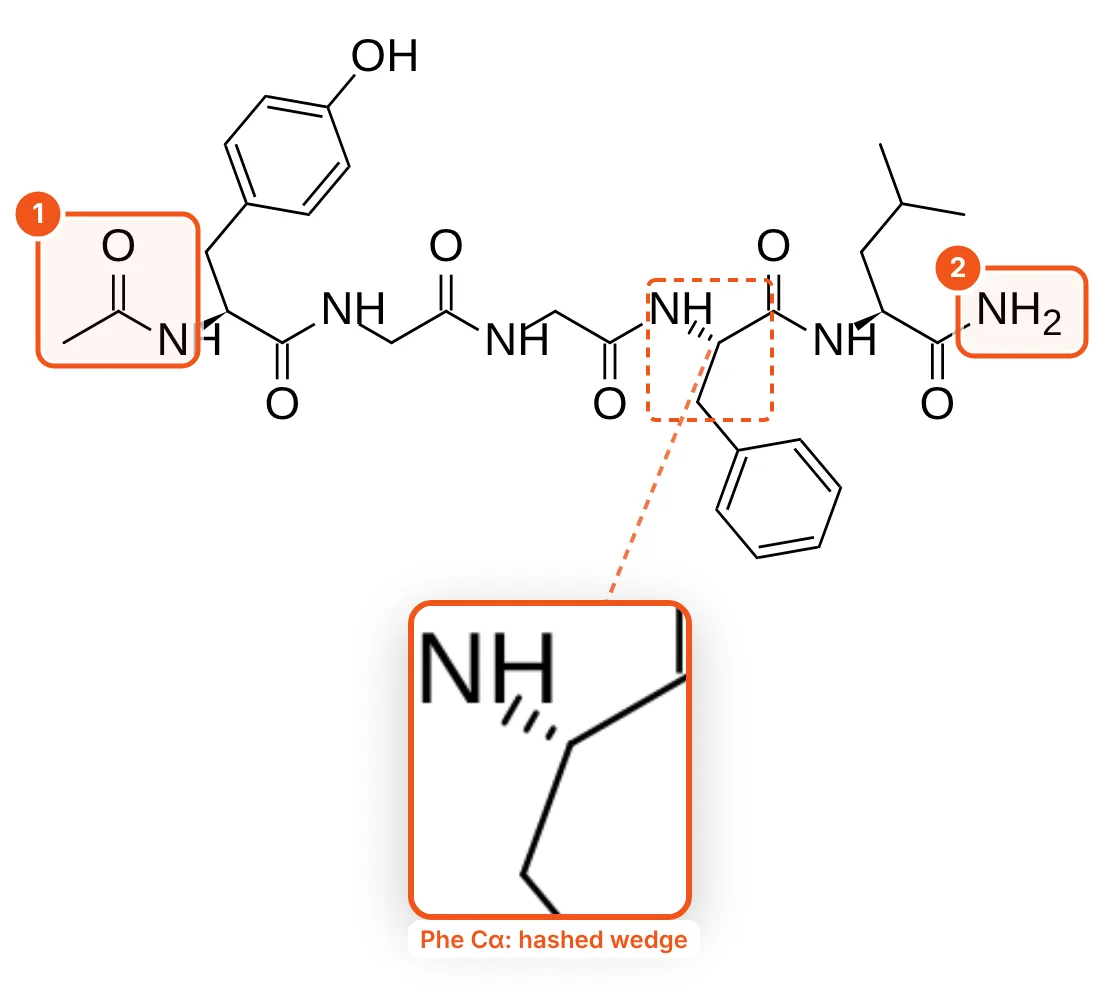
- The acetyl cap (Ac) on the N-terminal nitrogen.
- The C-terminal amide (NH₂) instead of a free acid.
The result is a normal MolDraw structure: you can select it, recolour it, add arrows, clean it up or export it as PNG, SVG, MOL or SMILES. It also appears in the 3D viewer, so you can look at the peptide in three dimensions right away.
Step 5: Make a cyclic peptide
Type cyclo(RGDfV), the integrin-binding cyclic RGD peptide (cilengitide without the N-methyl group). The lower-case f is D-phenylalanine.
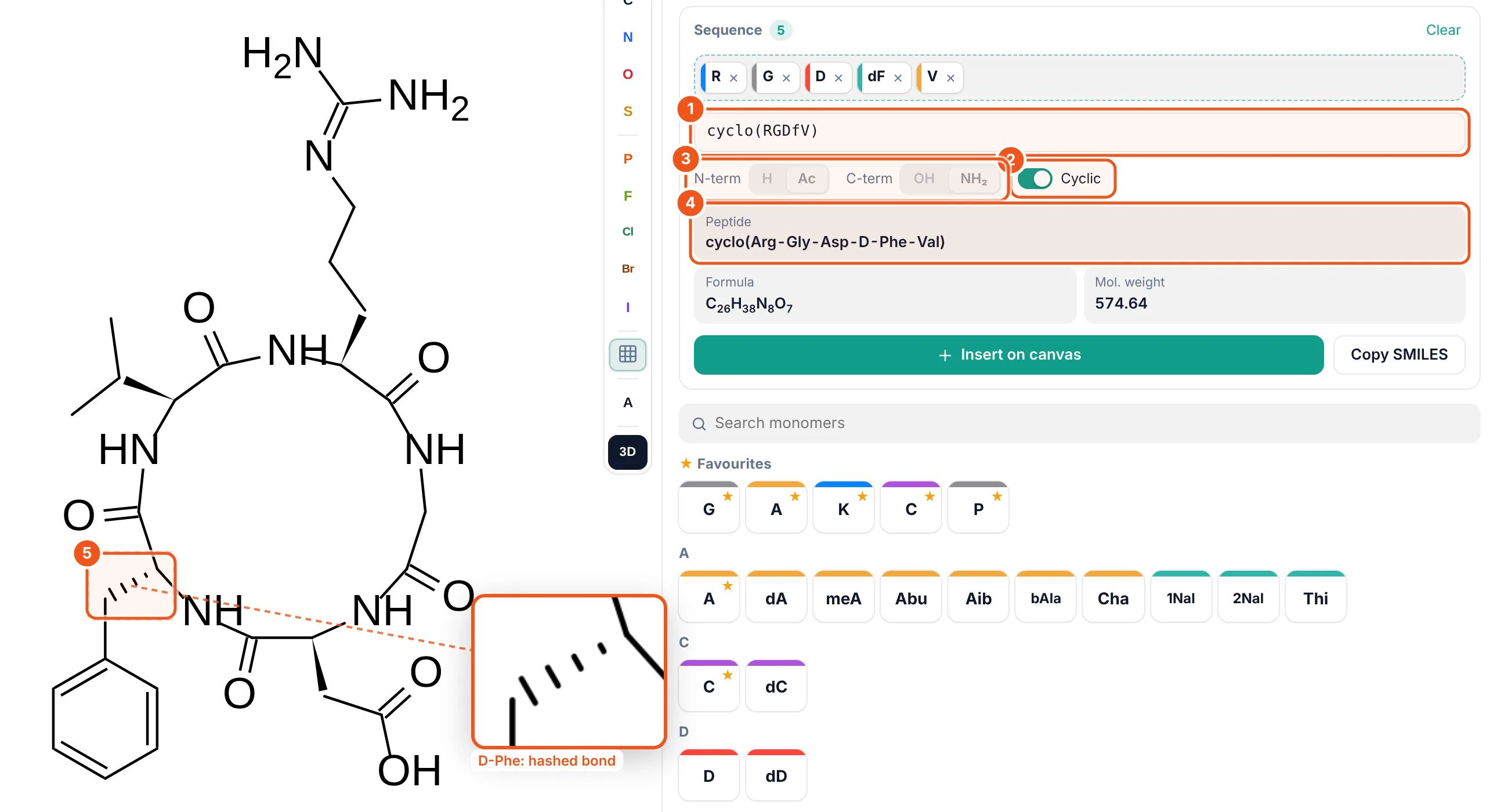
- The text
cyclo(RGDfV). - Cyclic switched itself on because of
cyclo( ). - N-term and C-term are greyed out: the ring has no free ends.
- The name reads cyclo(Arg-Gly-Asp-D-Phe-Val), so you can check the D-residue.
- The D-Phe stereocentre. Compare its hashed bond with the wedges of the L-residues around the ring.
Step 6: Build from tiles and use non-standard residues
Instead of typing, click tiles. Here Clear was used, then G and Aib were clicked, and the library was searched for “methyl”.
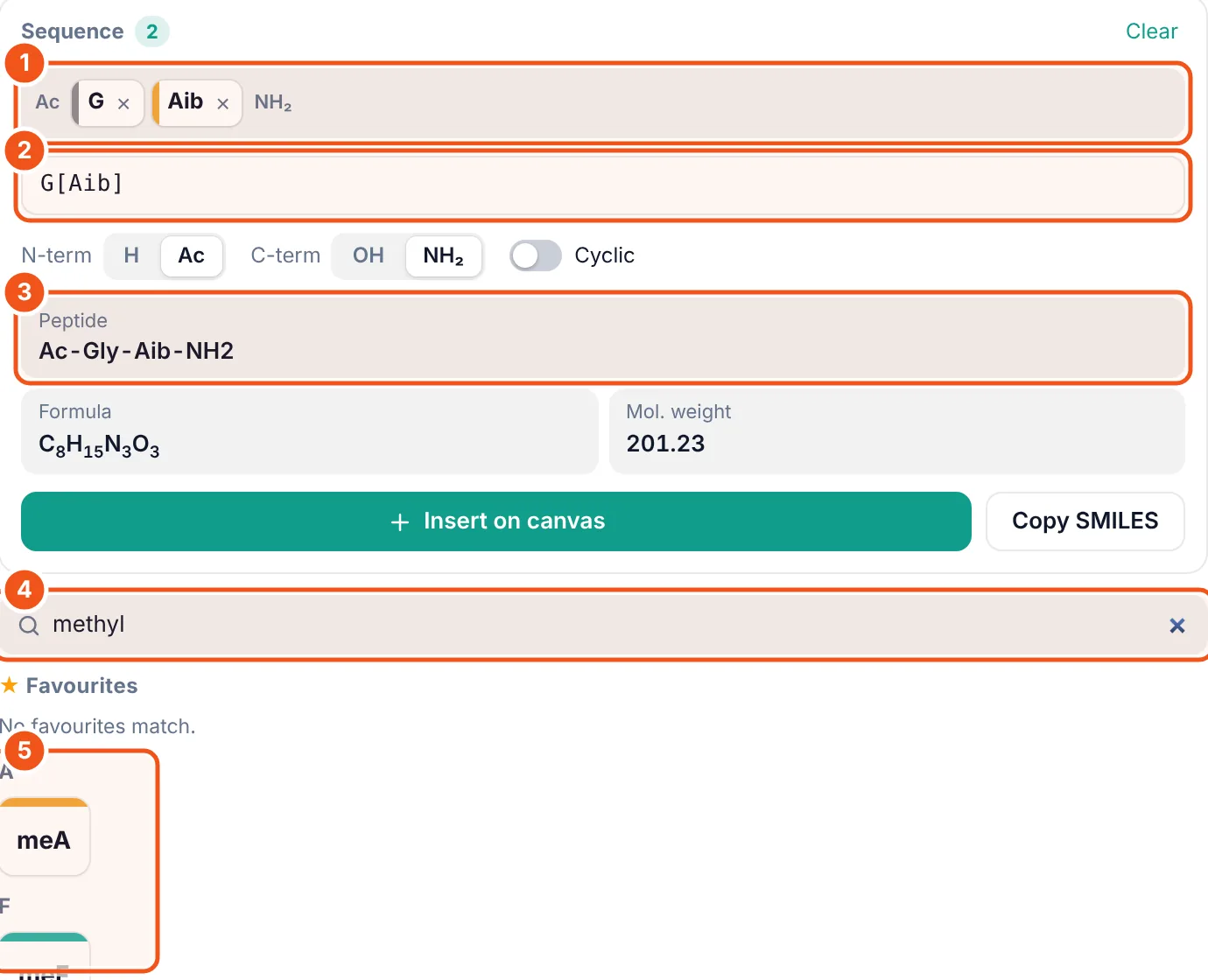
- The chips G and Aib (2-aminoisobutyric acid).
- The text box now reads
G[Aib]: non-standard residues are written in brackets. - The termini you set last time (Ac, NH₂) are kept, so the name is Ac-Gly-Aib-NH2.
- Search for
methylkeeps only matching monomers. - The matches: N-methyl alanine (meA), N-methyl phenylalanine (meF), sarcosine (Sar) and more below.
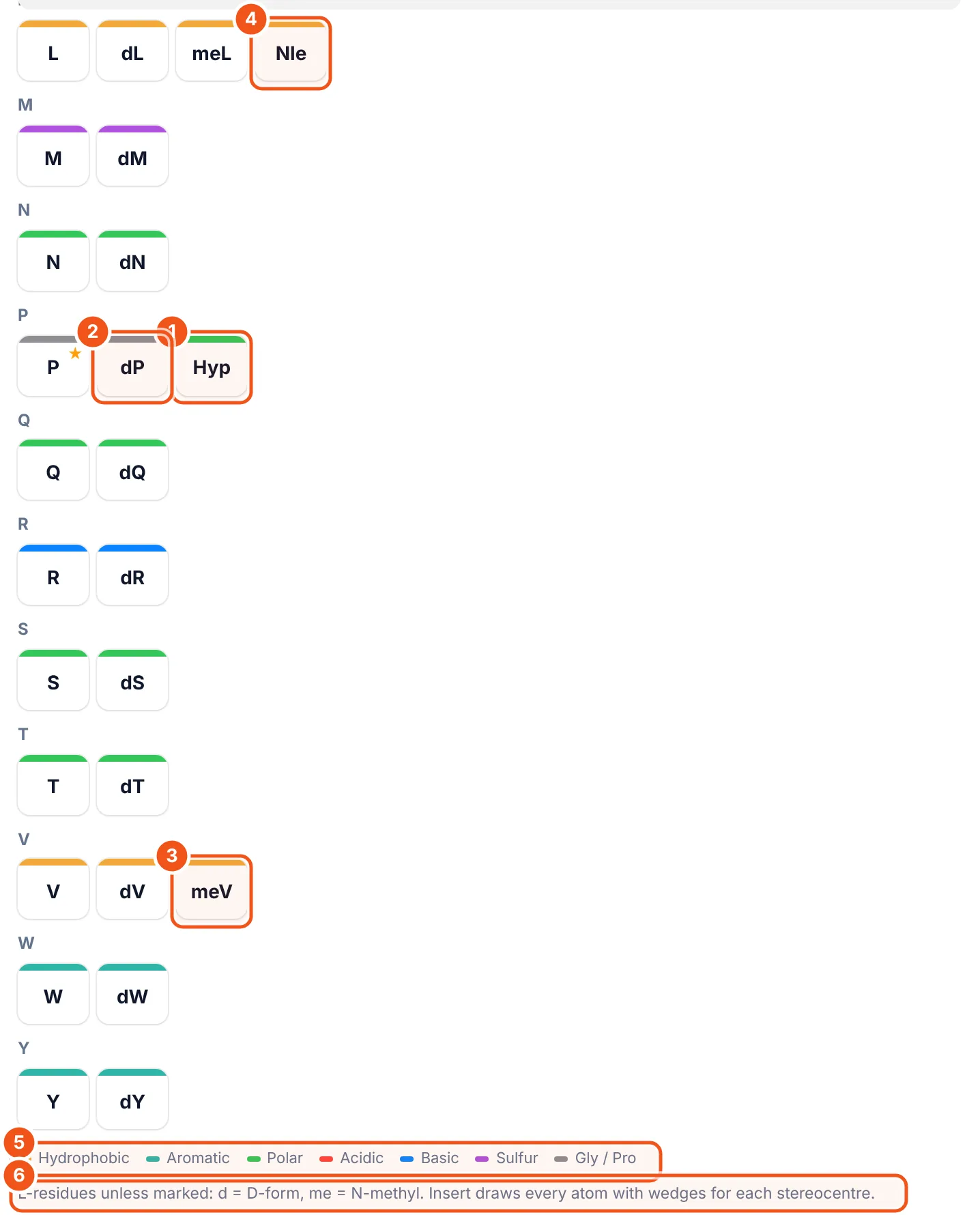
- Hydroxyproline (Hyp), next to proline.
- D-proline (dP). Every standard residue has its D-form next to it.
- N-methyl valine (meV).
- Norleucine (Nle), in the leucine group.
- The colour key: hydrophobic, aromatic, polar, acidic, basic, sulfur, Gly/Pro.
- The rule for codes: d = D-form, me = N-methyl. Everything else is the L-residue.
The library has 55 monomers: the 20 standard amino acids, their D-forms, N-methyl residues and common building blocks such as Aib, Abu, Nle, Orn, Sar, Hyp, Cha, Nal and Thi. Each was checked against reference structures.
Ways to use it
- Teaching: draw a dipeptide and point out the peptide bond, or show why proline breaks a helix.
- Lab notebooks: paste the exact sequence you ordered and keep formula and mass with the drawing.
- Figures: insert a capped or cyclic peptide with correct stereochemistry, then label it on the canvas.
- Other software: Copy SMILES and paste it into docking, property or database tools.
Without signing in, the free sequence to structure tool gives SMILES, formula and mass.
Questions and answers
How do I draw a peptide from its sequence?
Install the Peptide builder add-on in MolDraw, open the Peptide tab, type the sequence (one-letter codes such as GAVLK, or Gly-Ala-Val) and click Insert on canvas. Every atom is drawn with stereo wedges.
How do I enter a D-amino acid?
Use lower case inside a mixed-case sequence, for example RGDfV where f is D-Phe, or write dA, D-Ala or dLeu. In the library, D-forms are the tiles starting with d.
Can the Peptide builder make cyclic peptides?
Yes. Wrap the sequence in cyclo( ), for example cyclo(RGDfV), or switch on Cyclic. The last carbonyl is joined to the first nitrogen.
Which termini can I choose?
A free amine (H) or an acetyl cap (Ac) at the N-terminus, and a free acid (OH) or an amide (NH2) at the C-terminus.
Is the Peptide builder free?
Yes. You only need a free MolDraw account to install add-ons.