Free Peptide Builder: Draw Peptide Structures Online
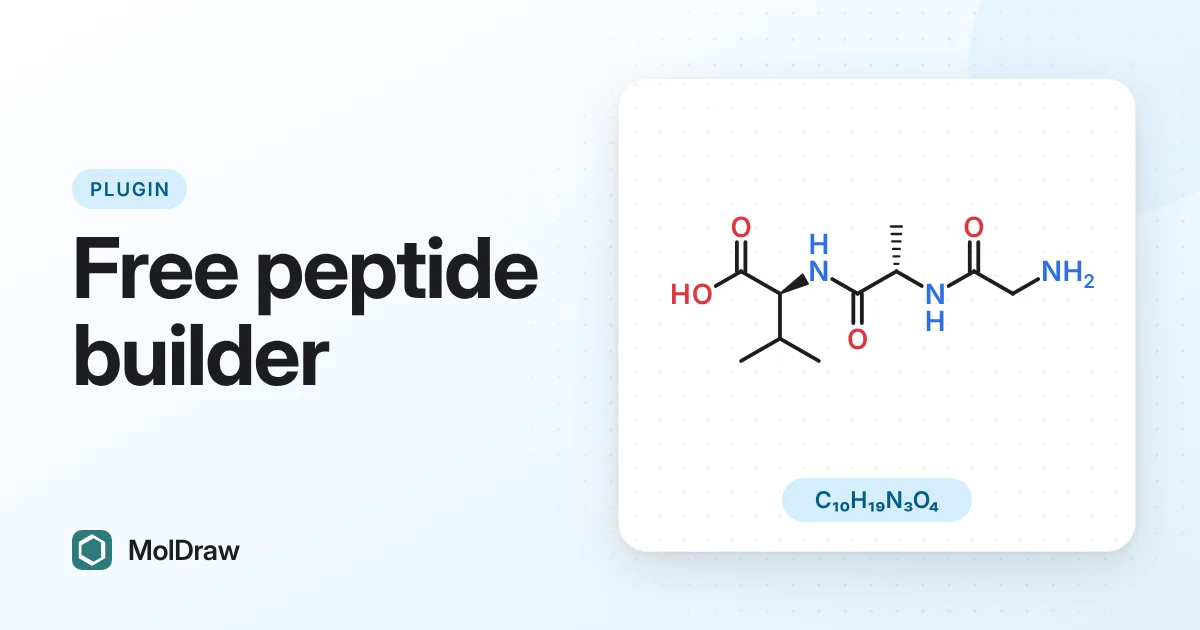
Short answer: In MolDraw, add the free Peptide builder plugin, type a sequence such as GAVLK or Gly-Ala-Val, and click Insert on canvas. You get the full-atom 2D structure with correct L/D stereochemistry, plus the formula, molecular weight and SMILES.
Peptides are everywhere in modern chemistry and medicine: GLP-1 drugs such as semaglutide, antimicrobial peptides, cyclic RGD peptides for imaging, and the peptide sequences every biochemistry student meets in their first year. Drawing them atom by atom is slow and easy to get wrong. A ten-residue peptide has more than a hundred heavy atoms and ten stereocentres. A peptide builder turns the sequence you already know into a correct structure in a few seconds.
How to draw a peptide from its sequence
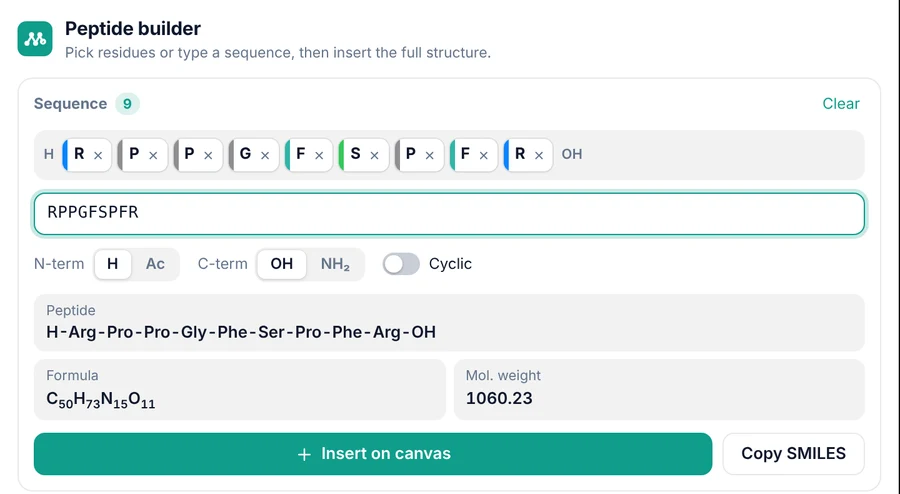
- Add the plugin. Open the MolDraw editor, click the + next to the Structure tab on the right and choose Peptide builder. A Peptide tab appears. Plugins need a free account.
- Enter the sequence. Type it in the sequence box, or click amino-acid tiles to add residues one at a time. Each residue appears as a chip you can remove or drag to reorder.
- Choose the ends. N-terminus: H (free amine) or Ac (acetyl). C-terminus: OH (free acid) or NH₂ (amide). Or switch on Cyclic for a head-to-tail ring.
- Insert. Check the three-letter name, formula and molecular weight, then click Insert on canvas.
Sequence formats it understands
| You type | What it means |
|---|---|
GAVLK | One-letter codes, N- to C-terminus |
Gly-Ala-Val | Three-letter codes with dashes |
H-Gly-D-Ala-NH2 | Explicit ends and a D-amino acid |
Ac-GAVK-NH2 | Acetyl N-terminus and amide C-terminus |
GAfK or GA[dF]K | Lowercase letter or d prefix for a D-amino acid |
GA[Aib]K | Non-standard residue in square brackets |
cyclo(RGDfV) | Head-to-tail cyclic peptide |
What you get on the canvas
The builder draws every atom. The backbone is laid out as a clean zigzag, side chains point away from it, and each stereocentre gets a wedge or hash. L-amino acids come out with the S configuration (L-cysteine is R, because of the sulfur), and D-amino acids are drawn as true mirror images. Proline and hydroxyproline rings are fused onto the backbone nitrogen, as in a textbook drawing.
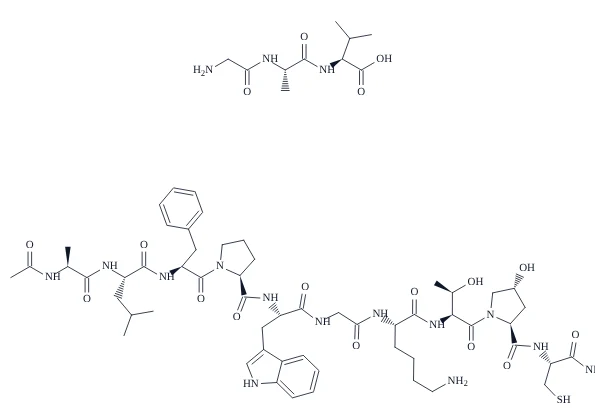
Because the result is an ordinary MolDraw drawing, you can edit it like any structure. Colour a residue, highlight the peptide bonds, add curved arrows for a mechanism, view it in 3D, or export it as PNG, SVG, PDF, MOL or CDXML for papers and slides.
Cyclic peptides
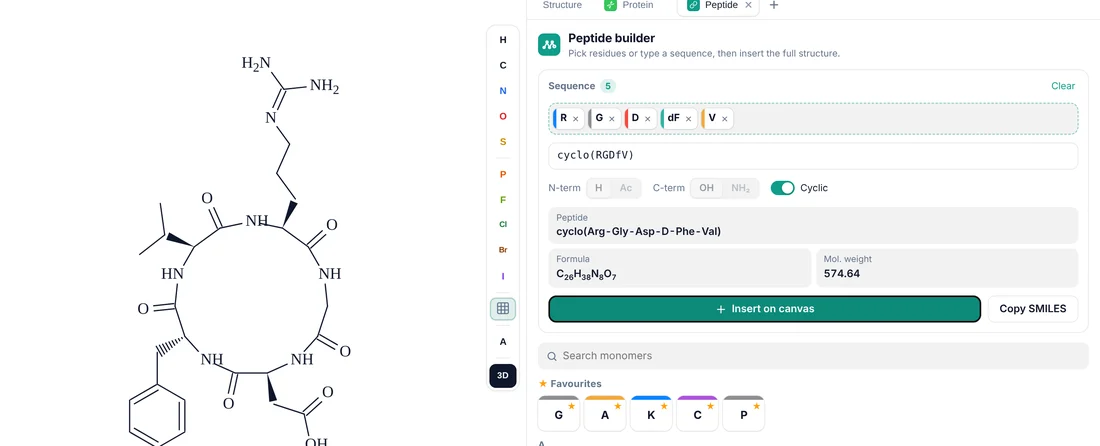
Switch on Cyclic, or type cyclo(...), and the builder closes the ring with an amide bond between the last and first residues. The end-group options switch off because a head-to-tail ring has no free ends. The example below is cyclo(RGDfV), the cyclic RGD peptide that cilengitide is based on, with D-phenylalanine written as a lowercase f.
Molecular weight and formula of a peptide
The panel shows the molecular formula and average molecular weight as you type. It updates when you add a residue, change an end group or make the peptide cyclic. It accounts for the water lost at each peptide bond, so you don't have to subtract 18.02 per bond yourself. For example:
- Gly-Ala-Val: C₁₀H₁₉N₃O₄, 245.28 g/mol
- Bradykinin (RPPGFSPFR): C₅₀H₇₃N₁₅O₁₁, 1060.23 g/mol
- cyclo(RGDfV): C₂₆H₃₈N₈O₇, 574.64 g/mol
Need the exact mass, isotope pattern or adduct m/z for LC-MS? Draw the peptide, then open the Mass spec plugin from the same + menu. Need a SMILES for docking or a database search? Click Copy SMILES in the peptide panel.
Amino acids included
There are 55 monomers, each checked against reference structures for formula and stereochemistry:
- 20 standard L-amino acids, shown by one-letter code with the three-letter code and full name on hover.
- D-amino acids for all chiral residues (dA, dF, dL …).
- N-methyl amino acids: meA, meF, meI, meL, meV, common in permeable and protease-resistant peptides.
- Non-standard residues: Aib, Abu, Nle, Orn, Sar, Hyp, Cha, β-alanine (bAla), 1-Nal, 2-Nal and Thi.
Tiles are grouped by the amino acid they relate to and coloured by side-chain type: hydrophobic, aromatic, polar, acidic, basic, sulfur-containing, and glycine/proline. Star the ones you use most to keep them in the favourites row.
Who it's for
- Students and teachers drawing di- and tripeptides, peptide bonds and protein primary structure for biochemistry classes and exams.
- Peptide and medicinal chemists who need a correct structure of a lead sequence, analogue series or cyclic peptide for a slide, report or patent figure.
- Anyone writing a paper or poster who wants a publication-quality peptide drawing without drawing it atom by atom.
Related guides: peptide and DNA sequence to structure (peptide bonds, pI, charge and the maths behind the formula), MolDraw as a free ChemDraw alternative and how to cite MolDraw in your work.
Questions
- How do I draw a peptide structure from a sequence?
- In MolDraw, install the free Peptide builder plugin, type the one-letter or three-letter sequence (for example GAVLK or Gly-Ala-Val) and click Insert on canvas. The full skeletal structure is drawn with the correct L or D stereochemistry.
- Can it draw cyclic peptides?
- Yes. Switch on Cyclic, or type cyclo(RGDfV). The builder joins the C-terminus to the N-terminus with an amide bond and draws the ring.
- Does it give the molecular weight of the peptide?
- Yes. The panel shows the molecular formula and average molecular weight as you build, and updates when you change the ends or make the peptide cyclic.
- Which amino acids are included?
- 55 monomers: the 20 standard L-amino acids, their D-forms, five N-methyl residues and non-standard residues such as Aib, Abu, Nle, Orn, Sar, Hyp, Cha, 1-Nal, 2-Nal and Thi.
- How do I write a D-amino acid in the sequence?
- Use a lowercase one-letter code (f for D-Phe), the d prefix (dA, dLeu) or D- in three-letter form (H-Gly-D-Ala-NH2). Non-standard residues go in square brackets: GA[Aib]K.
- Can I get the SMILES of the peptide?
- Yes. Click Copy SMILES in the panel, or draw it and use Copy SMILES in the top bar. You can paste it into other cheminformatics tools.
- Is the peptide builder free?
- Yes. The Peptide builder is a free MolDraw plugin. You need a free account to install plugins.