chemfig and MolDraw: Paste chemfig, Edit It Visually, Export LaTeX
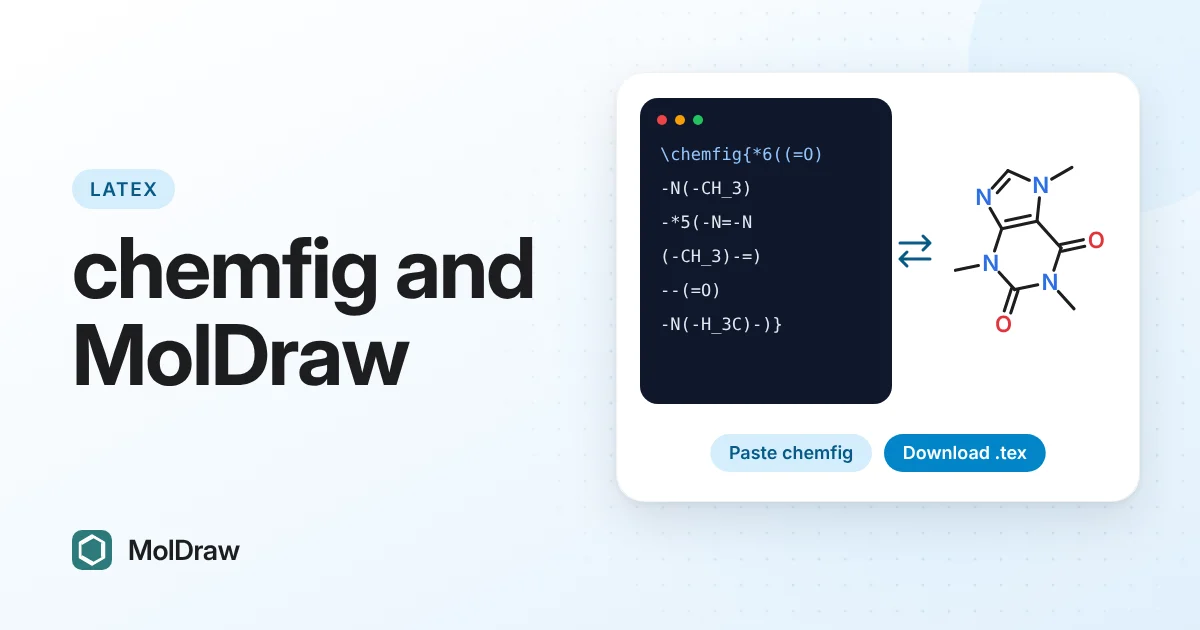
Short answer: Copy your \chemfig{…} code (or a whole \schemestart … \schemestop scheme, or the full .tex file), open the MolDraw editor and press Ctrl+V. MolDraw draws it, curly arrows included. Edit it with the mouse, then choose Download → chemfig (.tex) for a file that compiles with pdflatex, or Copy as chemfig (LaTeX) for code to paste into your thesis or paper.
Who this is for
chemfig is the standard way to draw molecules inside LaTeX. The output is beautiful and it lives in the same file as your text, but writing it is slow. You type -[:30] and =[::-60], compile, look, and adjust an angle. Fixing someone else's chemfig is harder still, and a curly arrow in \chemmove can take many attempts.
MolDraw now reads and writes chemfig. You keep chemfig as your format and use a canvas for the drawing:
- See what a chemfig snippet draws without compiling.
- Fix it with the mouse: move an atom, flip a double bond, add a charge or a curly arrow.
- Get chemfig back that compiles with pdflatex, with the same angles you see on screen.
- Start from other formats (SMILES, MOL, ChemDraw files, a compound name) and get chemfig out.
Everything runs in your browser. Your code is not sent to a server to be converted.
Paste chemfig onto the canvas
- Copy the code from your editor or Overleaf. A single
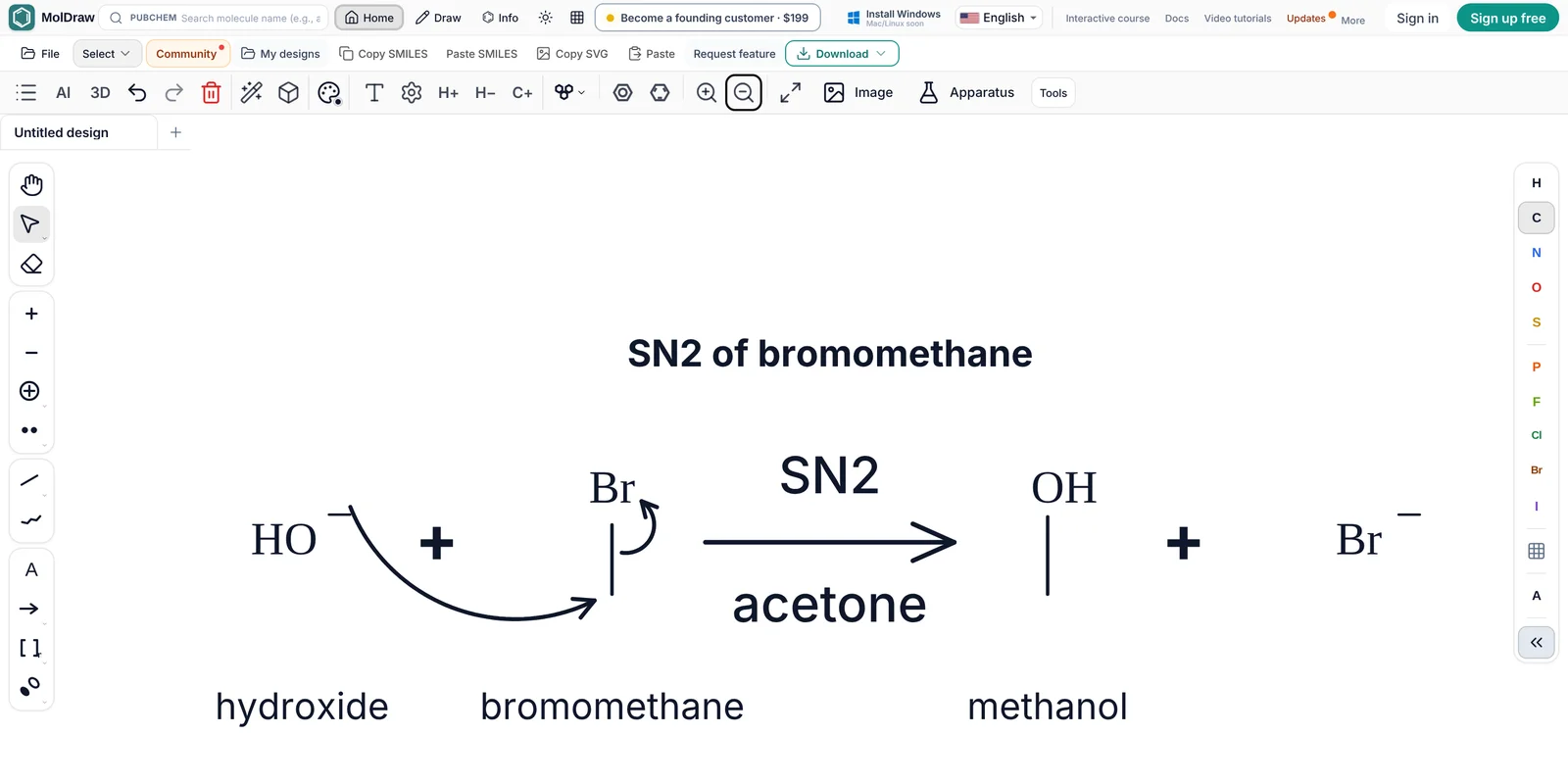
\chemfig{…}, several of them, a\schemestart … \schemestopblock or a complete document all work. - Open the MolDraw editor, click an empty part of the canvas and press Ctrl+V (Cmd+V on a Mac). You can also use the Paste button or right-click → Paste.
- The drawing appears selected, beside anything already on the canvas. Drag it where you want it.
Try it with this scheme:
\schemestart
  \chemname{\chemfig{*6(=-=-=-)}}{benzene}
  \+
  \chemfig{Br-Br}
  \arrow{->[FeBr$_3$][CH$_2$Cl$_2$]}
  \chemname{\chemfig{*6(=-=(-Br)-=-)}}{bromobenzene}
\schemestop
MolDraw keeps the bond angles and lengths you wrote, so the drawing has the same shape as your PDF. Labels such as H_3C, NH_2 or {CO_2Me}, charges, lone pairs from \lewis or \charge, and @{name} nodes all carry over.
Edit it like any drawing
The pasted drawing is a normal MolDraw structure, so every tool works on it:
- drag atoms, or select a group and rotate it;
- hover a bond and press 1, 2 or 3 to make it single, double or triple, and click a double bond with the double-bond tool to move its second line to the other side;
- add charges, lone pairs and radicals from the toolbar or the right-click menu;
- draw curly arrows and fish-hooks with the arrow tool. They attach to lone pairs, bonds and charges and stay attached when you move atoms;
- edit the text above and below a reaction arrow by double-clicking it.
You also get the chemistry checks that chemfig cannot give you: valence warnings, the formula and mass, SMILES, and a 3D view of each structure.
Export chemfig back to LaTeX
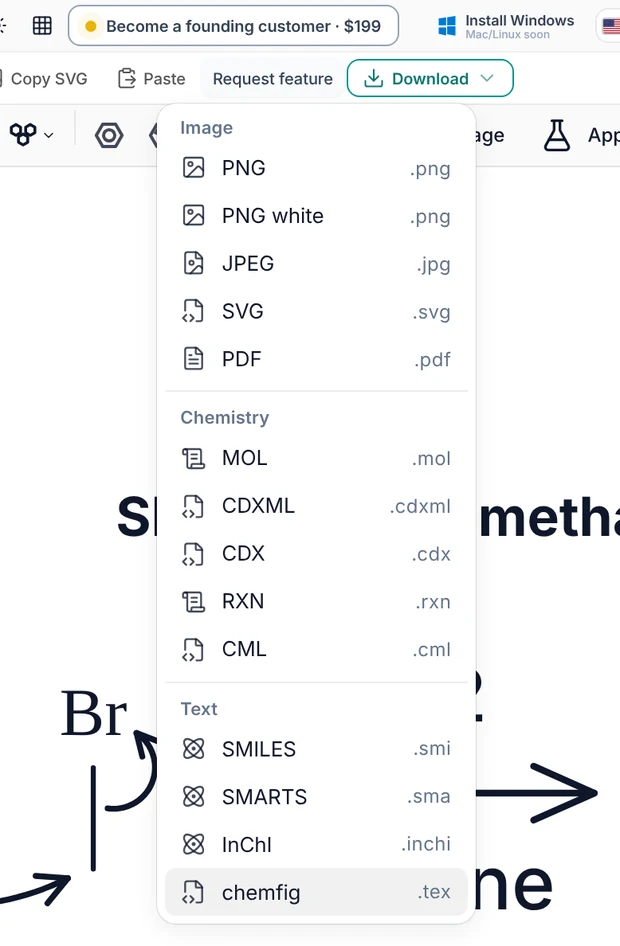
There are two ways out:
- Download → chemfig (.tex) saves a complete, standalone LaTeX file. Compile it on its own to get a PDF of the drawing, or include that PDF in your document with
\includegraphics. - Copy as chemfig (LaTeX) (in the Copy menu and in the right-click Copy as menu) copies only the drawing code, with no
\documentclass. Paste it straight into your thesis or paper.
For copied code, add these two lines to your preamble once:
\usepackage{chemfig}
\usetikzlibrary{arrows.meta,decorations.pathmorphing}
If a drawing has curly arrows or polymer brackets, compile twice. chemfig draws those from positions it saves in the first run. If you select part of the canvas first, only the selection is exported.
What the exported code looks like
This is the file MolDraw writes for the SN2 scheme in the first screenshot:
% Exported from MolDraw — compile with pdflatex / lualatex (twice: arrows and brackets use positions from the first run)
\documentclass[border=22pt,varwidth=60cm]{standalone}
\usepackage{chemfig}
\usetikzlibrary{arrows.meta,decorations.pathmorphing}
\begin{document}
\setchemfig{+ sep left=2em, + sep right=2em, arrow offset=6pt}
{\centering \textbf{SN2 of bromomethane}\par}
\par\bigskip
\schemestart
  \chemname[2em]{\chemfig{@{a1}HO^{-}}}{hydroxide}
  \+
  \chemname[2em]{\chemfig{@{a2}-[@{b1}:90]@{a3}Br}}{bromomethane}
  \arrow{->[SN2][acetone]}
  \chemname[2em]{\chemfig{-[:90,,,1]OH}}{methanol}
  \+
  \chemfig{Br^{-}}
\schemestop
\chemmove{
  \draw[-{Stealth[length=4pt,inset=1.5pt]}]([shift={(1.07em,0.77em)}]a1) to[bend right=47] ([shift={(-0.39em,-0.23em)}]a2);
  \draw[-{Stealth[length=4pt,inset=1.5pt]}]([shift={(0.21em,-0.36em)}]b1) to[bend right=77] ([shift={(0.64em,-0.23em)}]a3);
}
\end{document}
A few things to notice:
- Bonds use absolute angles (
-[:90]), so each bond points the same way as on the canvas. A bond that is not the standard length gets a length factor such as-[:30,1.2]. - Atoms and bonds that a curly arrow touches get node names (
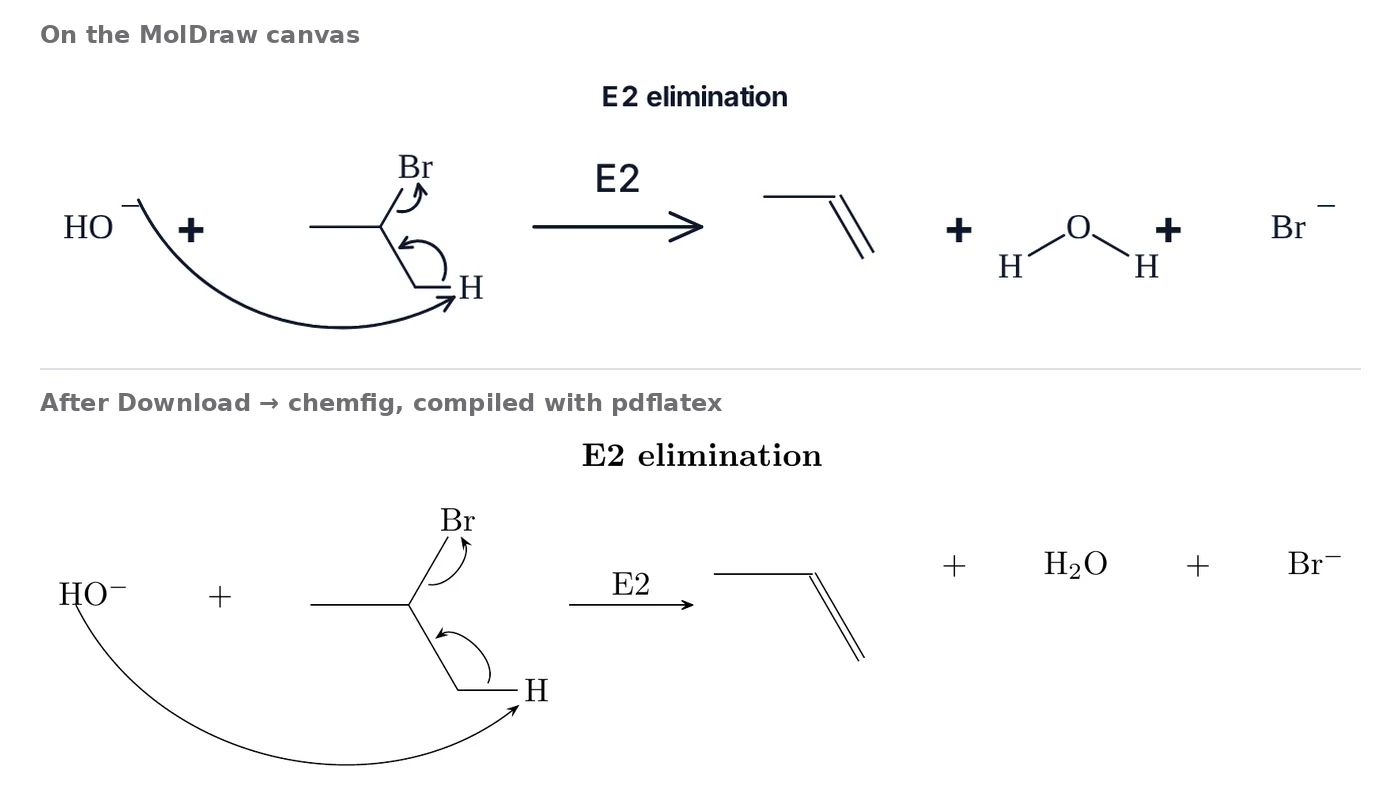
@{a1},@{b1}).\chemmovedraws each arrow between them, with abendangle that matches the curve on the canvas. - Compound names sit under the structures, with room left for curly arrows that bow underneath.
- Ring bonds are closed with hooks (
?[a]), and each double bond gets=^or=_so its second line is on the same side as in MolDraw, inside the ring for rings.
Get chemfig from SMILES, MOL or ChemDraw files
Because MolDraw reads many formats, it also works as a converter to chemfig:
- Bring the structure in: paste SMILES or InChI, search a compound name in the PubChem box, or open a MOL, SDF, RXN, CDXML or CDX (ChemDraw) file.
- Tidy it if needed. Clean-up and rotation are in the toolbar.
- Choose Download → chemfig (.tex).
This is the quickest way to move a set of ChemDraw figures into a LaTeX thesis: open each file and download it as chemfig.
Reaction mechanisms and curly arrows
Curly arrows are the hardest part of chemfig to write by hand. In MolDraw you draw them with the mouse, or ask the AI assistant to draw a mechanism, and the export writes the @{…} names and the \chemmove block for you.
When you paste chemfig that already has \chemmove arrows, MolDraw reads which atoms or bonds each arrow joins. It then places the arrow by its own drawing rules: the tail starts on the lone pair, charge or bond, and the head stops just short of its target. You do not have to copy the exact TikZ curve.
For complete worked examples, see the chemfig mechanism samples: radical chain reactions with fish-hooks and multi-step polar mechanisms, each as a .tex file you can download.
Ask the AI assistant
The chat assistant in the editor knows chemfig. For example, you can ask:
- “Export this as chemfig.” It returns the code for what is on the canvas.
- “Draw this:
\chemfig{H_3C-C(=[:60]O)-[:-60]OH}.” It puts the structure on the canvas. - “Draw the mechanism of acid-catalysed ester hydrolysis, then give me the chemfig.”
What carries over in both directions
Each item below is exported, compiled with pdflatex, read back into MolDraw and checked against the original drawing.
| Bonds | Single -, double =, triple ~; aromatic rings in Kekulé form; the side of a double bond's second line (=^ / =_); wedge and hash bonds with their direction (< > <: >:). |
|---|---|
| Bond styles | Wavy, bold, dotted and dative bonds, and bond colours, written as TikZ options on the bond. |
| Atoms | Labels with implicit H, condensed groups (CO2Me, Ph), charges, circled charges (\oplus), isotopes, D and T, lone pairs and radical dots (\charge, \lewis), atom colours. |
| Rings | Any ring and fused rings; on import also *6(…), **6(…) and nested rings. |
| Schemes | ->, <-, equilibrium <=>, half equilibrium <->>, resonance <->, retrosynthesis arrows; conditions above and below on several lines; \+; \chemname; schemes wrapped onto several rows. |
| Text | A title above the scheme and notes below it. |
| Brackets | Transition-state brackets with ‡ (\chemleft[ … \chemright]) and polymer repeat units (\polymerdelim). |
| Curly arrows | Two-electron arrows and one-electron fish-hooks between named atoms and bonds (\chemmove). |
When you paste, MolDraw also understands \definesubmol with !{name}, a starting angle such as \chemfig{[:30]…}, invisible bonds (draw=none), arrows at an angle such as \arrow{->}[-90] (the next compound goes below), \subscheme, and colour names such as red and blue.
What chemfig cannot hold
Some things on a MolDraw canvas have no chemfig form: pasted images, shapes and lab glassware, freehand strokes, orbitals, ring fills and highlights. They are left out of the export, and the hint bar tells you what was left out after each download or copy, so nothing disappears without notice.
Curved or S-shaped scheme arrows become straight chemfig arrows. Text placed beside the drawing (not above or below it) is kept as a % comment in the file.
chemfig quick reference
The pieces of chemfig syntax you will meet most often, and what MolDraw draws for each:
A-B=C~D | Single, double and triple bonds. With no angle, bonds go to the right. |
|---|---|
-[2], -[:30], -[::60] | Angle in steps of 45°, an absolute angle, or an angle relative to the previous bond. |
-[:30,1.5] | Angle and length factor (1.5 times the normal bond length). |
< <: > >: | Wedge and hash bonds. < is narrow at the atom you start from. |
C(-[2]H)(-[6]H) | Branches in parentheses. |
*6(=-=-=-) | A six-membered ring, here benzene. **6(------) draws a circle inside; MolDraw reads it as a benzene ring with alternating double bonds. |
?[a] … ?[a] | A hook: bonds the two atoms that carry the same letter (closes a ring). |
=^, =_ | Double bond with the second line on the left or on the right of the direction of travel. |
\charge{90=\:}{O} | A lone pair at 90° on O. \. is a single electron. |
@{a1} | Names an atom or bond so \chemmove can draw an arrow to it. |
\arrow{->[above][below]} | A scheme arrow with text above and below. |
Troubleshooting
- Nothing happens when I paste. The text must contain
\chemfigor\schemestart. Click the canvas first, so the paste goes to the drawing and not to a text box. - Curly arrows are in the wrong place in the PDF. Compile a second time.
- “I do not know the key /tikz/Stealth”. Add
\usetikzlibrary{arrows.meta,decorations.pathmorphing}to your preamble. - A structure looks squashed after pasting. If the chemfig puts two atoms on the same spot, MolDraw lays the structure out again and says so in the hint bar. Use the clean-up button to tidy it.
- “B” or “D” turned into boron or deuterium. MolDraw reads atom labels as chemistry. Placeholder letters from the chemfig manual are read as elements where one exists.
Questions and answers
Can I convert chemfig code into a drawing?
Yes. Paste \chemfig{…} code, a \schemestart scheme or a whole .tex file onto the MolDraw canvas. MolDraw reads the bonds, angles, rings, charges, lone pairs, arrows, compound names and \chemmove curly arrows and draws them.
Can MolDraw export chemfig code?
Yes. Download → chemfig (.tex) saves a standalone LaTeX file, and Copy as chemfig (LaTeX) copies only the drawing code for your own document. The code compiles with pdflatex and lualatex.
Which LaTeX packages do I need?
chemfig, plus the TikZ libraries arrows.meta and decorations.pathmorphing: \usepackage{chemfig} and \usetikzlibrary{arrows.meta,decorations.pathmorphing}. The downloaded file already contains these lines.
Why are my curly arrows in the wrong place after compiling?
chemfig's \chemmove draws curly arrows from positions saved in the first LaTeX run. Compile the file a second time and the arrows land on their atoms and bonds.
Can I turn a ChemDraw or MOL file into chemfig?
Yes. Open the MOL, SDF, CDXML or CDX file in MolDraw, or paste SMILES, then choose Download → chemfig (.tex).
What does not convert to chemfig?
Images, shapes and glassware, freehand strokes, orbitals, ring fills and highlights have no chemfig form. MolDraw lists anything it left out in the hint bar after you download or copy.
Is it free?
Yes. Pasting chemfig and editing it is free in the browser. Downloading files needs a free MolDraw account.