MolDraw › Templates › General & inorganic › Balancing redox half-equations
General & inorganicPremium
Balancing redox half-equations template
Premium template. Preview and edit it free in MolDraw; downloading and exporting it is part of MolDraw Pro.
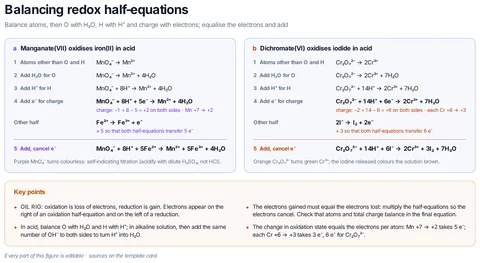
Step-by-step ion–electron (half-equation) method in acidic solution for GCSE, A-level and NCERT Class 11: MnO₄⁻/Fe²⁺ (5 e⁻) and Cr₂O₇²⁻/I⁻ (6 e⁻) worked through each step, with charge checks, oxidation-state changes and colour changes.
What the template shows
- Balance atoms, then O with H₂O, H with H⁺ and charge with electrons; equalise the electrons and add
- Manganate(VII) oxidises iron(II) in acid
- Dichromate(VI) oxidises iodide in acid
- charge: −1 + 8 − 5 = +2 on both sides · Mn +7 → +2
- Other half
- × 5 so that both half-equations transfer 5 e⁻
- Purple MnO₄⁻ turns colourless: self-indicating titration (acidify with dilute H₂SO₄, not HCl).
- charge: −2 + 14 − 6 = +6 on both sides · each Cr +6 → +3
- × 3 so that both half-equations transfer 6 e⁻
- Orange Cr₂O₇²⁻ turns green Cr³⁺; the iodine released colours the solution brown.
- OIL RIG: oxidation is loss of electrons, reduction is gain. Electrons appear on the right of an oxidation half-equation and on the left of a reduction.
- In acid, balance O with H₂O and H with H⁺; in alkaline solution, then add the same number of OH⁻ to both sides to turn H⁺ into H₂O.
- The electrons gained must equal the electrons lost: multiply the half-equations so the electrons cancel. Check that atoms and total charge balance in the final equation.
- The change in oxidation state equals the electrons per atom: Mn +7 → +2 takes 5 e⁻; each Cr +6 → +3 takes 3 e⁻, 6 e⁻ for Cr₂O₇²⁻.
- Every part of this figure is editable · sources on the template card
Drawn with 5 shapes – every one editable in MolDraw.
Sources
How to use this template
- Press Edit in MolDraw. The template opens on the canvas of the free MolDraw editor.
- Change anything: move structures, edit atoms and labels, recolour highlights or delete what you do not need.
- Add your own structures, arrows and text next to it, or combine several templates on one page.
- Export the drawing as PNG, SVG or PDF for slides, worksheets, theses and papers.
Frequently asked questions
Is the Balancing redox half-equations template free?
You can preview the Balancing redox half-equations template here and open and edit it in MolDraw for free. Downloading or exporting it is part of MolDraw Pro, together with the other premium templates.
Can I edit the Balancing redox half-equations template?
Yes. It opens as an ordinary MolDraw drawing, so every structure, arrow, label and colour can be changed, and you can add your own content around it.
Is the chemistry checked?
Every structure is checked with RDKit and every curly arrow passes MolDraw’s electron-flow audit. The sources used are listed on this page.
Which MO diagrams are included?
H₂ and He₂, N₂ and O₂ (showing s–p mixing and paramagnetic O₂), and carbon monoxide.