MolDraw › Templates › Research figures › Substrate scope grid
Research figuresPremium
Substrate scope grid template
Premium template. Preview and edit it free in MolDraw; downloading and exporting it is part of MolDraw Pro.
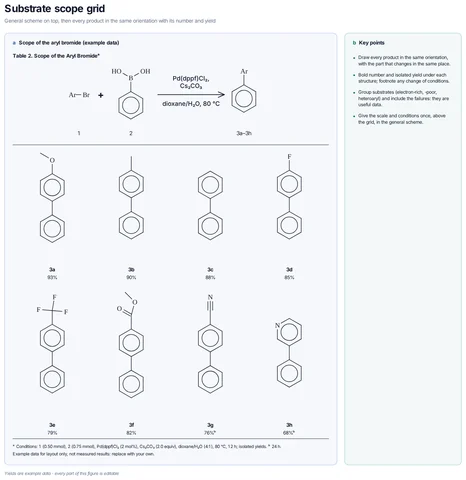
A general Suzuki scheme over a 4 × 2 grid of biaryl products 3a–3h, each with a bold number and an example yield, with footnotes for changed conditions.
What the template shows
- General scheme on top, then every product in the same orientation with its number and yield
- Scope of the aryl bromide (example data)
- Table 2. Scope of the Aryl Bromideᵃ
- ᵃ Conditions: 1 (0.50 mmol), 2 (0.75 mmol), Pd(dppf)Cl₂ (2 mol%), Cs₂CO₃ (2.0 equiv), dioxane/H₂O (4:1), 80 °C, 12 h; isolated yields. ᵇ 24 h.
- Example data for layout only, not measured results: replace with your own.
- Draw every product in the same orientation, with the part that changes in the same place.
- Bold number and isolated yield under each structure; footnote any change of conditions.
- Group substrates (electron-rich, -poor, heteroaryl) and include the failures: they are useful data.
- Give the scale and conditions once, above the grid, in the general scheme.
- Yields are example data · every part of this figure is editable
Drawn with 128 atoms, 1 arrow, 4 shapes – every one editable in MolDraw.
Sources
How to use this template
- Press Edit in MolDraw. The template opens on the canvas of the free MolDraw editor.
- Change anything: move structures, edit atoms and labels, recolour highlights or delete what you do not need.
- Add your own structures, arrows and text next to it, or combine several templates on one page.
- Export the drawing as PNG, SVG or PDF for slides, worksheets, theses and papers.
Frequently asked questions
Is the Substrate scope grid template free?
You can preview the Substrate scope grid template here and open and edit it in MolDraw for free. Downloading or exporting it is part of MolDraw Pro, together with the other premium templates.
Can I edit the Substrate scope grid template?
Yes. It opens as an ordinary MolDraw drawing, so every structure, arrow, label and colour can be changed, and you can add your own content around it.
Is the chemistry checked?
Every structure is checked with RDKit and every curly arrow passes MolDraw’s electron-flow audit. The sources used are listed on this page.
Are the research figure templates suitable for journals?
They follow common ACS and RSC figure conventions (scheme layout, numbered compounds, condition text above and below arrows). Export as SVG or PDF for the final figure.