MolScript: A Text Language for Reaction Schemes and Curly-Arrow Mechanisms
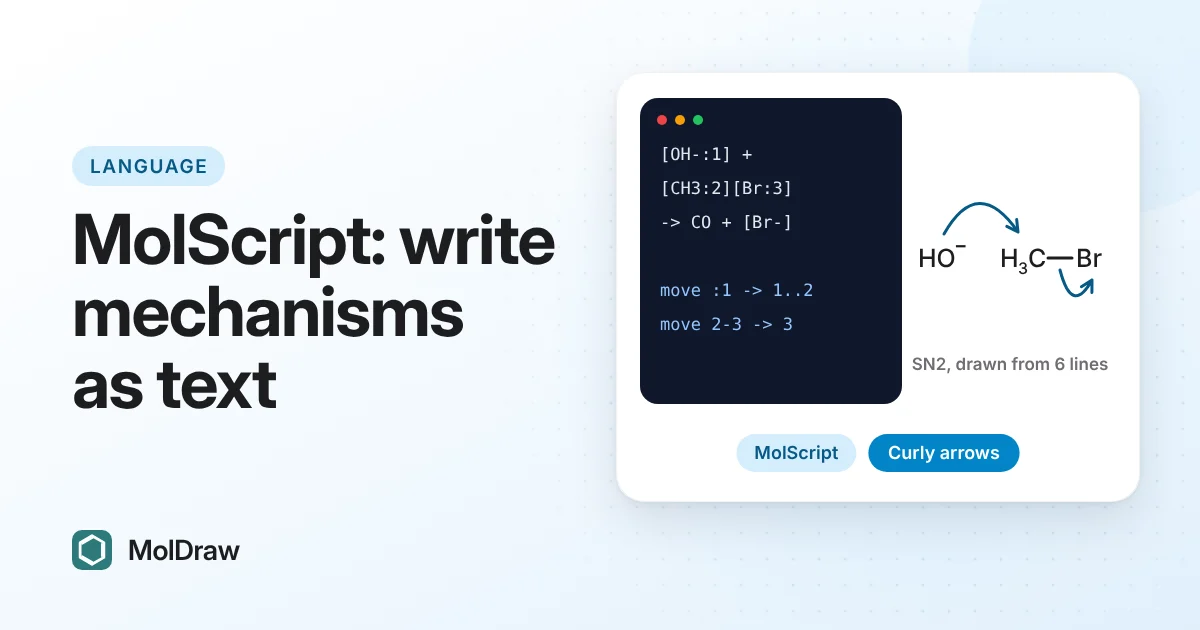
Short answer: MolScript is a small text language for reaction schemes and electron-pushing mechanisms. You write each species as SMILES, join species with +, ->, <-> or <=>, tag the atoms an arrow touches with atom-map numbers, and write one move line per curly arrow. MolDraw draws the structures, conditions, lone pairs, charges and every arrow, and checks each arrow against drawing rules before you see it. The result is ordinary, editable canvas content that you can download as an image or as chemfig code for LaTeX.
MolScript at a glance
| What you write | Species as SMILES, operators between them, conditions in brackets after an arrow, and move lines for the electrons. |
|---|---|
| What you get | A laid-out scheme: structures, plus signs, reaction, equilibrium or resonance arrows, conditions, captions, lone pairs, charges, radical dots and curly arrows. |
| Arrow types | Two-electron curly arrows (->) and one-electron fish-hooks (~>), from lone pairs, charges, radicals, atoms or bonds, to atoms, bonds or bonds being formed. |
| Checking | Every map number must exist and be unique; every arrow must start where electrons are; every drawn arrow is judged for gaps, aim, curvature and clearance. Problems come back with line numbers. |
| Output | Editable MolDraw canvas objects; every MolDraw export, including chemfig (.tex) for LaTeX documents. |
| Where it is used today | The MolDraw AI chat draws mechanisms by writing MolScript, and the mechanism figures in the Templates panel are built from it. |
| What is next | An open framework for canvas apps and an AI skill any assistant can load. See the roadmap. |
Your first script: SN2
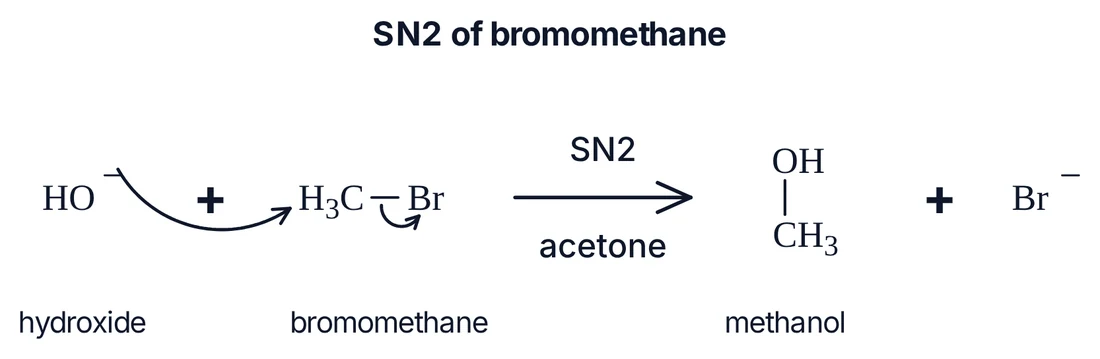
Hydroxide attacks bromomethane from the back and bromide leaves in the same step. In MolScript that is four lines:
title: SN2 of bromomethane
[OH-:1] "hydroxide" + [CH3:2][Br:3] "bromomethane" ->[SN2][acetone] CO "methanol" + [Br-]
move :1 -> 1..2
move 2-3 -> 3
Line by line:
title:puts a heading above the scheme.- The scheme line lists the species.
[OH-:1]is hydroxide whose oxygen carries map number 1;[CH3:2][Br:3]is bromomethane with the carbon as 2 and bromine as 3."hydroxide"is a caption drawn under the structure.->[SN2][acetone]is a reaction arrow with text above and below. move :1 -> 1..2: the lone pair (here the negative charge) on atom 1 goes to the bond being formed between 1 and 2.move 2-3 -> 3: the electrons of the existing C–Br bond go to bromine.
Map numbers are labels for you and the arrows. They are never drawn, and they do not change the molecule.
The language
Species and operators
Any SMILES is a species. Operators are written with a space on each side:
+ | Plus between co-reactants or co-products. Species joined by + always stay on one row. |
|---|---|
-> | Reaction arrow. |
<=> | Equilibrium arrow (two half-headed arrows). |
<-> | Resonance arrow (double-headed). Use it between resonance forms of one species. |
=> | Retrosynthesis arrow. |
Text above and below an arrow goes in square brackets glued to it: ->[NaBH4][MeOH, 0 °C]. Leave the first pair empty for text below only: ->[][reflux]. A caption in double quotes after a species is drawn under that species: CC(=O)O "acetic acid".
Several steps
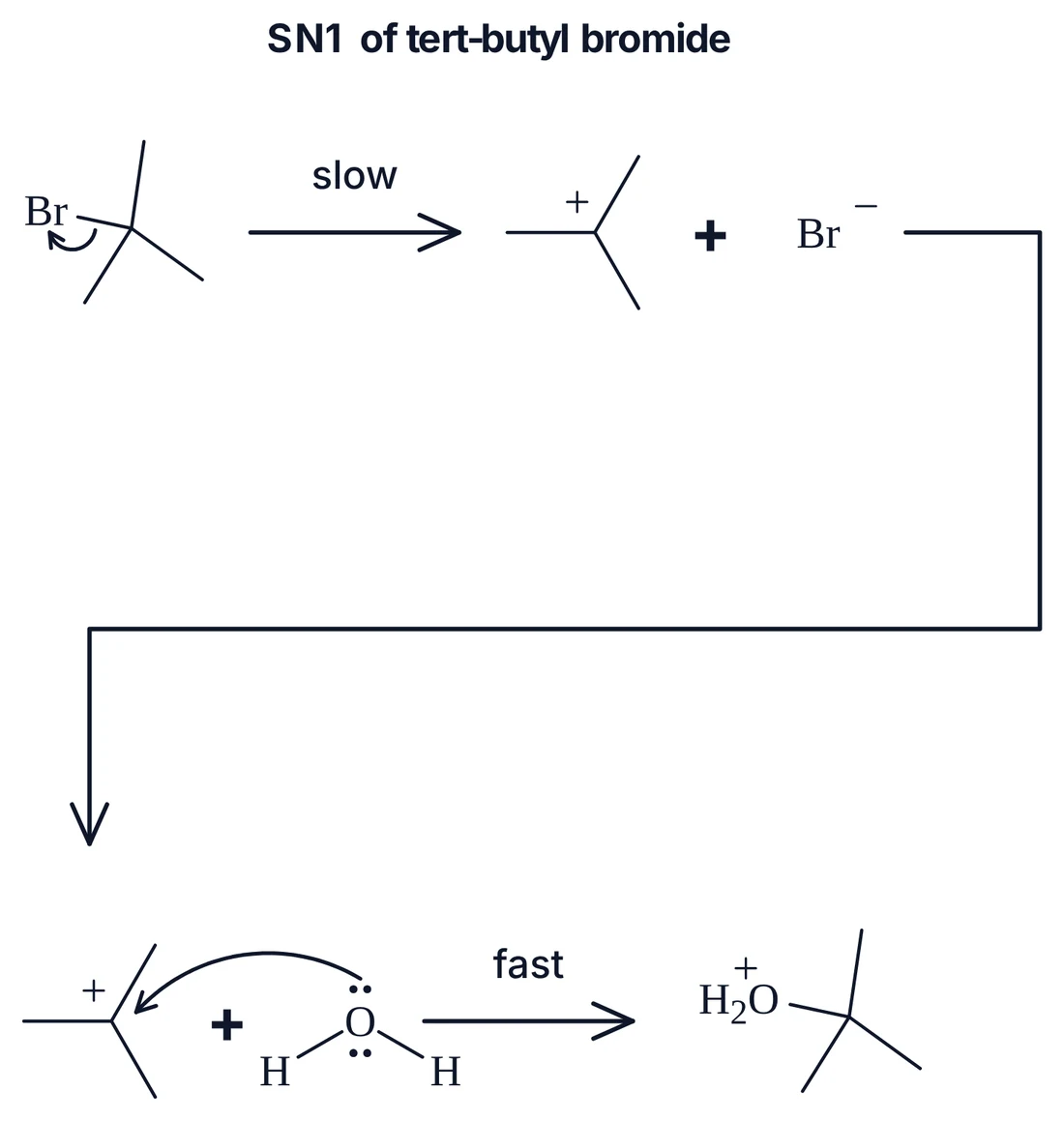
A line that starts with an operator continues the scheme from the last species, so a mechanism reads one step per line, with that step's arrows right under it:
title: SN1 of tert-butyl bromide
C[C:1](C)(C)[Br:2] ->[slow] C[C+:3](C)C + [Br-]
move 1-2 -> 2
-> C[C+:4](C)C + [OH2:5]
move :5 -> 5..4
->[fast] CC(C)(C)[OH2+]
Curly arrows: move lines
Every atom an arrow touches gets a map number in the SMILES: [OH-:1], [CH3:2][Br:3], [O:4] for a plain oxygen. Numbers must be unique across the whole script. Then:
move <from> -> <to>     two-electron curly arrow
move <from> ~> <to>     one-electron fish-hook
Both ends are written the same way:
:n | The lone pair on atom n. On an anion the arrow starts at its minus sign, as chemists draw it. |
|---|---|
n | Atom n. A radical's arrow starts at its dot. |
n-m | The existing bond between atoms n and m. As a start, its electrons leave the bond; as an end, they make the bond a double bond. |
n..m | A bond being formed between n and m (end only). The head stops beside atom m, on the side facing n. |
Several arrows can share a line, separated by semicolons: move :1 -> 1..4; 4-2 -> 2-3; 3-5 -> 5. Write a transferred hydrogen explicitly, [H:5][O:6]CC, so an arrow can start from its bond. Write a mapped radical centre with its hydrogen count so it keeps its dot: CC(C)(C)[OH0:1] is the tert-butoxyl radical.
Arrows are placed automatically. When you want a particular bend, add an override in braces: move 2-3 -> 3 {bow=0.3 side=left}.
Directives and comments
title: … | Heading above the scheme. |
|---|---|
per-row: 2 to 8 | Structures per row before the scheme wraps (default 4). |
layout: row, cycle, branch | Scheme shape: left to right, a catalytic cycle, or one reactant to several products. |
# … | Comment to the end of the line. A # inside SMILES (a triple bond) is not a comment. |
Errors
Problems come back with the line they are on, in plain words, so a person or an AI assistant can fix the line and draw again:
line 1: put +, -> or <-> between "[O:1]C" and "[O:1]C"
line 3: no atom is tagged :9 in the SMILES (write it as [X:9])
line 4: n..m (a bond being formed) can only be the destination
line 5: a move needs -> (curly arrow) or ~> (fish-hook) between its ends
C (map 2) has no lone pair
How a script becomes a drawing
A script goes through the same steps every time, so the same script always gives the same drawing:
- Read. The script is split into scheme lines, move lines and directives. Each species, operator, caption and set of conditions is recorded with its line number.
- Check the labels. Every map number used in a move must be on exactly one atom, every
n-mmust be a real bond, and every start must have electrons to give: a lone pair, a charge, a radical or a bond. - Draw the species. Each SMILES becomes a 2D structure with clean bond angles. Explicit hydrogens that an arrow needs are drawn as atoms; charges, lone pairs and radical dots are added where the SMILES says.
- Lay out the scheme. Structures, plus signs and arrows are packed by their real widths, rows wrap at reaction arrows, and conditions and captions are spaced so no text overlaps.
- Place the curly arrows. Each arrow leaves its source where a chemist would draw it and bends away from bonds, labels and other arrows (details below).
- Judge every arrow. Each placed arrow is measured against the rules. An arrow that could not meet them in a crowded spot is still drawn and reported as a warning.
- Hand over editable objects. The result is ordinary canvas content: drag a structure and its arrows follow, restyle anything, and export.
The arrow rules MolScript applies:
| Tail | On the lone pair or minus sign, the radical dot, or the middle of the bond that gives the electrons, never on top of an atom label. |
|---|---|
| Head | Just short of the atom that receives the electrons, or in the gap of a bond being formed, on the side facing the attacking atom. |
| Curve | Bowed to the outside of the structure, with one constant head angle; fish-hooks keep their single barb on the outside of the curve. |
| Clearance | Kept away from bonds, labels, charges, dots and other arrows; arrows that share a target fan out instead of stacking. |
| Length | Too short to read or too long to follow is flagged. |
Every reference mechanism in MolScript's test set is drawn and judged against these rules whenever MolDraw changes. Today that is 22 mechanisms with 46 curly arrows, all passing, plus the Templates figures.
Worked examples
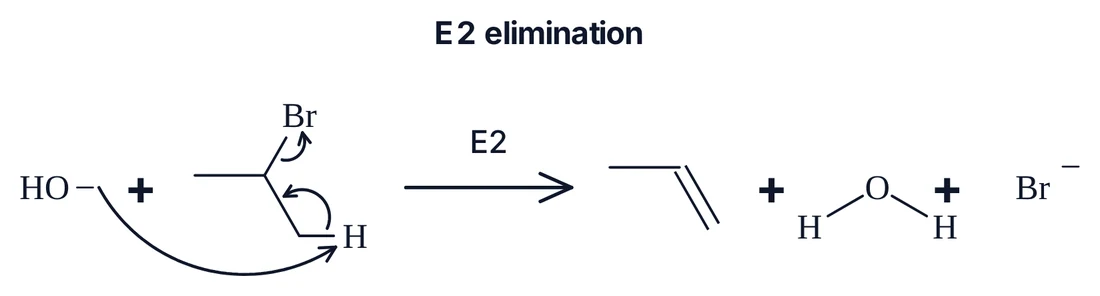
E2 elimination: three arrows in one step
title: E2 elimination
[OH-:1] + [H:4][CH2:2][CH:3](C)[Br:5] ->[E2] C=CC + O + [Br-]
move :1 -> 1..4; 4-2 -> 2-3; 3-5 -> 5
Michael addition: a chain of arrows through a conjugated system
title: Michael addition
[CH2-:1]C(C)=O + [CH2:2]=[CH:3][C:4](C)=[O:5] ->[1,4-addition] CC(=O)CCC=C(C)[O-]
move :1 -> 1..2; 2-3 -> 3-4; 4-5 -> 5
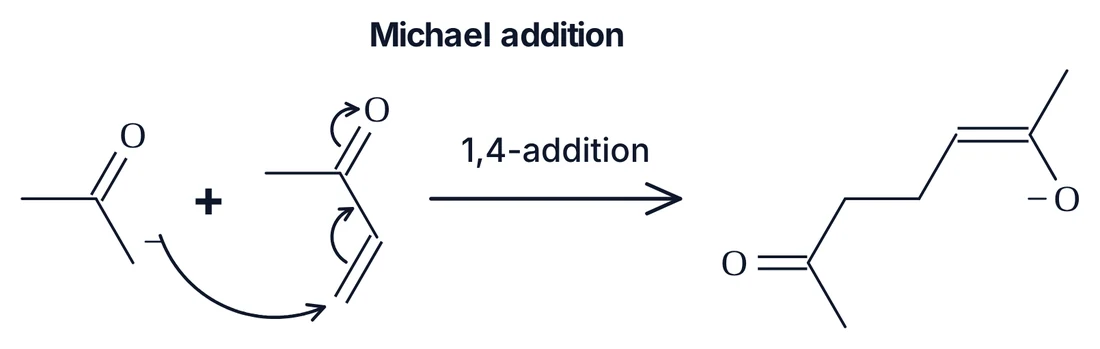
2-3 -> 3-4 moves the C=C π electrons into the C–C bond, making it a double bond.Diels–Alder: arrows in a ring
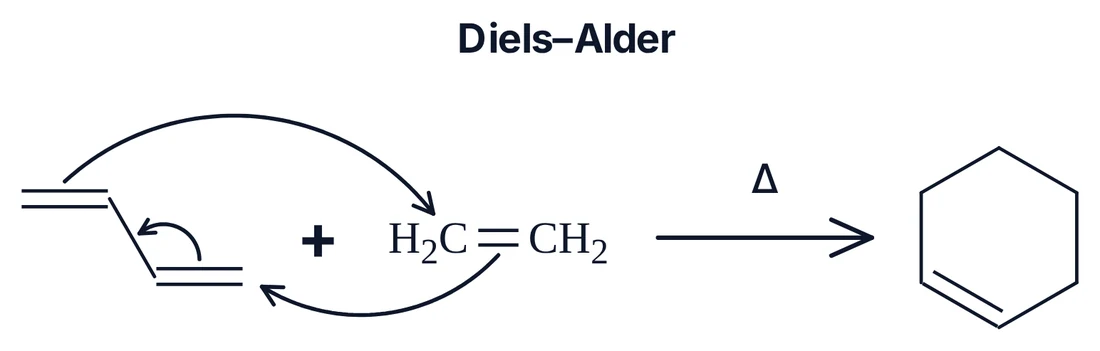
title: Diels–Alder
[CH2:1]=[CH:2][CH:3]=[CH2:4] + [CH2:5]=[CH2:6] ->[Δ] C1CC=CCC1
move 1-2 -> 2-3; 3-4 -> 4..5; 5-6 -> 6..1
Radical addition: fish-hooks
title: Radical addition of Br• to propene
[Br:1] + [CH2:2]=[CH:3]C -> BrC[CH]C
move 1 ~> 1..2
move 2-3 ~> 1..2
move 2-3 ~> 3
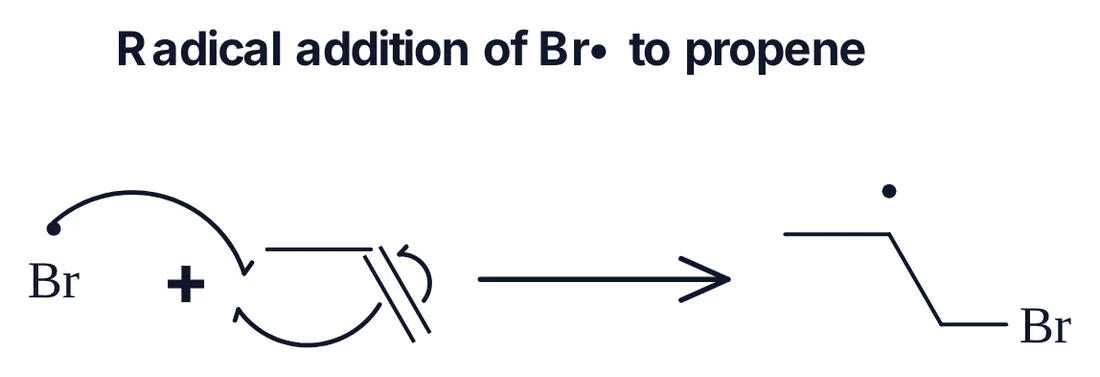
~> draws a fish-hook. The two that end on 1..2 meet in the middle of the new bond.Resonance: an enolate
[CH2-:1][C:2](C)=[O:3] <-> C=C(C)[O-]
move :1 -> 1-2
move 2-3 -> 3
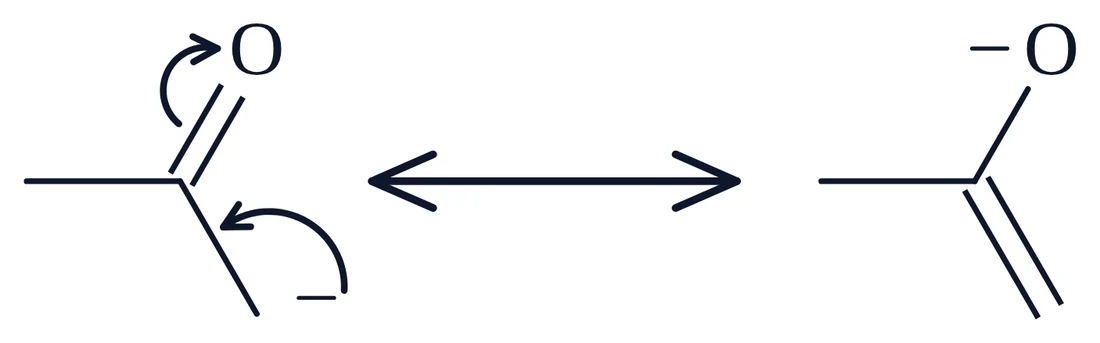
<-> is the resonance arrow; the curly arrows show how one form becomes the other.Built on MolScript: whole figures
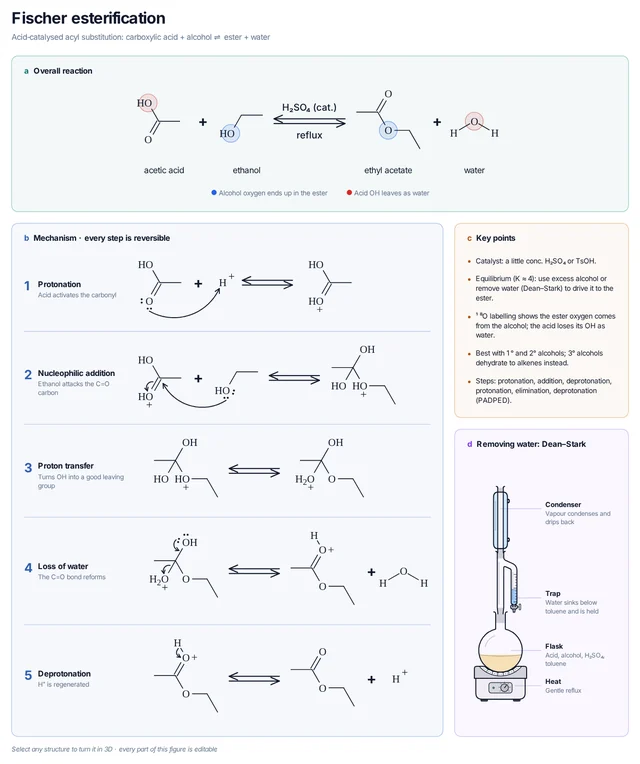
The mechanism figures in MolDraw's Templates panel (the button at the bottom of the left toolbar) are written in MolScript. Each step of Fischer esterification, the aldol addition and the Grignard addition is a short script; a template adds the panels, step labels, highlight circles and notes around them. Because the steps are text, every arrow in every figure is checked the same way as in the examples above.
MolScript and chemfig
chemfig is the LaTeX package most chemists use to typeset structures and mechanisms. It is excellent at what it is for, and MolScript is not meant to replace it inside LaTeX. The two describe different things:
| chemfig | MolScript | |
| You describe | The drawing: each bond's angle and length, then each arrow's anchor, offset and bend. | The chemistry: species as SMILES and which electrons move where. |
| Layout | By hand, per structure and per scheme. | Automatic: structures, rows, conditions and captions. |
| Curly arrows | TikZ paths between named points; positions are fixed in a second LaTeX run. | One move line between map numbers; placed and judged against drawing rules. |
| Mistakes | Show up as a wrong-looking PDF. | Reported with line numbers: a missing map number, a start with no electrons, a bond that does not exist. |
| Result | Typeset output in a document. | Editable canvas objects, plus image, vector and chemfig exports. |
| Best for | Fine typographic control inside a LaTeX document. | Getting a correct, clean mechanism quickly, by hand or from an AI assistant. |
They work together: draw with MolScript, then choose Download → chemfig (.tex) to get chemfig code for your document. The chemfig mechanism samples show what that code looks like.
Why text: MolScript and AI assistants
MolScript was designed so that a language model can draw a mechanism without ever handling coordinates:
- Models already write SMILES well, so every species is in a notation they know.
- Atom maps make arrows unambiguous. "From the lone pair on atom 1 to the bond forming between 1 and 2" cannot be misplaced the way "an arrow from the oxygen to the carbon" can.
- Errors are actionable. A model that gets
line 3: no atom is tagged :9can fix line 3 and try again. - Geometry is not the model's job. Bends, gaps and clearances are decided and checked by the engine, which is where models are weakest.
The MolDraw AI chat already works this way: ask it for "the mechanism of the aldol addition" and it writes MolScript behind the scenes. We plan to publish MolScript as a packaged AI skill as well, a single bundle with the reference, the rules and worked examples, so any assistant that supports skills can write correct mechanisms.
Roadmap: from MolDraw feature to open framework
The plan is to release MolScript, its compiler and the scheme and arrow engine as an open-source framework that any canvas app can use to draw reactions and mechanisms, with the reliability of a programming language: a written specification, stable output and errors you can act on. This is what stands between today and that release.
The language
| Species, operators, conditions, captions, continuation lines | Done |
|---|---|
| Two-electron arrows and fish-hooks from lone pairs, charges, radicals and bonds | Done |
| A versioned specification with a formal grammar and a conformance test set | Next |
Named species that can be reused: let A = …, then A in later steps | Next |
| Orientation hints: flip or turn a species, line up the reacting atoms across steps | Next |
| Transition states (‡, partial bonds), δ+ / δ−, brackets, highlights and step numbers in the script | Later |
| Reagents drawn as structures above an arrow; abbreviations (Ph, Ts, Boc) and R groups | Later |
| Catalytic cycles with curly arrows, metal–ligand bonds and oxidation states | Later |
Accuracy
| Labels exist, starts have electrons, every drawn arrow passes the geometry rules | Done |
|---|---|
| Electron bookkeeping: work out the product the arrows imply and compare it with the product written | Next |
| Charge and atom balance for each step | Next |
| Less ceremony: fewer explicit hydrogens and map numbers when the arrow is unambiguous | Later |
Layout
| Rows packed by real widths; conditions and captions never overlap | Done |
|---|---|
| Cleaner row breaks: turn the scheme back on the next row instead of one long elbow arrow | Next |
| Explicit grid placement for figures with several schemes | Later |
The framework
| Compiler and engine as a standalone package, independent of the MolDraw app | Next |
|---|---|
| A stable, documented scheme format between the compiler and any renderer | Next |
| Renderers for canvas and SVG; exporters for chemfig and other formats | Next |
| A command-line tool: a script in, an image or chemfig file out | Next |
| Versioned layout, so a script draws the same way after an upgrade | Later |
| Editor support: highlighting, inline errors, completion of map numbers | Later |
| A public gallery of hundreds of reference mechanisms, each checked automatically | Later |
The AI skill
| Used by the MolDraw AI chat, with line-numbered errors fed back to the model | Done |
|---|---|
| A packaged skill: reference, rules, worked examples and a check step an assistant can run before it answers | Next |
| An evaluation set of mechanism prompts, scored for correct chemistry and clean arrows | Next |
If you teach, write papers or build chemistry software and want to shape this, tell us through Request feature in MolDraw.
Try it
- Open MolDraw and the AI chat, and ask for a mechanism, for example "draw the E2 mechanism of 2-bromopropane with hydroxide". The chat writes the MolScript and draws it.
- Or open Templates at the bottom of the left toolbar and add the Fischer esterification, aldol or Grignard figure.
- Drag, restyle or extend the result like any drawing, then download it as an image or as chemfig.
Questions and answers
What is MolScript?
MolScript is a short text language for reaction schemes and curly-arrow mechanisms. Species are written as SMILES, joined by +, ->, <-> or <=>, and each curly arrow is one move line between atom-map numbers. MolDraw draws the structures, conditions, lone pairs, charges and arrows, and the result stays editable on the canvas.
How do I draw a curly arrow in MolScript?
Tag the atoms the arrow touches with atom-map numbers in the SMILES, for example [OH-:1] and [CH3:2][Br:3], then write move :1 -> 1..2 for the lone pair of atom 1 forming a bond to atom 2, and move 2-3 -> 3 for the C–Br bond breaking onto bromine.
How do I draw a fish-hook (one-electron) arrow?
Use ~> instead of ->: move 1-2 ~> 1 sends one electron of the bond between atoms 1 and 2 to atom 1. Two fish-hooks that end on the same forming bond (n..m) meet in the middle of it.
Is MolScript better than chemfig?
They solve different problems and work together. chemfig is a LaTeX package where you place every bond and arrow yourself inside a document. MolScript describes the chemistry and leaves layout and arrow geometry to MolDraw, which checks every arrow. Any MolScript drawing can be downloaded as chemfig code for a LaTeX document.
Can AI assistants write MolScript?
Yes. The MolDraw AI chat draws mechanisms by writing MolScript, because language models write SMILES well and atom maps make every arrow end unambiguous. Errors come back with line numbers so the model can fix them. A packaged AI skill is planned so other assistants can use it too.
Will MolScript be open source?
That is the plan: the language, the compiler and the scheme and arrow engine are to be released as an open framework that other canvas apps can use to draw reactions and mechanisms. The roadmap lists what has to be done first.