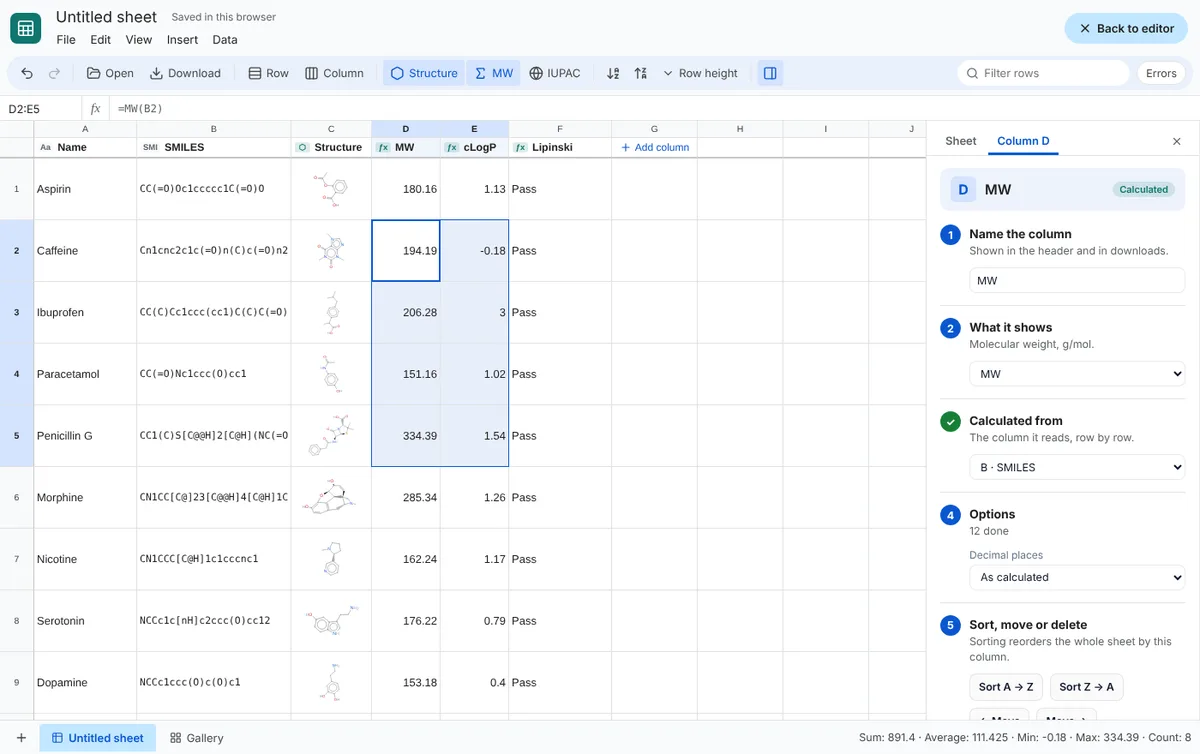
MolDraw Sheets: a spreadsheet for molecules
In short: More › MolDraw Sheets (it replaces Bulk actions and keeps everything it did) is a spreadsheet where every row is a compound. Add rows by pasting SMILES, names, CAS numbers or PubChem CIDs, opening a CSV, Excel, SDF or SMILES file, sending the canvas, or picking hits in PubChem search. Then add the columns you need; click a column header to adjust it in the left panel.
What’s new
- Structure column: every row drawn and cleaned up like the editor; click a picture to open it on the canvas
- Properties computed in your browser: formula, MW, exact mass, cLogP, HBD, HBA, TPSA, rotatable bonds, rings, stereocentres, Lipinski, canonical SMILES
- PubChem columns: SMILES, name, IUPAC name, CID, CAS number, InChI, InChIKey, XLogP3 and a link, looked up from any identifier column (CIDs in batches of 100)
- Names and CAS numbers become structures in one click (looked up in PubChem, then drawn)
- Export Excel with structure pictures, CSV, SDF with every column as data, SMILES list, PNG / SVG images (.zip) and a grid PDF; all rows or only the selected ones
- Works like Google Sheets: click a cell and type, Enter / Tab / arrows to move, drag or Shift-click to select, copy and paste blocks with Excel or Google Sheets, right-click to insert or delete rows and columns, Ctrl+Z to undo
- Formula bar (computed cells read like =MW(B2)), File / Edit / View / Insert / Data menus, Sum and Average of the selection, Table and Gallery tabs, filter, sort, up to 10,000 rows kept in your browser
- Compact Google Sheets-sized cells; type into the empty columns on the right to add a column
- Search PubChem from inside the sheet (toolbar, step 1, File and Data menus): tick compounds and add them, or paste a list
- Settings panel on the right in numbered steps: 1 add molecules, 2 choose data for every row, 3 style the pictures, 4 download; a step turns green when done