Share a drawing with a link: students open their own copy
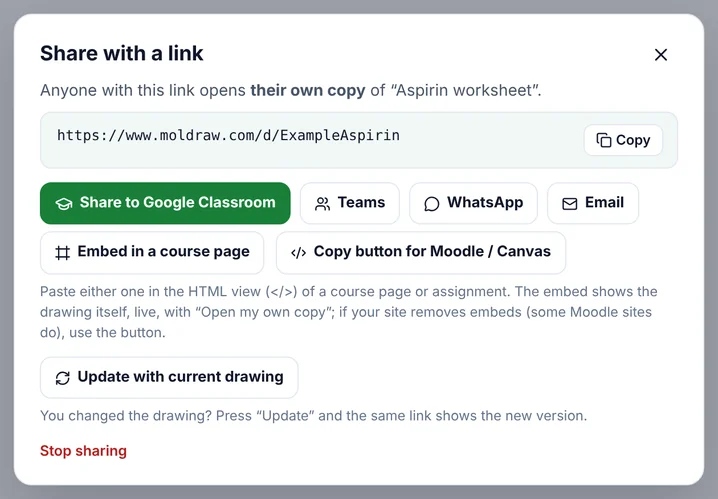
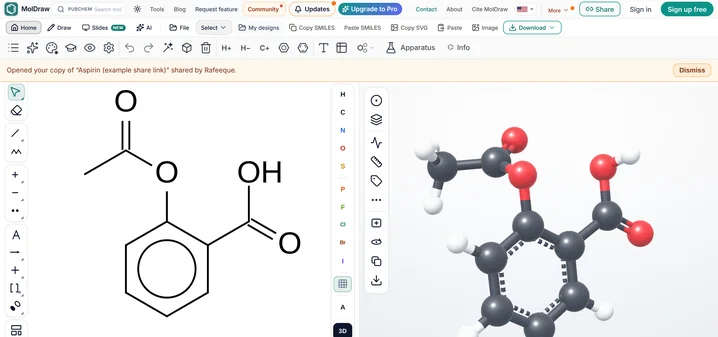
In short: Press Share, create a link and send it to your class or colleagues. Everyone who opens it gets their own copy of your drawing in MolDraw to work on, with no account needed, and your original never changes.
What’s new
- Share in the top bar and in the Download menu (on phones: Download → Share with a link). Free with a MolDraw account
- One click to post it to Google Classroom, Microsoft Teams, WhatsApp or email
- Embed in a course page: the drawing itself, live in 2D and 3D, inside your Canvas, Blackboard, Moodle or Google Sites page, with “Open my own copy in MolDraw” for each student
- Copy button for Moodle / Canvas: a ready-made “Open in MolDraw” button to paste into a course page or assignment (also works in Blackboard and Brightspace)
- Changed the drawing? Press Update and the same link shows the new version. Stop sharing turns the link off
- The link opens in a new tab, so whatever the student was working on stays where it was