MolDraw › Templates › MOFs › Ni(BDC)
MOFsPremium
Ni(BDC) template
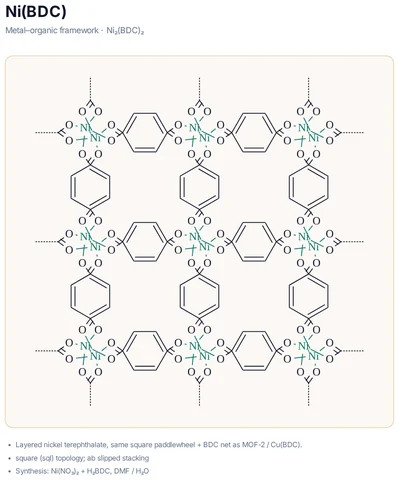
Premium template. Preview and edit it free in MolDraw; downloading and exporting it is part of MolDraw Pro.
Layered nickel terephthalate, same square paddlewheel + BDC net as MOF-2 / Cu(BDC).
What the template shows
- Metal–organic framework · Ni₂(BDC)₂
- Layered nickel terephthalate, same square paddlewheel + BDC net as MOF-2 / Cu(BDC).
- square (sql) topology; ab slipped stacking
- Synthesis: Ni(NO₃)₂ + H₂BDC, DMF / H₂O
Drawn with 210 atoms, 1 shape – every one editable in MolDraw.
How to use this template
- Press Edit in MolDraw. The template opens on the canvas of the free MolDraw editor.
- Change anything: move structures, edit atoms and labels, recolour highlights or delete what you do not need.
- Add your own structures, arrows and text next to it, or combine several templates on one page.
- Export the drawing as PNG, SVG or PDF for slides, worksheets, theses and papers.
Frequently asked questions
Is the Ni(BDC) template free?
You can preview the Ni(BDC) template here and open and edit it in MolDraw for free. Downloading or exporting it is part of MolDraw Pro, together with the other premium templates.
Can I edit the Ni(BDC) template?
Yes. It opens as an ordinary MolDraw drawing, so every structure, arrow, label and colour can be changed, and you can add your own content around it.
Is the chemistry checked?
Every structure is checked with RDKit and every curly arrow passes MolDraw’s electron-flow audit. Report anything that looks wrong from the Feedback button in the app.
What do the MOF templates show?
The metal nodes (paddlewheels or clusters), the organic linkers and how they connect into a 2D net.