MolDraw › Templates › COFs › COF-103
COFsPremium
COF-103 template
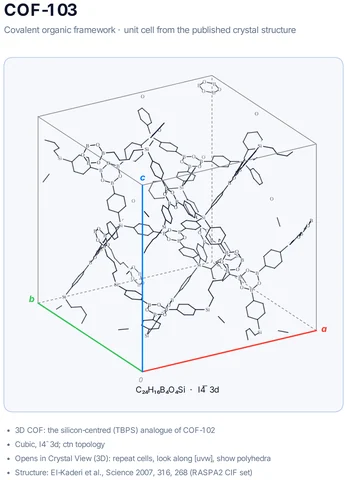
Premium template. Preview and edit it free in MolDraw; downloading and exporting it is part of MolDraw Pro.
3D COF: the silicon-centred (TBPS) analogue of COF-102
What the template shows
- Covalent organic framework · unit cell from the published crystal structure
- 3D COF: the silicon-centred (TBPS) analogue of COF-102
- Cubic, I4̄3d; ctn topology
- Opens in Crystal View (3D): repeat cells, look along [uvw], show polyhedra
- Structure: El-Kaderi et al., Science 2007, 316, 268 (RASPA2 CIF set)
Drawn with 408 atoms, 16 shapes – every one editable in MolDraw.
How to use this template
- Press Edit in MolDraw. The template opens on the canvas of the free MolDraw editor.
- Change anything: move structures, edit atoms and labels, recolour highlights or delete what you do not need.
- Add your own structures, arrows and text next to it, or combine several templates on one page.
- Export the drawing as PNG, SVG or PDF for slides, worksheets, theses and papers.
Frequently asked questions
Is the COF-103 template free?
You can preview the COF-103 template here and open and edit it in MolDraw for free. Downloading or exporting it is part of MolDraw Pro, together with the other premium templates.
Can I edit the COF-103 template?
Yes. It opens as an ordinary MolDraw drawing, so every structure, arrow, label and colour can be changed, and you can add your own content around it.
Is the chemistry checked?
Every structure is checked with RDKit and every curly arrow passes MolDraw’s electron-flow audit. Report anything that looks wrong from the Feedback button in the app.
How are the COFs drawn?
As a 2 × 2 patch of the framework built from the real linkers, showing the boronate ester or boroxine linkages and the pore shape.